Allegion Developer Portal
Allegion Developer Portal

In standalone mode (200), the ENGAGE device runs autonomously – running event schedules and granting access based upon a pre-configured embedded access control database. Audit trails of activity are stored internally to the device. The initial setup and any subsequent updates to either the device’s firmware, configuration settings, or its embedded access control database must be done by physically visiting the device and uploading the changes via a mobile application through Bluetooth low energy (BLE) technology. The specifics of the BLE communication are maintained separately from this document, but general information on the processes and underlying securing methods of communication are provide in the Encryption Standards Section of this document. Standalone mode is enabled by default whenever an ENGAGE managed site is set up and a device is commissioned. If the device is configured to use the on-board WiFi chipset capabilities, it will then be operating in 210 mode.
ENGAGE devices that contain WiFi chipsets are able to augment standalone mode with a programmable periodic call-in to an external server. This is considered standalone with WiFi update capability and is given the designation of 210 (two-ten). By enabling and configuring WiFi on the ENGAGE device and specifying a host server to contact, the ENGAGE device gains the ability to download updates as well as to post its transactional audit logs as part of a scheduled call-in without the need for a user to physically visit the device. On ENGAGE managed sites the host server is configured by default to connect to the Allegion hosted ENGAGE server and as a result, there is no need to configure an alternative host server. Additionally, limited real-time alert capability is possible for select events that may warrant immediate action. Communication with the host is via standard HTTP/HTTPS through a defined set of RESTful endpoints. Refer to the Abbreviations, Terms and Definitions page for more information and helpful links regarding the REST architecture. The host server may be located anywhere provided routing information has been properly configured both in the ENGAGE device during setup and through all intermediary access point/routers.
<Q1: where in the text is the image below referenced?>
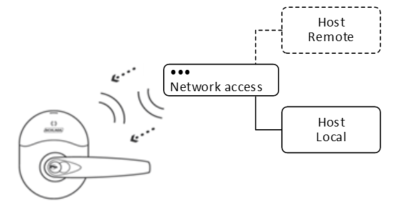
Software Alliance Members wishing to implement support for this mode of operation need to create and host a web server capable of providing database files to the calling-in device(s). The Lock ENGAGE Services Section contains the RESTful endpoints an ENGAGE device may use when initiating communication to the hosting server. The data exchanged in the body of these HTTP/HTTPS requests follows the defined JSON format; examples are given throughout this document for informational purposes with the complete set of JSON data structures defined in the ENGAGE - JSON Data Structures document.
SAMs must register each site their host server will manage with Allegion ENGAGE web services. This can be achieved programmatically as specified in Appendix B. This allows for the sites respective ENGAGE device(s) to receive the associated site key for all future transactions during the commissioning process. The API for registering a partner site and its associated key with Allegion ENGAGE web services, as well as other useful site level operations, is described in Appendix B of this document. All sites must be registered with Allegion ENGAGE web services regardless of whether the devices will be operating in Standalone Mode(s) or Real-Time Mode(s).
*********delete***************
Software Alliance Members wishing to implement support for this mode of operation need to create and host a web server capable of providing database files to the calling-in device(s). The Edge Device Services APIs Section contains the RESTful endpoints an ENGAGE device may use when initiating communication to the hosting server. The data exchanged in the body of these HTTP/HTTPS requests follows the defined JSON format; examples are given throughout this Web Portal for informational purposes.
SAMs must register each site their host server manages with Allegion ENGAGE web services. This can be achieved programmatically as specified in the Site Administration APIs section. This allows for the sites respective ENGAGE device(s) to receive the associated site key for all future transactions during the commissioning process. The APIs for registering a partner site and its associated key with Allegion ENGAGE web services, as well as other useful site level operations, are described in the Site Administration APIs section. All sites must be registered with Allegion ENGAGE web services regardless of whether the devices will be operating in Standalone Mode(s) or Real-Time Mode(s).
****************************