Allegion Developer Portal
Allegion Developer Portal

The API Host Server is configured to make the new certificates available to devices.
Partner managed devices are managed via API functions that are used to communicate to and from the managed devices. Two servers; written in Python are provided in this example. Both servers need to be running on the same server host.
An unsecure API server is necessary for initial load of the security certificate. After device commissioning, the secured device requests a certificate from the server. Once it is validated with the site key, that certificate is downloaded into the device.
For more details on creating and hosting an ENGAGE Device Server, refer to the Create and Host an ENGAGE Device Server page.
Python Version 3.7.x
Data Structure
In both python servers;
Perform the following modifications:
@app.route('/swordfish/lock/certificates/current')
Modify the .der file and HASH to be the .der file and HASH generated in Example 4 earlier
@app.route('/swordfish/lock/certificates/current')
def sam_certificates():
    print('Sending Certificate URL and hash to Client.')
    return
'{"cert_url":"http://10.44.68.128/static/Device_Certificates/partner_CA.der","hash":"2t86cWeynRQV1nJw59R4aOktjR0="}', 200
Only in the secure script: Example_Secure_API_TLS_Server.py
Modify the context.load_cert_chain command to contain the pem and .key certs generated in this document
context.load_cert_chain(certfile='./static/Device_Certificates/partner_server.pem',
                        keyfile='./static/Device_Certificates/partner_server.key')
To run the API Servers.
This IPv4 address is the server address
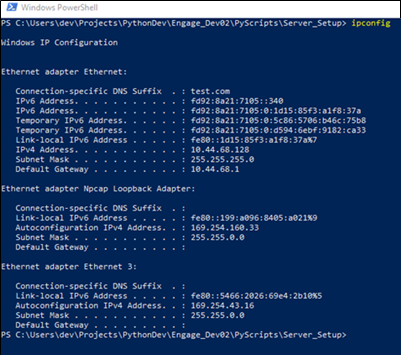
Edit Example_Non_Secure_API_Server.py
At the end of the py script is the app.run command
#  Start the web server.
#  This is an example Flask web server that is open to all network Addresses
#  No web address control is implemented.
#  It is the responsibility of the user enterprise to implement web and
#  server security.
#  The route handle_other_network():  will return an un-authorized message to
#  connection attempts, but this is NOT an adiquate security layer.


if __name__ == "__main__":
    print("Host Name ", socket.gethostbyname(socket.gethostname()))
    app.run(host='10.44.68.128', port=80)
In this example the server executes at IP address 10.44.68.128, port 80
To execute the python server scripts, perform the following:
Execute:
Example_Non_Secure_API_Server.py
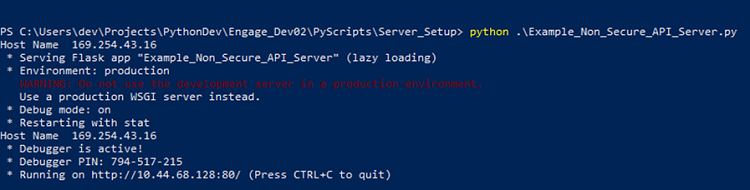
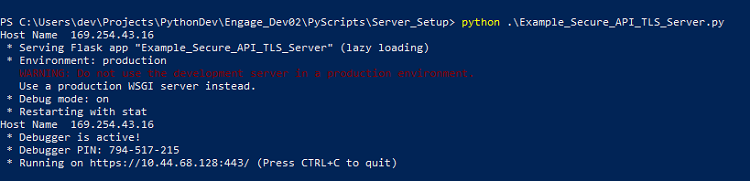
Repeat for the Secure server.
Example_Secure_API_TLS_Server.py
The ENGAGE enabled device performs a non-secured request. This standard HTTP GET request (shown below) is made to the configured host (URL assigned during commissioning of the device) using the defined format.
GET /swordfish/lock/certificates/current
The host needs to respond to the request with the following:
Response:
    HTTP status code 200
        OK
        Body
            Type: application/json
            Body Content:
                { “cert_url”:“<URLtoNewCertificate>”,
                “hash”:“<HMACValue>” }
            Where:
                <URLtoNewCertificate> is the URL from which the device should retrieve the new certificate.
                When requested by the ENGAGE device, this certificate should be served as a DER encoded
                certificate file (binary).

                <HMACValue> is a hash-based message authentication code computed for the new certificate
                using the SiteKey associated with the account. The algorithm used for authentication code
                generation must be HMAC-SHA1 as defined by RFC 2104. <HMACValue> should be the MIME Base64
                encoding of the resultant HMAC.
The following files are ready to be deployed to the server:
IMPORTANT NOTE: The ENGAGE NDE and MT20W both have internal memory limitations on the length of the entire certificate chain supported during a TLS negotiation. These devices support a total chain length (top level root authority certificate + intermediate certificate(s) + SSL host certificate) of no longer than 4096 bytes. Chain lengths greater than 4096 bytes may cause the device to fail host communication, reporting a TLS Connection Error audit, at each attempt.
NOTE 2: In addition, no individual key size can be longer than 2048 bits.