Allegion Developer Portal
Allegion Developer Portal

| REVISION CONTROL RECORD | |||
|---|---|---|---|
| VER | DATE | DESCRIPTION OF CHANGE | AUTHOR |
| 1.00 | 01/16/2017 | Initial Document Creation: | T. Holt |
| adapted from K. Broerman’s “ENGAGE Gateway-as-IP Client Whitepaper” | |||
| adapted from A. Setter’s “ENGAGE IP Client Mode Specification” | |||
| adapted from A. Setter’s “Getting Started with ENGAGE IP Client Mode” | |||
| 1.01 | 10/12/2017 | Update to Proof of Concept Implementation | T. Holt |
| 1.02 | 11/20/2017 | Update to Proof of Concept Implementation | T. Holt |
| 1.03 | 12/12/2017 | Updates for clarity around the usage of the POC | T. Anfield |
| 1.04 | 2/28/2018 | Addition of FAQ section for Scalability questions | T. Holt |
| TERM | DEFINITION |
|---|---|
| API | Application Programming Interface |
| DOS | Denial of Service |
| DNS | Domain Name System |
| ENGAGE | Allegion ENGAGE connectivity platform |
| FDR | Factory Default Reset |
| HTTP | Hypertext Transfer Protocol |
| IDL | Interactive Data Language |
| IETF | Internet Engineering Task Force |
| IP | Internet Protocol |
| IP Host | Third-party controller used to configure, control, and monitor gateway and locks and edge devices |
| ITU | International Telecommunication Union |
| JSON | JavaScript Object Notation |
| MAPP | Mobile Application (running on either iOS or Android) |
| NAT | Network Address Translation |
| POC | Proof-of-Concept |
| REST | Representational State Transfer |
| RFC | Request for Comments |
| TCP | Transport Control Protocol |
| TLS | Transport Later Security |
| URI | Uniform Resource Identifier |
| VM | Virtual Machine |
| VPN | Virtual Private Network |
| W3C | World Wide Web Consortium |
| ws:// | WebSocket protocol specifier URI prefix |
| wss:// | Secure WebSocket protocol specifier URI prefix |
| X.509 | ITU-T standard for a public key infrastructure |
The purpose of this section is to provide the rationale behind the implementation of the ENGAGE Gateway WebSockets feature, provide a base level understanding of how the feature works and why our ENGAGE Alliance Partners may want to use it, as well as to outline specifics of the communication protocol and discuss possible network architectures.
NOTE: Allegion has provided the code and instructions necessary for our ENGAGE Alliance Partners to set up their own Proof-of-Concept WebSocket Server as outlined in Appendix A.
The Gateway WebSocket feature, which is also called “Gateway as IP Client” or “IP Client Mode”, introduces the ability to reverse the host / client relationship that existed with Gateway firmware versions prior to 01.49.12. Prior to this feature’s implementation the Gateway would act as an HTTP server providing RESTful API resources to the ENGAGE Alliance Partners’ host which acted as an HTTP client. This is shown in Figure 1.
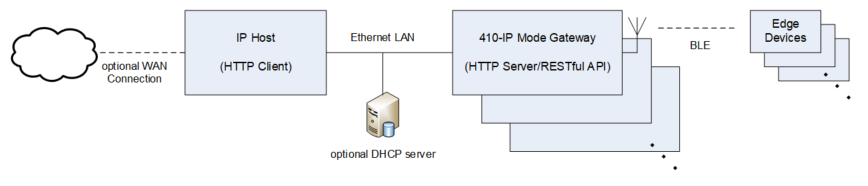
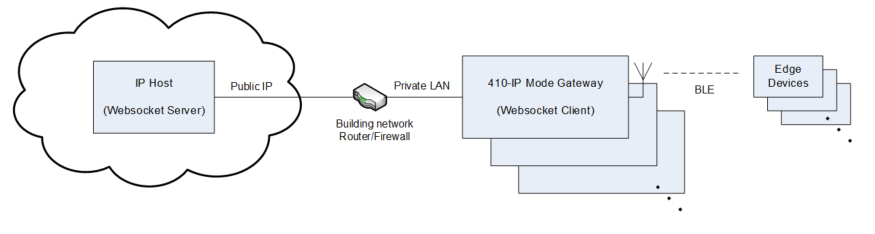
With the implementation of the Gateway WebSocket feature, the Gateway can now be configured to act as a WebSocket client to initiate a secure IP connection with a remote IP Host acting as a WebSocket server. This allows ENGAGE Alliance Partners to provide a remote WebSocket server at a publicly addressable IP address, permitting the Gateway to initiate a connection with the IP Host. This is shown in Figure 2.
In a typical ENGAGE installation, IP mode Gateways are hosted on a private LAN, with the Gateway configured manually or automatically with a non-routable IP address. Additionally, the facility may provide indirect internet connectivity to the Gateway via a router providing NAT/firewall and/or port forwarding features. As such, the Gateway as IP server architecture results in several IP connectivity limitations:
IP Host clients must reside on the same subnet as the Gateway (or)
Routing and/or router port forwarding rules must be created so that off-subnet IP Hosts can reach the Gateway (or)
A VPN connection must be established between the remote IP Host and the Gateway LAN
Concerning the second point, IP routing is required when the IP Host and Gateway are located on separate subnets. However, in many cases the ENGAGE installer may not have physical access to or permissions needed to create new routing rules in the router(s) that link the IP Host to the Gateway LAN. Taken together, these limitations resulted in a desire to reverse the roles and to support a Gateway-as-IP client mode.
While the WebSocket protocol implementation in the Gateway overcomes many of the obstacles which may be present in traditional access control installations, it additionally allows for several auxiliary benefits. Due to the asynchronous, full-duplex nature of the WebSocket connections, Gateways which are configured to operate in this mode also support the ability to send additional events to the server as they occur in real-time (Sections 3.7.3 and 3.7.4). These events are configurable and independent from the existing RESTful API resources which remain unchanged. Additionally, the existing RESTful API can be used within the WebSocket protocol with only a few changes to the format of the HTTP requests (Section 3.7.1 and 3.7.2) therefore allowing the Allegion Alliance Partners to implement the WebSocket protocol and Allegion WebSocket sub-protocol into their host servers in a favorably timely manner.
(Adapted from Client Server Model)
The client–server model of computing is a distributed application structure that partitions tasks or workloads between the providers of a resource or service, called servers, and service requesters, called clients. Clients and servers typically run on separate hardware and communicate over a computer network. A server host runs one or more server programs which share their resources with clients. A client does not share any of its resources, but requests a server's content or service function. Clients therefore initiate communication sessions with servers which await incoming requests.
In the client–server model, the server is often designed to be a centralized system that serves many clients.
Clients and servers exchange messages in a request–response messaging pattern: The client sends a request, and the server returns a response.
(Adapted from WebSocket)
WebSocket is a protocol providing full-duplex communication channels over a single TCP connection. The WebSocket Protocol was standardized by the IETF as RFC 6455 in 2011, and the WebSocket API in Web IDL is being standardized by the W3C.
The intent of the WebSocket feature is to provide a relatively simple protocol that can coexist with HTTP and deploy HTTP infrastructure (such as proxies), and that is as close to TCP as is safe for use with such infrastructure, given security considerations. (From RFC6455: 2011)
The WebSocket Protocol is designed to be implemented in web browsers and web servers, but it can be used by any client or server application. The WebSocket Protocol is an independent TCP-based protocol. Its only relationship to HTTP is that its handshake is interpreted by HTTP servers as an Upgrade request. The WebSocket Protocol makes more interaction between a client (e.g., browser) and a server (e.g., website) possible, facilitating the real-time data transfer from and to the server. This is made possible by providing a standardized way for the server to send content to the browser without being solicited by the client, and allowing for messages to be passed back and forth while keeping the connection open. In this way a two-way (bi-directional) ongoing conversation can take place between a client and a server. The communications are done over TCP port numbers 80 or 443, which is of benefit to those environments which block non-web Internet connections using a firewall.
Unlike HTTP, the WebSocket protocol provides full-duplex communication. Additionally, WebSocket enables streams of messages on top of TCP. TCP alone deals with streams of bytes with no inherent concept of a message.
The WebSocket Protocol specification defines ws and wss as two new uniform resource identifier (URI) schemes that are used for unencrypted and encrypted connections, respectively.
The WebSocket Protocol is designed to supersede existing bidirectional communication technologies that use HTTP as a transport layer to benefit from existing infrastructure (proxies / filtering / authentication). Such technologies were implemented as trade-offs between efficiency and reliability because HTTP was not initially meant to be used for bidirectional communication. (See RFC6202: 2011)
The WebSocket Protocol attempts to address the goals of existing bidirectional HTTP technologies in the context of the existing HTTP infrastructure; as such, it is designed to work over HTTP ports 80 and 443 as well as to support HTTP proxies and intermediaries.
The IP Host server is located in the cloud, with a publicly addressable IP address, and is reachable from any client having either a public address or private LAN address. See Figure 2 for an illustration of a typical network configuration.
Each gateway establishes a secure long-lived (hours) WebSocket connection with the IP Host. Once established, communication is full duplex, with either side initiating messages to the other side. Application-level messaging uses a request-response paradigm in which JSON-formatted payloads emulate the ENGAGE Gateway’s request-response RESTful API originally developed for use over HTTP.
The IP Host server must meet the following requirements:
The IP Host server must be located at a publicly addressable IP address.
The IP Host server must support a relatively large number of Gateway WebSocket clients communicating simultaneously.
The IP Host must host a HTTPS server providing a limited number of URLs for use by the gateway.
The IP Host server must contain a unique X.509 certificate and private key used to authenticate itself to gateway clients during TLS session establishment.
The IP Host server must provide a X.509 root certificate which is signed by the root certificate authorities’ HMAC-SHA1.
The IP Host server must provide the ability for the root CA to be re-downloaded upon authentication failure.
The IP Host must be able to authenticate Gateways using its Site Key and is able to maintain unique HTTP Basic Authentication credentials on a per-Gateway basis.
The IP Host server must support WebSocket protocol version 13.
The IP Host server must support the Allegion WebSocket sub-protocol.
In Appendix A of this document is a Proof-of-Concept - WebSocket Server, developed by Allegion as a sample implementation method for Allegion Alliance Partner Integrators use. The source code and a short implementation tutorial have been made available for Alliance Partner Integrators to gain experience with, and understand the basic implementation of a WebSocket server as well as the Allegion WebSocket sub-protocol. While operating WebSockets over SSL/TLS (wss) is encrypted, it is the responsibility of the Alliance Partners to verify and validate any server implementation which they plan to use including the attached Proof- of-Concept Server.
For Authentication, the IP Host shall host a HTTP server that serves at least the following fixed resource path:
Gateways will attempt to connect to the “Server URL” path which is specified during Gateway Commissioning and authenticate themselves over HTTPS by issuing a POST to this resource path in order to establish credentials prior to any WebSocket connection with the host.
If the request is valid, the Host must respond with a 200 OK to this request and must contain a unique temporary 32 byte Basic Authentication password to be used during the WebSocket connection upgrade request. The IP Host must decline all WebSocket connection requests by HTTP clients not having the correct Basic Auth credentials.
Once credentials are established the Gateway opens a WebSocket connection. The Gateway only accepts TLS encrypted WebSocket server connections, and validates the IP Host server based on the TLS certificates supplied at the time of connection. The TLS certificate is validated against a root signing certificate which the Gateway attempts to fetch from the “CA Server URL” address supplied during Gateway commissioning.
NOTE: While all WebSocket communication with the server must be over TLS/SSL, the CA server must provide the root CA over unsecured HTTP.
The root signing certificate is retrieved with the same method as other ENGAGE devices. Refer to the ENGAGE – Lock Root Certificate Update App Note documentation for more details.
Gateways authenticate every 24 hours, or whenever the connection is (re)established. This authentication mimics that of any other ENGAGE edge device that communicates directly with a server and is documented in the ENGAGE – Alliance Partner Integration document (Lock Authentication (210 mode)).
Additionally, Refer to the ENGAGE – Lock Root Certificate Update App Note documentation for details of when the Gateway will attempt to re-retrieve the root CA.
Each Gateway initiates a WebSocket connection with the IP Host (Server URL) using an HTTP request containing an Upgrade request header. Reference RFC6455: 2011 for specifics, or see Example of Connection Establishment below for an example of what the connection establishment looks like.
For this example assume the IP Host HTTP server has IP address 137.112.45.2. Please see the Schlage ENGAGE – Alliance Partner Integration document (Lock Authentication (210 mode)) for authentication specifics.
Client Request:
GET HTTP/1.1
Host: 137.112.45.2
Upgrade: WebSocket
Connection: Upgrade
Sec-WebSocket-Key: x3JJHMbDL1EzLkh9GBhXDw==
Sec-WebSocket-Protocol: engage.v1.gateway.allegion.com
Sec-WebSocket-Version: 13
Authorization: Basic QmFzZTY0IDMyYnl0ZSBSYW5kb20gUGFzc3dvcmQuLi4=
Server Response (success):
HTTP/1.1 101 Switching Protocols
Upgrade: WebSocket
Connection: Upgrade
Sec-WebSocket-Accept: AXmrc0sM1YLm3Gmm5OPpG2HaG23=
Sec-WebSocket-Protocol: engage.v1.gateway.allegion.com
If the IP Host is unable to authenticate to the Gateway, the IP Host must send an error message in response, at which time the Gateway tries to re-authenticate.
Server Response (failure):
HTTP/1.1
401 Unauthorized
Reference RFC6455: 2011 for specifics of the WebSocket Protocol.
Sub-protocols are application-level protocols, layered over the base WebSocket protocol that defines the structure and contents of a frame’s application data payload. The Gateway indicates which sub-protocols are acceptable to the client during connection establishment, at which time the sub-protocol is negotiated and selected by the server who echoes that value in its handshake to indicate which sub-protocol, if any, was selected.
The ENGAGE WebSocket Sub-Protocol is indicated in the connection request by:
Sec-WebSocket-Protocol: engage.v1.gateway.allegion.com
The ENGAGE sub-protocol defines two JSON message types to emulate the ENGAGE IP Mode request / response RESTful API originally developed for use over HTTP. The two defined message types are:
ENGAGE Request Message
ENGAGE Response Message
Since WebSocket communication is asynchronous, the IP Host can send an ENGAGE Request Message at any time. The receiver responds with an ENGAGE Response Message.
Additionally, the ENGAGE sub-protocol defines two additional message types that capitalize on the full-duplex, asynchronous communication capabilities of WebSockets:
ENGAGE Event Subscription Message
ENGAGE Event Message
The IP Host sends ENGAGE Event Subscription Messages to the Gateway to subscribe to Gateway and/or edge device events. If enabled, the Gateway sends ENGAGE Event Messages to the IP Host in real time.
Request Messages generally emulate the request content previously conveyed by HTTP in the ENGAGE IP Mode Gateway’s RESTful API. A requestId tag has been added to permit the requestor to associate responses with previously sent requests. The requestId numbers are 32-bit values and are incremented with each new message request to prevent re-use.
The ENGAGE WebSocket Sub-Protocol for an ENGAGE Request Message is described below:
| Tag | Type/Length (ASCII bytes) | Value |
|---|---|---|
| requestId | Number | 32 bit unsigned integer |
| request | JSON Object | JSON object that represents the ENGAGE Gateway’s RESTful API |
| method | String | String that mirrors the HTTP method in the ENGAGE Gateway’s RESTful API e.g. “PUT” or “Get” |
| path | String | String that mirrors the path given in the HTTP request in the ENGAGE Gateway’s RESTful API |
| messageBody | String | Serialized string that contains the information that would have been sent in the body of an equivalent HTTP client request. Note: message bodies for the ENGAGE Gateway RESTful API are usually serialized JSON strings. The entire API body request serialized JSON, with all quote characters escaped, should fit into this “messageBody” value. |
| optionalQueryStrings | String | An options string member that can contain additional information about a specific request. This will be request dependent. |
A JSON Schema has been provided against which all ENGAGE Request Message’s must be validated:
{
"$schema": "http://json-schema.org/draft-04/schema#",
"title": "engage.v1.gateway.allegion.com Request",
"description": "A request sent by the server to the client",
"type": "object",
"properties": {
    "requestId": {
        "description": "Unique id between all requests",
        "type": "integer"
    },
    "request": {
        "description": "Object that represents the contents of a request",
        "type": "object",
        "properties": {
            "method": {
                "description": "The HTTP-style method of the request",
                "type": "string"
            },
            "path": {
                "description": "The path which the request is targeted at",
                "type": "string"
            },
            "messageBody": {
                "description": "The additional body information associated with the request",
                "type": "string"
            },
            "optionalQueryStrings": {
                "description": "Optional strings that may be required",
                "type": "string"
            }
        },
        "required": [
            "method",
            "path",
            "messageBody"
        ]
    }
},
"required": [
    "requestId",
    "request"
]
}
Response Messages generally emulate the response content previously conveyed by HTTP in the ENGAGE IP Mode Gateway’s RESTful API. The returned requestId tag value must match the requestId tag from original request. The status tag must contain a valid HTTP response code.
The ENGAGE WebSocket Sub-Protocol for an ENGAGE Response Message is described below:
| Tag | Type/Length (ASCII bytes) | Value |
|---|---|---|
| requestId | Number | 32 bit unsigned integer |
| response | JSON Object | JSON object that represents the ENGAGE Gateway’s RESTful API response |
| status | String | String that mirrors the HTTP method in the ENGAGE Gateway’s RESTful API |
| messageBody | String | String that mirrors the HTTP method in the ENGAGE Gateway’s RESTful API |
A JSON Schema has been provided against which all ENGAGE Response Message’s must be validated:
{
    "$schema": "http://json-schema.org/draft-04/schema#",
    "title": "engage.v1.gateway.allegion.com Response",
    "description": "A response sent by the client to the server associated with a request",
    "type": "object",
    "properties": {
        "requestId": {
            "description": "Unique id matching the associated request's id",
            "type": "integer"
        },
        "response": {
            "description": "Object that represents the contents of a response",
            "type": "object",
            "properties": {
                "status": {
                    "description": "The HTTP-style status code of the response",
                    "type": "string"
                },
                "messageBody": {
                    "description": "The additional body information associated with the response",
                    "type": "string"
                }
            },
            "required": [
                "status",
                "messageBody"
            ]
        }
    },
    "required": [
        "requestId",
        "response"
    ]
}
Event Subscription Messages are unacknowledged messages send from the IP Host to the Gateway to enable or disable real-time Gateway or edge device event messages. If the IP Host does not subscribe then the Gateway will default to not “eventing”.
The ENGAGE WebSocket Sub-Protocol for an ENGAGE Event Subscription Message is described below:
| Tag | Type/Length (ASCII bytes) | Value |
|---|---|---|
| subscriptionId | Number | 32 bit unsigned integer |
| subscription | JSON Object | JSON object that represents one or more event subscriptions |
| source | String | “gateway” \ “edgeDevice” |
| eventingEnabled | Boolean | True \ false |
| subscriptionBody | JSON Object | JSON Object that identifies which events are subscribed. Note: An empty object {} identifies a subscription to all events. |
A JSON Schema has been provided against which all ENGAGE Event Subscription Messages must be validated:
{
"$schema": "http://json-schema.org/draft-04/schema#",
"title": "engage.v1.gateway.allegion.com Event Subscription",
"description": "A message sent from the server to the client indicating the desired events to be received",
"type": "object",
"properties": {
    "subscriptionId": {
        "description": "Unique id between all event subscriptions",
        "type": "integer"
    },
    "subscription": {
        "description": "Array that represents the contents of a subscription",
        "type": "array",
        "items": [
            {
                "type": "object",
                "description": "Object that represents the Gateway specific subscription infomation",
                "properties": {
                    "source": {
                        "description": "Indicator of the type of subscription contents",
                        "type": "string",
                        "enum": [
                            "gateway"
                        ]
                    },
                    "eventingEnabled": {
                        "description": "Indicates whether events of this type are desired",
                        "type": "boolean"
                    },
                    "subscriptionBody": {
                        "description": "TDB. Will eventually contain more specific subscription info",
                        "type": "object"
                    }
                },
                "required" : [
                    "source",
                    "eventingEnabled",
                    "subscriptionBody"
                ]
            },
            {
                "type": "object",
                "description": "Object that represents the edgeDevice specific subscription infomation",
                "properties": {
                    "source": {
                        "description": "Indicator of the type of subscription contents",
                        "type": "string",
                        "enum": [
                            "edgeDevice"
                        ]
                    },
                    "eventingEnabled": {
                        "description": "Indicates whether events of this type are desired",
                        "type": "boolean"
                    },
                    "subscriptionBody": {
                        "description": "TDB. Will eventually contain more specific subscription info",
                        "type": "object"
                    }
                },
                "required" : [
                    "source",
                    "eventingEnabled",
                    "subscriptionBody"
                ]
            }
        ]
    }
},
"required": [
    "subscriptionId",
    "subscription"
]
}
Event Messages are unacknowledged asynchronous messages sent from the Gateway to the IP Host that convey real-time Gateway or edge device status(s) or audit(s).
The ENGAGE WebSocket Sub-Protocol for an ENGAGE Event Message is described below:
| Tag | Type/Length (ASCII bytes) | Value |
|---|---|---|
| eventId | Number | 32 bit unsigned integer |
| event | JSON Object | JSON object that contains the Gateway or edge device event |
| eventType | String | Identifies what type of event this is. Intended to be used to help decipher the eventBody string |
| Source | String | Identifies the source of the event |
| deviceId | String | Please see Schlage ENGAGE – JSON Data Structures for details |
| eventBody | String | Serialized string that contains the event message. Any quote characters must be escaped |
A JSON Schema has been provided against which all ENGAGE Event Message’s must be validated:
{
    "$schema": "http://json-schema.org/draft-04/schema#",
    "title": "engage.v1.gateway.allegion.com Event",
    "description": "An event sent from the client asynchronously to the server",
    "type": "object",
    "properties": {
        "eventId": {
            "description": "Unique id between all events",
            "type": "integer"
        },
        "event": {
            "description": "Object that represents the contents of a event",
            "type": "object",
            "properties": {
                "eventType": {
                    "description": "Indicator of type of body contents",
                    "type": "string"
                },
                "source": {
                    "description": "Identifies the source of the event",
                    "type": "string"
                },
                "deviceId": {
                    "description": "Serial number of the source device",
                    "type": "string"
                },
                "eventBody": {
                    "description": "Contains the event message",
                    "type": "string"
                }
            },
            "required": [
                "eventType",
                "source",
                "deviceId",
                "eventBody"
            ]
        }
    },
    "required": [
        "eventId",
        "event"
    ]
}
The ENGAGE WebSocket connection is re-established automatically when a connection is dropped or does not exist. Either the IP Host or the Gateway may drop the WebSocket connection. The Gateway drops the connection if it has existed for more than 24 hours. The Gateway re-authenticates itself to the IP Host, and must receive a new temporary password, at least once every 24 hours.
Gateways acting as WebSocket clients have a periodic TCP keep alive message enabled in order to preserve potential routing restrictions. This does not have any impact on the implementation of the WebSocket server because TCP keep alive messages are handled by the receiving TCP stack, not the application layer code. The rate of the TCP keep alive message can be configured in the Gateway as necessary.
Due to the nature of TCP connections, it may be desirable to know if a connection to a WebSocket client from a server is no longer routable. A server may optionally implement WebSocket application layer ping pong messages to solve this problem. All ENGAGE Gateways which are configured to act as a WebSocket client respond with a pong message when they receive a ping message as defined in the WebSocket specification. A WebSocket server can then force close a connection that fails to receive enough pong messages.
Other architectures based on WebSocket protocols are possible. For example, adding an HTTP server back-end to the WebSocket server results in a cloud based “broker” model that permits existing ENGAGE Alliance Partner IP Hosts acting as HTTP clients to monitor and control ENGAGE WebSocket enabled Gateways. In this configuration, both IP Host and Gateways can reside on their own private LANs. This architecture supports existing IP Host equipment that already has been configured to inter-operate with the ENGAGE Gateways RESTful APIs.

In the configuration shown in Figure 3, the IP Host issues HTTP client requests to the broker, which translates them into the appropriate ENGAGE WebSocket Sub-Protocol messages that can be forwarded to the specified Gateways. Since the WebSocket server is located on a public IP, large numbers of Gateways can connect to it. The IP Host appends a simple query string to each HTTP request for use by the broker to determine which Gateway to forward the request to. If no query string is provided the request is forwarded to all connected Gateways. The broker translates the ENGAGE WebSocket Sub-Protocol responses back into HTTP responses and returns them to the IP Host.
How does a single server scale to handle multiple WebSocket connections?
WebSocket runs on top of a TCP connection that is persistent to support the initial request and then is retained after the protocol switches to WebSocket.
The TCP protocol defines five elements for each connection: local IP, local port, remote IP, remote port, and protocol; and inherently supports multiple incoming connections.
The WebSockets design philosophy (Section 1.5 of the RFC) specifically calls out “adds an addressing and protocol naming mechanism to support multiple services on one port and multiple host names on one IP address.”
The only HTTP connections are for the handshake and upgrade request – after that, it falls back to the WebSocket protocol running on the underlying TCP connection.
References:
Since WebSocket connections are stateful, how do you scale server support? (i.e. how do you load balance, etc.?)
While this is outside the scope of the Proof-of-Concept implementation provided in the Appendix (it is more complex than stateless connections), this can be accomplished. Here is a blog link discussing this issue, and one approach to resolve it:
How does the Proof-of-Concept Python WebSocket server handle multiple connections?
For each new incoming WebSocket connection, the server factory (./EngageWS/EngageWsServer.py) creates a new instance of the EngageWsServerProtocol class to encapsulate the connection. This is part of the underlying library WebSocket library implementation.
In the EngageEsServerProtocol class (./EngageWS/EngageWsProtocol.py), a connection is recorded as a valid connection (connection_made method) during the onOpen callback. The onOpen callback is called when all prior states in the WebSocket setup are completed. (For additional information, see: latest WebSocket programming.
Finally, this set of valid_connections is then used throughout the EngageWsServer Class to allow the server to know what connection is to each Gateway.
Example: ./examples/example-server-user-application.py, only shows a single connection. However, if a list were used that tracked multiple connections, it could send messages to multiples. This was done to keep the example as simple as possible.
The intent of the Proof-of-Concept server (POC) is to allow Allegion Software Alliance Members to quickly gain an understanding of the details necessary to implement a basic ENGAGE WebSocket Server. Please note that while operating WebSockets over SSL/TLS (wss) is encrypted, it is the responsibility of the Alliance Partners to verify and validate any server implementation which they plan to use. It is not recommended that this POC software be used directly in a production environment, and it is the responsibility of the Software Alliance Member to create their own WebSocket server and conduct all necessary security assessments of their implementation of the server.
Allegion provides this Proof-of-Concept server software “as is”, without warranty of any kind, express or implied, including but not limited to the warranties of merchantability, fitness for a particular purpose and noninfringement. In no event shall the authors or copyright holders be liable for any claim, damages or other liability, whether in an action of contract, tort or otherwise, arising from, out of or in connection with the software or the use or other dealings in the software.
The instructions included here assume the reader has some basic familiarity with the Gateway as HTTP server mode of operation. If any piece of this documentation has already been configured it can be skipped.
A link to the .zip package with the relevant files is here: WebSocket Zip Package.
This POC is implemented in the Windows environment.
The POC code requires Python 2.72.12 or later to run. Please download the installer directly.
Python 2.72.12 Installation Instructions.
Run the installation wizard after downloading is complete.
Ensure you select the option “Add python.exe to Path” to enable easier running of python commands.
_Setup.png)
You will need a copy of the Microsoft Visual C++ compiler for Python to work correctly. Please download the installer directly
Run the installation wizard after download has completed.
Finally, as this demonstration runs web servers on your PC, you need to disable your firewall completely or as a minimum allow incoming and outgoing connections on ports 8080 and 8081 to ensure proper operation.
Once Python and the Microsoft Visual C++ compiler are installed, the .zip package needs to be unpacked and saved to the local machine. For the purposes of this document we will assume that the .zip package has been unpacked to the following location:
The folder structure created under this path contains the demonstration WebSocket server configuration files in the nested EngageWS_package_1.1 folder as well as demonstration certificate files. Note that some of the nested folders contain a file called ‘README.md’. A Markdown file (.md) is simply a text file that describes the contents of the particular folder it resides in and can be safely ignored.
Open a terminal session:
Navigate to the respective directory where the .zip package is unpacked and enter the nested EngageWS_package_1.1 folder (for example: cd \EngageWS_package\EngageWS_package_1.1).
Run the following command to install the necessary Python modules:
The terminal output should show that all packages were installed correctly. If this is not the case, please contact your Software Alliance Member Integration Engineer.
Once pip has completed the install of the Python modules defined in the requirements.txt file, you need to configure the server by modifying the example.config.json file located in the “config” folder which came from the unpacked .tar package.
For the purposes of this section we will run the server without TLS. The Gateway will not communicate via an unsecured WebSocket connection, however the purpose of this section is to prove that Python and the module requirements, as well as the configuration settings are correctly working. TLS will be added later. To avoid any competing programs running on the host machine, we will proceed with this example using port 8080. This port was chosen for the example only to avoid interference from the host operating system. Other ports may be used in a production environment.
In order to run the WebSocket server as unsecure, set the “ssl_enabled” tag to “false” (without quotation) and set the “server_port” to 8080. The config file should look as follows:
{
    "server_port": 8080,
    "site_key_file": "./config/sitekey",
    "ssl_info": {
        "ssl_enabled": false,
        "ssl_key": "./config/gw.key.1.pem",
        "ssl_cert": "./config/gw.crt.2"
    },
    "event_subscription_info": {
    "gateway_events": true,
    "edgedevice_events": true
    }
}
Save the file with the file name “config.json” once the modification to the server port and ssl enable is complete.
Your terminal should still be in the EngageWS_package_1.1 directory. Run the following command to start the unsecure WebSocket server.
The terminal output should look similar to the following:
2017-11-17 08:54:14-0500 [-] Log opened.
2017-11-17 08:54:14-0500 [-] Site starting on 8080
2017-11-17 08:54:14-0500 [-] Starting factory <twisted.web.server.Site instance at 0x0000000005160A48>
2017-11-17 08:54:14-0500 [-] Starting server version 1.1
If the terminal output is not similar to the above, contact your Software Alliance Member Integration Engineer.
At this point, assuming the terminal output did match the above, you are now successfully hosting an unsecure WebSocket server. However, in order to communicate with an ENGAGE Gateway, connections between the WebSocket host server and the Gateway must be secured under a TLS/SSL connection. The following sections define how to modify your unsecure WebSocket server into a secured WebSocket server demonstration.
To close the unsecure WebSocket server, do the following in the terminal window:
The terminal should report the following to confirm that the unsecure WebSocket server has been closed:
2017-11-17 10:24:48-0500 [-] Received SIGINT, shutting down.
2017-11-17 10:24:48-0500 [twisted.web.server.Site] (TCP Port 8080 Closed)
2017-11-17 10:24:48-0500 [-] Stopping factory <twisted.web.server.Site instance at 0x0000000005160A48>
2017-11-17 10:24:48-0500 [-] Main loop terminated.
This section describes how to configure the Root CA hosting server demo; a second webserver that runs in parallel with the WebSocket host server providing an interface for the ENGAGE Gateway to retrieve a top level root certificate.
That is, this demonstration provides a basic programmatic implementation of the certificate update mechanism described in the ENGAGE – Lock Root Certificate Update App Note. Refer to that documentation for more details on the overall operation mimicked herein.
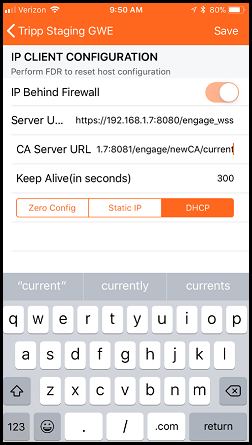
To run a secure WebSocket server, the Gateway must be able to download and verify the host’s SSL certificate. To do this, the Gateway validates the host certificate using the root certificate. Both the WebSocket server URL and the Root CA Hosting Server URL are configured in the Gateway during the commissioning process with the ENGAGE Mobile Application.
For the purposes of the demo Root CA Hosting server example, use the following:
Server URL: https://(your server’s IP address):8080/engage_wss
CA Server URL: http://(your server’s IP address):8081/engage/newCA/current
In the above configuration settings, replace (your server’s IP address) with the IPv4 dotted notation IP address matching your PC’s Ethernet/WiFi connection to the ENGAGE Gateway. Take care to note the difference, both in connection type (https vs http) and port (8080 vs 8081) between the two settings when entering them fully in the mobile app (see the Section: Set-up the Gateway).
NOTE: The endpoints specified above are purely a consequence of the example servers provided. Your production implementation may likely vary.
The Gateway automatically downloads the root CA from the CA server specified after commissioning is complete. The root CA hosted on the server MUST be the top-level root signing certificate of the chain of trust certificates that ends with the SSL certificate running on the secure WebSocket server.
The demo certificate hosting server is located in the /integration/cert-hosting directory. In order to run this server there are two necessary files, which must be included in this same /integration/cert-hosting directory:
Site Key File (named “sitekey”)
Root CA File (named “rootca.der”)
The sitekey file is used to create a SHA-1 HMAC digest of the rootca.der file. This digest is required to be sent in the GET JSON response from the host. This allows the Gateway to validate the authenticity and integrity of the root CA. For the example Root CA hosting server to function properly, the sitekey file must be a text file with the site key used to commission the Gateway. The site key must be formatted as hex, with no spaces, and be exactly 64 bytes large. An example sitekey file is included below:
112233445566778899aabbccddeeff112233445566778899aabbccddeeff1122
An example rootca.der file has been provided in the demo package. It is a matching root CA for the example WebSocket SSL Certificate and Key also provided in the root directory of the demo package.
For the purposes of this example CA hosting Server, copy the included sitekey herein (or make your own) and the rootca.der file to the /integration/cert-hosting directory under the EngageWS_package_1.1 folder.
NOTE: You need to either create a new site using the provided site key, or modify the sitekey file to match the actual site key of the site to which the Gateway is commissioned or communication will not be successful.
The commissioning of the Gateway is outside the scope of this document, however the following is a screen shot of how the example WebSocket server and Root CA hosting server would be configured in the Gateway using the ENGAGE Mobile Application (iOS version 2.0.75). Please note that other versions of the ENGAGE Mobile Application may appear slightly differently.
To run the CA Server, open another instance of terminal and navigate to the /integration/cert-hosting directory. Then run the following command:
The example CA Server should provide output similar to the following:
* Running on http://0.0.0.0:8081/ (Press CTRL+C to quit)
Got a request for newCA from 192.168.1.3
subpath == current
query serialNumber == AAAAAAAAAACgsQAAAAACBg==
query hashType == primary
query v == 2
Returning: {"cert_url": "http://192.168.1.7:8081/engage/certificates", "hash":
"oVD3oOqtHpqEEv+0a89oHmZsKvE="}
192.168.1.3 - - [17/Nov/2017 15:50:24] "GET
/engage/newCA/test?serialNumber=AAAAAAAAAACgsQAAAAACBg==&hashType=primary&v=2
HTTP/1.1" 200 –
After the Gateway has received the JSON response, it attempts to download the rootca.der file located at the “cert_url” location provided in the JSON response to the previous request. The example CA Server provides the rootca.der file to the Gateway and the terminal output should look like the following:
Got a request to download certificate from 192.168.1.3
192.168.1.3 - - [17/Nov/2017 15:50:24] "GET /engage/certificates HTTP/1.1" 200 –
If the terminal output is not similar to the above, contact your Software Alliance Member Integration Engineer.
NOTE: Your hash value will likely be different depending on the site key and rootca.der file used.
To run the secure WebSocket server, you need to configure the server by modifying the example.config.json file located in the “config” folder. For secure communication, the WebSocket server needs to provide its certificate to the Gateway. This certificate must be signed by the root signing certificate that was hosted by the CA Server. An example certificate and certificate private key have been provided that are properly signed by the example root certificate (rootca.der) mentioned in the CA Server section.
Copy the certificate and key file to the /config directory where the “example.config.json” resides. Also copy the sitekey file which was used for the CA Server to the /config directory.
Once these three files (certificate, certificate key, site key) have been copied to the /config directory, modify the example.config.json file to look as shown below:
{
    "server_port": 8080,
    "site_key_file": "./config/sitekey",
    "ssl_info": {
        "ssl_enabled": true,
        "ssl_key": "./config/gw.key.1.pem",
        "ssl_cert": "./config/gw.crt.2"
    },
    "event_subscription_info": {
    "gateway_events": true,
    "edgedevice_events": true
    }
}
Save the file with the file name “config.json” once the required modifications are complete.
The original terminal session should still be in the nested EngageWS_package_1.1 directory.
Run the following command to start the secure WebSocket server:
The terminal output should look similar to the following:
2017-11-17 08:54:14-0500 [-] Log opened.
2017-11-17 08:54:14-0500 [-] Site starting on 8080
2017-11-17 08:54:14-0500 [-] Starting factory <twisted.web.server.Site instance at 0x0000000005160A48>
2017-11-17 08:54:14-0500 [-] Starting server version 1.1
If the terminal output matches the above, you are now successfully hosting a secure WebSocket server. Very soon after this is completed you should see the Gateway initiate a connection to the WebSocket server. The terminal output should look similar to the following:
2017-11-20 10:42:39-0500 [_GenericHTTPChannelProtocol (TLSMemoryBIOProtocol),0,192.168.1.3] New credentials request from 192.168.1.3
2017-11-20 10:42:39-0500 [_GenericHTTPChannelProtocol (TLSMemoryBIOProtocol),0,192.168.1.3] Request Body :: MDAwMDAwMDAwMDAwMDAwMEEwQjEwMDAwMDAwMDAyMDY6NkRENjA4NjY4MTYyM0IyODM 2NUQ2MjUxODJDQjNFODU2ODI1RkNFMzY5M0QzNDM5NEVFQTNCOEI1MjJFOTAwRTox
2017-11-20 10:42:39-0500 [_GenericHTTPChannelProtocol (TLSMemoryBIOProtocol),0,192.168.1.3] base64 decoded request body :: 0000000000000000A0B1000000000206:6DD6086681623B28365D625182CB3E856825FCE3693D 34394EEA3B8B522E900E:1
2017-11-20 10:42:39-0500 [_GenericHTTPChannelProtocol (TLSMemoryBIOProtocol),0,192.168.1.3] Good request from sn: 0000000000000000a0b1000000000206
2017-11-20 10:42:39-0500 [_GenericHTTPChannelProtocol (TLSMemoryBIOProtocol),0,192.168.1.3] Saving new credentials 0000000000000000A0B1000000000206:vb0tg7Pn+mojQ08gYm0L8LY5qvIJPERrdKLLnJ0aWWs=
2017-11-20 10:42:39-0500 [-] "192.168.1.3" - - [20/Nov/2017:15:42:38 +0000] "POST /engage/newCredentials HTTP/1.1" 200 44 "-" "-"
2017-11-20 10:42:39-0500 [_GenericHTTPChannelProtocol (TLSMemoryBIOProtocol),1,192.168.1.3] Client connecting: tcp4:192.168.1.3:34589
2017-11-20 10:42:39-0500 [_GenericHTTPChannelProtocol (TLSMemoryBIOProtocol),1,192.168.1.3] Client auth: Basic MDAwMDAwMDAwMDAwMDAwMEEwQjEwMDAwMDAwMDAyMDY6dmIwdGc3UG4rbW9qUTA4Z1lt MEw4TFk1cXZJSlBFUnJkS0xMbkowYVdXcz0=
2017-11-20 10:42:39-0500 [_GenericHTTPChannelProtocol (TLSMemoryBIOProtocol),1,192.168.1.3] Credentials are good
2017-11-20 10:42:39-0500 [_GenericHTTPChannelProtocol (TLSMemoryBIOProtocol),1,192.168.1.3] Client supplied protocols: ['engage.v1.gateway.allegion.com']
2017-11-20 10:42:39-0500 [_GenericHTTPChannelProtocol (TLSMemoryBIOProtocol),1,192.168.1.3] Selecting client protocol - engage.v1.gateway.allegion.com
2017-11-20 10:42:39-0500 [_GenericHTTPChannelProtocol (TLSMemoryBIOProtocol),1,192.168.1.3] WebSocket connection open.
2017-11-20 10:42:39-0500 [_GenericHTTPChannelProtocol (TLSMemoryBIOProtocol),1,192.168.1.3] Sending subscription message
2017-11-20 10:42:39-0500 [_GenericHTTPChannelProtocol (TLSMemoryBIOProtocol),1,192.168.1.3] Sending engage message: {"subscriptionId": 1, "subscription": [{"source": "gateway", "subscriptionBody": {}, "eventingEnabled": true}, {"source": "edgeDevice", "subscriptionBody":
{}, "eventingEnabled": true}]}
If the terminal output is not similar to the above, please contact your Software Alliance Member Integration Engineer.
Additionally, once ENGAGE edge devices are linked to the Gateway, any audit information generated in the edge device will immediately be seen in the terminal output as part of the subscription stream. An example of this audit stream is as follows:
2017-11-20 10:47:14-0500 [_GenericHTTPChannelProtocol (TLSMemoryBIOProtocol),1,192.168.1.3] Text message received: {"eventId":2,"event":{"eventType":"Audit","source":"edgeDevice","deviceId":"a100000000002479","eventBody":"{\"edgeDevice\":{\"linkId\":\"dev00000\",\"audits
\":[{\"event\":\"07040000\",\"time\":\"20171120104717\"}]}}"}}
2017-11-20 10:47:14-0500 [_GenericHTTPChannelProtocol (TLSMemoryBIOProtocol),1,192.168.1.3] Valid Protocol Event from tcp4:192.168.1.3:34589 Recieved!
2017-11-20 10:47:15-0500 [_GenericHTTPChannelProtocol (TLSMemoryBIOProtocol),1,192.168.1.3] Text message received: {"eventId":3,"event":{"eventType":"Audit","source":"edgeDevice","deviceId":"a100000000002479","eventBody":"{\"edgeDevice\":{\"linkId\":\"dev00000\",\"audits
\":[{\"event\":\"07000000\",\"time\":\"20171120104719\"}]}}"}}
2017-11-20 10:47:15-0500 [_GenericHTTPChannelProtocol (TLSMemoryBIOProtocol),1,192.168.1.3] Valid Protocol Event from tcp4:192.168.1.3:34589 Received!
Closing the Secure WebSocket Server should be handled identically to closing the Unsecure WebSocket server.
An Example of how to utilize the WebSocket Subprotocol has also been included with this Proof-of-Concept server. This example code runs the secure WebSocket server and requests the ScanList from the Gateway every 10 seconds after the ScanList response has been received.
To run this example after the Secure WebSocket server has been successfully set up and run, close the secure WebSocket server and navigate to the /examples directory. Then execute the following command:
The terminal output should appear as follows:
2017-11-20 10:50:50-0500 [-] Log opened.
2017-11-20 10:50:50-0500 [-] Site (TLS) starting on 8080
2017-11-20 10:50:50-0500 [-] Starting factory <twisted.web.server.Site instance at 0x0000000005F4FE48>
2017-11-20 10:50:50-0500 [-] Starting server version 1.0
2017-11-20 10:50:55-0500 [-] I'm the example user application!
2017-11-20 10:50:55-0500 [-] There is no connection yet!
2017-11-20 10:50:55-0500 [-] User application is done for now...
2017-11-20 10:50:58-0500 [_GenericHTTPChannelProtocol (TLSMemoryBIOProtocol),0,192.168.1.3] New credentials request from 192.168.1.3
2017-11-20 10:50:58-0500 [_GenericHTTPChannelProtocol (TLSMemoryBIOProtocol),0,192.168.1.3] Request Body :: MDAwMDAwMDAwMDAwMDAwMEEwQjEwMDAwMDAwMDAyMDY6MkJBN0U0RkI5MDQ4QTE1 NEUxNkVFRTA4MjU4MDc1MzJCRkEwOTE5QzkwNTVBQUIwNjk1QzM3QjJBRDhFMjIyRjox
2017-11-20 10:50:58-0500 [_GenericHTTPChannelProtocol (TLSMemoryBIOProtocol),0,192.168.1.3] base64 decoded request body
:: 0000000000000000A0B1000000000206:2BA7E4FB9048A154E16EEE0825807532BFA0919C9055 AAB0695C37B2AD8E222F:1
2017-11-20 10:50:58-0500 [_GenericHTTPChannelProtocol (TLSMemoryBIOProtocol),0,192.168.1.3] Good request from sn: 0000000000000000a0b1000000000206
2017-11-20 10:50:58-0500 [_GenericHTTPChannelProtocol (TLSMemoryBIOProtocol),0,192.168.1.3] Saving new credentials 0000000000000000A0B1000000000206:VhtqU0vCoH3qHrTrgGxVkkXtBIp7Ucyv0KgTVIAgcFA=
2017-11-20 10:50:58-0500 [-] "192.168.1.3" - - [20/Nov/2017:15:50:57 +0000] "POST /engage/newCredentials HTTP/1.1" 200 44 "-" "-"
2017-11-20 10:50:59-0500 [_GenericHTTPChannelProtocol (TLSMemoryBIOProtocol),1,192.168.1.3] Client connecting: tcp4:192.168.1.3:38040
2017-11-20 10:50:59-0500 [_GenericHTTPChannelProtocol (TLSMemoryBIOProtocol),1,192.168.1.3] Client auth: Basic MDAwMDAwMDAwMDAwMDAwMEEwQjEwMDAwMDAwMDAyMDY6Vmh0cVUwdkNvSDNxSHJUcmd HeFZra1h0QklwN1VjeXYwS2dUVklBZ2NGQT0=
2017-11-20 10:50:59-0500 [_GenericHTTPChannelProtocol (TLSMemoryBIOProtocol),1,192.168.1.3] Credentials are good
2017-11-20 10:50:59-0500 [_GenericHTTPChannelProtocol (TLSMemoryBIOProtocol),1,192.168.1.3] Client supplied protocols: ['engage.v1.gateway.allegion.com']
2017-11-20 10:50:59-0500 [_GenericHTTPChannelProtocol (TLSMemoryBIOProtocol),1,192.168.1.3] Selecting client protocol -engage.v1.gateway.allegion.com
2017-11-20 10:50:59-0500 [_GenericHTTPChannelProtocol (TLSMemoryBIOProtocol),1,192.168.1.3] WebSocket connection open.
2017-11-20 10:50:59-0500 [_GenericHTTPChannelProtocol (TLSMemoryBIOProtocol),1,192.168.1.3] Sending subscription message
2017-11-20 10:50:59-0500 [_GenericHTTPChannelProtocol (TLSMemoryBIOProtocol),1,192.168.1.3] Sending engage message: {"subscriptionId": 1, "subscription": [{"source": "gateway", "subscriptionBody": {}, "eventingEnabled": true}, {"source": "edgeDevice", "subscriptionBody": {}, "eventingEnabled": true}]}
2017-11-20 10:50:59-0500 [-] Receiving a new connection! => 0000000000000000A0B1000000000206
2017-11-20 10:51:11-0500 [-] Sending request to connection 0000000000000000A0B1000000000206!
2017-11-20 10:51:11-0500 [-] @@@@@@@@@Request@@@@@@@@
2017-11-20 10:51:11-0500 [-] request_id: 1
2017-11-20 10:51:11-0500 [-] Request Method: GET
2017-11-20 10:51:11-0500 [-] Request Path: /gateway/scanList
2017-11-20 10:51:11-0500 [-] Request Body:
2017-11-20 10:51:11-0500 [-] @@@@@@@@@@@@@@@@@@@@@@@@
2017-11-20 10:51:11-0500 [-] Sending engage message: {"request": {"path": "/gateway/scanList", "method": "GET", "message Body": ""}, "requestId": 1}
2017-11-20 10:51:17-0500 [_GenericHTTPChannelProtocol (TLSMemoryBIOProtocol),1,192.168.1.3] Text message received:
{"requestId":1,"response":{"status":"200","messageBody":"{\"gatewayScanList\":[{\"signalQuality\":\"Med\",
\"modelType\":\"le\",\"deviceName\":\"LEtree8\",\"mainSn\":\"f10000000f12326b\"},{\"signalQuality\":\"Med\",
\"modelType\":\"control\",\"deviceName\":\"Nick Jagger\",\"mainSn\":\"e1000000000146c0\"},{\"signalQuality\":\"High\",
\"modelType\":\"cte\",\"deviceName\":\"LakshmiSaiCTE\",\"mainSn\":\"a021000000010007\"},{\"signalQuality\":\"Med\",
\"modelType\":\"le\",\"deviceName\":\"LEtree3\",\"mainSn\":\"a0f10000000a0013\"},{\"signalQuality\":\"High\",
\"modelType\":\"control\",\"deviceName\":\"Tripp Staging Con\",\"mainSn\":\"e1000000000007df\"},{\"signalQuality\":\"High\",
\"modelType\":\"le\",\"deviceName\":\"Tripp Staging LE\",\"mainSn\":\"a0f10000000a0183\"},{\"signalQuality\":\"Med\",
\"modelType\":\"le\",\"deviceName\":\"LEtree6\",\"mainSn\":\"f10000000f123348\"},{\"signalQuality\":\"Med\",
\"modelType\":\"le\",\"deviceName\":\"LEtree4\",\"mainSn\":\"a0f10000000a0022\"},{\"signalQuality\":\"Low\",
\"modelType\":\"le\",\"deviceName\":\"TestFW\",\"mainSn\":\"f10000000f1272bc\"},{\"signalQuality\":\"Med\",
\"modelType\":\"le\",\"deviceName\":\"LEtree1\",\"mainSn\":\"a0f10000000a0105\"},{\"signalQuality\":\"Med\",
\"modelType\":\"le\",\"deviceName\":\"HarvardLE\",\"mainSn\":\"f10000000f123284\"},{\"signalQuality\":\"Med\",
\"modelType\":\"cte\",\"deviceName\":\"NicoleCTE\",\"mainSn\":\"a0210000000a0123\"},{\"signalQuality\":\"Med\",
\"modelType\":\"le\",\"deviceName\":\"LEtree7\",\"mainSn\":\"f10000000f1232b4\"},{\"signalQuality\":\"Med\",
\"modelType\":\"le\",\"deviceName\":\"LEtree5\",\"mainSn\":\"f10000000f1232c0\"},{\"signalQuality\":\"Med\",
\"modelType\":\"le\",\"deviceName\":\"LEtree2\",\"mainSn\":\"a0f10000000a3009\"},{\"signalQuality\":\"High\",
\"modelType\":\"nde\",\"deviceName\":\"5_274\",\"mainSn\":\"a10000000f126274\"},{\"signalQuality\":\"Med\",
\"modelType\":\"le\",\"deviceName\":\"Eminince2\",\"mainSn\":\"f10000000f12731f\"},{\"signalQuality\":\"High\",
\"modelType\":\"le\",\"deviceName\":\"Tripp Staging LE \",\"mainSn\":\"f10000000f122f15\"},{\"signalQuality\":\"High\",
\"modelType\":\"le\",\"deviceName\":\"Tripp Staging LE \",\"mainSn\":\"f10000000f122f4c\"},{\"signalQuality\":\"Med\",
\"modelType\":\"nde\",\"deviceName\":\"Rsi Test Lock 8\",\"mainSn\":\"a100000000002bc6\"},{\"signalQuality\":\"Low\",
\"modelType\":\"le\",\"deviceName\":\"Eminince1\",\"mainSn\":\"f10000000f127326\"},{\"signalQuality\":\"Low\",
\"modelType\":\"control\",\"deviceName\":\"TestLabLock9\",\"mainSn\":\"e1000000000019f3\"},{\"signalQuality\":\"Low\",
\"modelType\":\"nde\",\"deviceName\":\"Keith NDE Lock 4\",\"mainSn\":\"a100000000003fa7\"},{\"signalQuality\":\"High\",
\"modelType\":\"nde\",\"deviceName\":\"3_27E\",\"mainSn\":\"a10000000f12627e\"},{\"signalQuality\":\"Med\",
\"modelType\":\"nde\",\"deviceName\":\"Rsi Test Lock 5\",\"mainSn\":\"a0a1000000000047\"},{\"signalQuality\":\"Med\",
\"modelType\":\"le\",\"deviceName\":\"Tripp Staging LE \",\"mainSn\":\"a0f10000000a1077\"},{\"signalQuality\":\"High\",
\"modelType\":\"nde\",\"deviceName\":\"4_26B\",\"mainSn\":\"a10000000f12626b\"},{\"signalQuality\":\"Med\",
\"modelType\":\"rmru\",\"deviceName\":\"RMRU-Ladder2.1\",\"mainSn\":\"a01100000000007b\"},{\"signalQuality\":\"Med\",
\"modelType\":\"nde\",\"deviceName\":\"Rsi Test Lock 4\",\"mainSn\":\"a0a1000000000081\"},{\"signalQuality\":\"Low\",
\"modelType\":\"nde\",\"deviceName\":\"NDE-16\",\"mainSn\":\"a10000000000250e\"},{\"signalQuality\":\"Med\",
\"modelType\":\"nde\",\"deviceName\":\"MadburyRm519\",\"mainSn\":\"a100000000002ae5\"},{\"signalQuality\":\"Low\",
\"modelType\":\"control\",\"deviceName\":\"Lock1\",\"mainSn\":\"e10000000000078f\"},{\"signalQuality\":\"Med\",
\"modelType\":\"control\",\"deviceName\":\"3311A\",\"mainSn\":\"e100000000002318\"},{\"signalQuality\":\"High\",
\"modelType\":\"nde\",\"deviceName\":\"Tripp Staging NDE\",\"mainSn\":\"a100000000002251\"}]}"}}
2017-11-20 10:51:17-0500 [_GenericHTTPChannelProtocol (TLSMemoryBIOProtocol),1,192.168.1.3] Valid Protocol Response from tcp4:192.168.1.3:38040 Received!
2017-11-20 10:51:17-0500 [-] Response received!
2017-11-20 10:51:17-0500 [-] ========Response========
2017-11-20 10:51:17-0500 [-] request_id: 1
2017-11-20 10:51:17-0500 [-] Response Status: 200
2017-11-20 10:51:17-0500 [-] Response Body: {"gatewayScanList":[{"signalQuality":"Med","modelType":"le","deviceName":"LEtree8","mainSn":"f10000000f12326b"},
{"signalQuality":"Med","modelType":"control","deviceName":"Nick Jagger","mainSn":"e1000000000146c0"},
{"signalQuality":"High","modelType":"cte","deviceName":"LakshmiSaiCTE","mainSn":"a021000000010007"},
{"signalQuality":"Med","modelType":"le","deviceName":"LEtree3","mainSn":"a0f10000000a0013"},
{"signalQuality":"High","modelType":"control","deviceName":"Tripp Staging Con","mainSn":"e1000000000007df"},
{"signalQuality":"High","modelType":"le","deviceName":"Tripp Staging LE","mainSn":"a0f10000000a0183"},
{"signalQuality":"Med","modelType":"le","deviceName":"LEtree6","mainSn":"f10000000f123348"},
{"signalQuality":"Med","modelType":"le","deviceName":"LEtree4","mainSn":"a0f10000000a0022"},
{"signalQuality":"Low","modelType":"le","deviceName":"TestFW","mainSn":"f10000000f1272bc"},
{"signalQuality":"Med","modelType":"le","deviceName":"LEtree1","mainSn":"a0f10000000a0105"},
{"signalQuality":"Med","modelType":"le","deviceName":"HarvardLE","mainSn":"f10000000f123284"},
{"signalQuality":"Med","modelType":"cte","deviceName":"NicoleCTE","mainSn":"a0210000000a0123"},
{"signalQuality":"Med","modelType":"le","deviceName":"LEtree7","mainSn":"f10000000f1232b4"},
{"signalQuality":"Med","modelType":"le","deviceName":"LEtree5","mainSn":"f10000000f1232c0"},
{"signalQuality":"Med","modelType":"le","deviceName":"LEtree2","mainSn":"a0f10000000a3009"},
{"signalQuality":"High","modelType":"nde","deviceName":"5_274","mainSn":"a10000000f126274"},
{"signalQuality":"Med","modelType":"le","deviceName":"Eminince2","mainSn":"f10000000f12731f"},
{"signalQuality":"High","modelType":"le","deviceName":"Tripp Staging LE","mainSn":"f10000000f122f15"},
{"signalQuality":"High","modelType":"le","deviceName":"Tripp Staging LE","mainSn":"f10000000f122f4c"},
{"signalQuality":"Med","modelType":"nde","deviceName":"Rsi Test Lock8","mainSn":"a100000000002bc6"},
{"signalQuality":"Low","modelType":"le","deviceName":"Eminince1","mainSn":"f10000000f127326"},
{"signalQuality":"Low","modelType":"control","deviceName":"TestLabLock9","mainSn":"e1000000000019f3"},
{"signalQuality":"Low","modelType":"nde","deviceName":"KeithNDE Lock 4","mainSn":"a100000000003fa7"},
{"signalQuality":"High","modelType":"nde","deviceName":"3_27E","mainSn":"a10000000f12627e"},
{"signalQuality":"Med","modelType":"nde","deviceName":"Rsi Test Lock5","mainSn":"a0a1000000000047"},
{"signalQuality":"Med","modelType":"le","deviceName":"Tripp Staging LE","mainSn":"a0f10000000a1077"},
{"signalQuality":"High","modelType":"nde","deviceName":"4_26B","mainSn":"a10000000f12626b"},
{"signalQuality":"Med","modelType":"rmru","deviceName":"RMRU-Ladder2.1","mainSn":"a01100000000007b"},
{"signalQuality":"Med","modelType":"nde","deviceName":"Rsi TestLock 4","mainSn":"a0a1000000000081"},
{"signalQuality":"Low","modelType":"nde","deviceName":"NDE-16","mainSn":"a10000000000250e"},
{"signalQuality":"Med","modelType":"nde","deviceName":"MadburyRm519","mainSn":"a100000000002ae5"},
{"signalQuality":"Low","modelType":"control","deviceName":"Lock1","mainSn":"e10000000000078f"},
{"signalQuality":"Med","modelType":"control","deviceName":"3311A","mainSn":"e100000000002318"},
{"signalQuality":"High","modelType":"nde","deviceName":"Tripp Staging NDE","mainSn":"a100000000002251"}]}
2017-11-20 10:51:17-0500 [-] ========================
2017-11-20 10:51:17-0500 [-] User application is done for now...