Allegion Developer Portal
Allegion Developer Portal

| REVISION CONTROL RECORD | |||
|---|---|---|---|
| VER | DATE | DESCRIPTION OF CHANGE | AUTHOR |
| 0.01 | 12/22/2014 | Initial draft | L. Christensen |
| 0.02 | 01/26/2015 | Allegionized | R. Taylor |
| 0.03 | 02/03/2015 | Old Data removed | J. Baumgarte |
| 0.04 | 02/11/2015 | Fixed minor formatting issues | R. Taylor |
| 0.05 | 02/13/2015 | Added Authentication to Appendix B | J. Luif |
| 0.06 | 03/12/2015 | Updated Partner API, Appendix B, for what will be released in May 2015 | J. Luif |
| 1.00 | 06/29/2015 | Added Section for General Notes about NDE Integration Removed Unused resources and improved readability from Appendix A | J. Baumgarte |
| 2.00 | 08/24/2015 | Added Gateway APIs and other improvements to document | Z. GrandPre |
| 2.01 | 10/29/2015 | Added Gateway root cert | Z. GrandPre |
| Updated the partner API for site creation to include new parameters (supported in ENGAGE v2.1) | |||
| Added the partner API for account invite in Appendix B (supported in ENGAGE v2.1) | |||
| Added the new Site Device List API to Appendix B (supported in ENGAGE v3.0.1) | |||
| Consolidated Partner API service and Firmware Update service into Appendix B. Gateway API is now Appendix C (effective in ENGAGE v3.0.1) | |||
| Corrected ENGAGE firmware service API in Appendix B (formerly C). FW Service uses Partner API, not ENGAGE API. (effective ENGAGE 3.0.1) | |||
| Removed the deprecated /firmware/{devicetype}/{version} API. (effective ENGAGE 3.0.1) | |||
| 2.02 | 01/13/2016 | Added new Lock ENGAGE services URI that is used by the lock to upload its current devices properties and configurations. | Z. GrandPre |
| - Supported by NDE firmware 2.6 and greater | |||
| Divided Alliance Partner API services into three sections for better organization. | |||
| New response parameter added to Partner API GET /ENGAGE/devices/site/reference | |||
| New Partner API URI allowing a user to delete a device from a partner site | |||
| New Partner API URI allowing a user to update a device’s friendly name. | |||
| New Partner API URI allowing a user to find the site reference ID given a device serial number. | |||
| 2.03 | 01/25/2016 | Added reference to new Lock ENGAGE services URI that is used by the lock to replace the root certificate. See standalone application note for more detail. | Z. GrandPre |
| - Supported by NDE firmware 2.6 and greater | |||
| 2.04 | 04/27/2016 | Alliance Partner API: | Z. GrandPre |
| - ENGAGE 4.1 - New Alliance Partner API URI for requesting a list of all sites belonging to a given partner type account | |||
| - ENGAGE 4.1 - New Alliance Partner API URI for requesting a list of operators with access to a given site reference. | |||
| Gateway API updates in ENGAGE 4.1 for Gateway FW 1.38: | |||
| - Improved status responses for variety of messages. | |||
| - Improved functionality for /edgeDevices/{{linkId}}/lockControl and /edgeDevices/lockControl | |||
| - New URI for checking the transfer status of a database update to a given linkId: GET /edgeDevices/{{linkId}}/dbDownloadStatus | |||
| - Improved functionality for DELETE /edgeDevices/{{linkId}}/audits so that unread audits will not be deleted with this request. | |||
| 2.05 | 08/17/2016 | Correct return code for /engage/sites/register | T. Anfield |
| Add information on lock, GW, ENGAGE services timeouts | |||
| 2.06 | 10/17/2016 | Add delay note for subsequent operations on an edgeDevice immediately after linking to a Gateway | T. Anfield |
| Add note on transfer rate and limiting periodic database sends to an edge Device | |||
| 2.07 | 11/16/2016 | Add note that extra forward slashes in GW URLs are ignored | T. Anfield |
| Clarify legacy term ‘lock’ is generic for ENGAGE enabled device and change references where possible to be generalized | |||
| Rewrite of Introduction and Integration sections to give more context on operation and an general overview of ENGAGE | |||
| Add note on network config considerations | |||
| 2.08 | 01/10/2017 | Add abbreviations used in this document | T. Holt |
| Add miscellaneous information for clarity in Theory of Operation | |||
| Add note on prior knowledge needed for understanding this document to the introduction | |||
| Updated the naming of the document “Schlage ENGAGE - JSON Data Structures” for consistency throughout | |||
| Moved “Root Certificate programmed into lock” section into the “Encryption Standards” section for ease of readability. | |||
| Miscellaneous updates to correct JSON discrepancies | |||
| Made note of Firmware via Gateway as part of gateway config | |||
| Corrected Lock Login CBC Block Definition to reflect 32 Byte Blocks | |||
| 2.09 | 01/11/2017 | Added an outline of WebSocket implementation to the section “Other considerations of integration” | T. Holt |
| 2.10 | 01/30/2017 | Updated description regarding lockControl states and state recalculation | T. Holt |
| 2.11 | 03/03/2017 | Added description regarding the DB Resume functionality | T. Holt |
| Added DELETE edgeDevices/{linkId}/database endpoint | |||
| Added description around the config endpoint data size limit and HTTP status codes | |||
| 2.12 | 03/15/2017 | Reiterated comments regarding relying on audits to ensure edge device has followed requested state in the two separate lockControl sections (per device and per gateway) | T. Holt |
| Added description around the possibility of duplicate audits | |||
| Duplicated language surrounding checking for audits from the Theory of Operation into GET /edgeDevices/{linkId}/audits | |||
| Added description around storing at least the last 30 days of audits | |||
| Added DELETE /edgeDevices/audits | |||
| Added GET /edgeDevices/audits | |||
| 2.13 | 04/14/2017 | Specified that each ENGAGE Gateway can support 10 edge devices | T. Holt |
| Added a brief description of Gateway WebSockets. | |||
| 2.14 | 04/27/2017 | Changed the Title of the Document | T. Holt |
| Added Descriptions of SAM and API | |||
| Added a Note about Variable Cap Sense | |||
| Added notes around creating sites programmatically to determine the site key | |||
| Added notes around site roles and who should be an administrator vs a manager | |||
| Added API documentation for Virtual Devices | |||
| 2.15 | 05/05/2017 | Added dbDownloadStatus “status” JSON tag and info | T. Holt |
| Added Gateway Diagnostics Section | |||
| - Not to be used programmatically | |||
| 2.16 | 05/24/2017 | Added more descriptive text to the explanation of POST /engage/sites/invite | T. Holt |
| 2.17 | 06/08/2017 | Added the API to delete a site | T. Holt |
| - DELETE /engage/sites/{siteReference} | |||
| Added the API to delete an operator on a site | |||
| - DELETE /engage/sites/operators/{operatorId} | |||
| Added the new JSON tag “OperatorId” to GET /engage/sites/{siteReference}/operators | |||
| Corrected the JSON body request details of PUT /engage/sites/{siteReference} | |||
| Incorporated the document “Schlage - ENGAGE - aptiQ MT20w API.docx into this document. Changes mainly added to the section “MT20W ENGAGE™ Service” | |||
| 2.18 | 06/16/2017 | Added the API to cancel the Gateway from sending a config | T. Holt |
| - DELETE /edgeDevices/{linkId}/config | |||
| Updated DELETE / edgeDevices/{linkId}/database HTTP response codes | |||
| Added 36 hour timeout for PUT /edgeDevices/{linkId}/config and PUT /edgeDevices/{linkId}/database | |||
| 2.19 | 06/19/2017 | Renamed Appendix A to “ENGAGE™ Edge Device Services API” | T. Holt |
| Corrected miscellaneous spelling errors | |||
| 2.20 | 06/21/2017 | Corrected HTTP response for PUT /engage/devices/{{deviceReference}}/site/{{siteReference}} from 200 to 204 | T. Holt |
| Added error response code 404 to DELETE /engage/devices/{{deviceReference}}/site/{{siteReference}} | |||
| 2.21 | 10/09/2017 | Added GET /edgeDevices/{linkId}/time | T. Holt |
| Additional information regarding gatewayNetworkStatistics and how the information is populated | |||
| 2.22 | 10/11/2017 | Removed JSON “name” tag from the asyncEvent example and changed asynchronous event schema from “Name” to “name” and “AsyncEvent” to “asyncEvent” | T. Holt |
| 2.23 | 10/16/2017 | Fixed WiFi endpoint …/Audits to /audits to report actual behavior of the lock. | T. Holt |
| Added Requirement for HTTP 1.1 | |||
| 2.24 | 10/23/2017 | Fixed WiFi endpoint /Alert to /alert to report actual behavior of the lock | T. Holt |
| Added /api/ to the beginning of each MT-20W to report actual behavior of the reader | |||
| 2.25 | 10/27/2017 | Added comments regarding ENGAGE 6.0 and later firmware supporting WiFi events during low battery conditions (except for firmware downloads and updates) | T. Holt |
| Added comments around WiFi edge devices not supporting native static IP addressing configuration | |||
| 2.26 | 11/02/2017 | Added new endpoint GET /engage/lookup/sitesoftware | T. Holt |
| Added new optional tag to POST / engage/sites/register | |||
| 2.27 | 11/07/2017 | Added comment requiring “Content-Length:” to be a case sensitive string | T. Holt |
| 2.28 | 11/29/2017 | Corrected GET /engage/lookupsitesoftware to /engage/lookup/sitesoftware | R. Verde |
| 2.29 | 6/15/2018 | Added Site Device Defaults in Section 9.2 | M. Nichols |
| Added Reader Device Defaults in Sections 9.3.5, 9.3.5, and 9.3.7 | |||
| 2.30 | 6/19/2018 | Updates to Theory of Operation for instruction on creating SAM site and account via API’s | T. Holt |
| Updates to Considerations of Integration on creating SAM site and account via API’s | |||
| Updates to Considerations of Integration on the HTTP response codes for POST /audit |
Introduction 9
Alliance Partner Integration 11
2.1 ENGAGE Theory of Operation 11
2.1.1 Standalone Modes (200 and 210) 11
2.1.2 Real-Time Modes (410) 13
2.2 Other considerations of integration 14
Account Creation 17
Create your own external server for 210 mode 20
4.1 Overview 20
4.2 ENGAGE Lock Services API 20
4.3 Lock Payloads - JSON 20
5.1 Encryption Standards Utilized 21
5.2 Data Encryption Diagrams 21
5.2.1 ENGAGE to Edge Device through MAPP 21
5.2.2 MAPP to Edge Device 22
5.2.3 ENGAGE to Edge Device 22
5.2.4 Alliance Partner to Edge Device 23
5.2.5 ENGAGE to MAPP 25
5.2.6 Software Alliance Member to RSI-mode Gateway 25
5.2.7 Software Alliance Member to IP-mode Gateway 25
5.3 Lock (210 mode) and MT20W Authentication 26
5.4 Software Alliance Member Services API 27
6.1 Prerequisites to Commissioning a NDE Lock 28
6.2 Steps to Commission a NDE Lock 28
6.3 Additional Considerations for Commissioning Devices 28
7.1 Device Settings 30
7.1.1 Device Parameters 30
7.1.2 Configuration Record 31
7.1.3 Partial User Database Update 31
8.1 Lock ENGAGE™ Services 35
8.1.1 POST /swordfish/lock/alert 35
8.1.2 POST /swordfish/lock/audit 35
8.1.3 GET /swordfish/lock/db/{timestamp} 36
8.1.4 PUT /swordfish/lock/Config 37
8.1.5 GET /swordfish/lock/certificates/current 38
8.2 MT20W ENGAGE™ Service 38
8.2.1 MT20w Credential Services 38
8.2.2 POST /api/credentials/scan 39
8.2.3 POST /api/credentials 40
8.2.4 POST /api/credentials/status 41
9.1 Site Administration SAM API 43
9.1.1 GET /engage/sites 43
9.1.2 GET /engage/lookup/sitesoftware 44
9.1.3 POST /engage/sites/register 45
9.1.4 POST /engage/sites/invite 46
9.1.5 PUT /engage/sites/{siteReference} 48
9.1.6 DELETE /engage/sites/{siteReference} 49
9.1.7 GET /engage/sites/{siteReference}/operators 50
9.1.8 DELETE /engage/sites/operators/{operatorId} 51
9.2 Site Device Default Settings 52
9.2.1 POST /engage/sites/{siteReference}/}/devicedefaults/{deviceType} 52
9.2.2 PUT /engage/sites/{siteReference}/}/devicedefaults 53
9.2.3 GET /engage/sites/{siteReference}/}/devicedefaults 55
9.3 Device SAM API 57
9.3.1 GET /engage/devices/site/{siteReference} 57
9.3.2 DELETE /engage/devices/{deviceReference}/site/{siteReference} 58
9.3.3 PUT /engage/devices/{deviceReference}/site/{siteReference} 59
9.3.4 GET /engage/devices/{hexSerialNumber}/SiteReference 60
9.3.5 GET /engage/sites/{siteReference}/readerdefaults 61
9.3.6 PUT /engage/sites/{siteReference}/readerdefaults 62
9.3.7 POST /engage/sites/{siteReference}/}/readerdefaults 65
9.4 Firmware SAM API 66
9.4.1 GET /engage/firmware/{deviceType} 66
9.5 Virtual Devices SAM API 67
9.5.1 POST /engage/devices/virtual/site/{siteReference} 67
9.5.2 GET /engage/devices/virtual/site/{siteReference} 68
10.1 Gateway Configuration & Setup 70
10.1.1 GET /gateway/newCredentials 70
10.1.2 PUT /gateway/newCredentials 71
10.1.3 GET /gateway/time 72
10.1.4 PUT /gateway/config 72
10.1.5 GET /gateway/deviceInfo 73
10.1.6 GET /gateway/scanList 74
10.2 Linking & Controlling Edge Devices 75
10.2.1 POST /edgeDevices 75
10.2.2 GET /edgeDevices/linkList 77
10.2.3 PUT /edgeDevices/lockControl 77
10.2.4 GET /edgeDevices/lockStatus 79
10.2.5 DELETE /edgeDevices/{linkId} 79
10.2.6 PUT /edgeDevices/{linkId}/database 80
10.2.7 DELETE /edgeDevices/{linkId}/database 82
10.2.8 GET /edgeDevices/{linkId}/dbDownloadStatus 83
10.2.9 PUT /edgeDevices/{linkId}/config 85
10.2.10 DELETE /edgeDevices/{linkId}/config 86
10.2.11 GET /edgeDevices/{linkId}/params 87
10.2.12 GET /edgeDevices/{linkId}/audits 88
10.2.13 DELETE /edgeDevices/{linkId}/audits 89
10.2.14 GET /edgeDevices/audits 89
10.2.15 DELETE /edgeDevices/audits 90
10.2.16 PUT /edgeDevices/{linkId}/lockControl 90
10.2.17 GET /edgeDevices/{linkId}/lockStatus 92
10.2.18 GET /edgeDevices/{linkId}/time 93
10.3 Gateway Diagnostics 93
10.3.1 GET /gateway/gatewayNetworkStatistics 94
10.3.2 GET /gateway/gatewayEventLog 96
10.4 Generic Error Responses 96
10.5 Unpublished URIs 97
10.5.1 GET /gateway/GatewayAudit.log 97
10.5.2 GET /edgeDevices 98
10.5.3 GET /edgeDevices/{linkId}/database 98
| Abbreviations Used In This Document | |
|---|---|
| 802.1x | An IEEE standard for port-based network access control |
| AES 256 | Advanced Encryption Standard utilizing a key length of 256 bits |
| API | Application Program Interface – The interface provided by the ENGAGE enabled devices and Web Application |
| BLE | Bluetooth Low Energy |
| Commission | Process in which the device gets a replaceable encryption key (REK) or the site key. |
| Db | Database |
| DB | Database |
| DHCP | Dynamic Host Configuration Protocol |
| Edge Device | Any ENGAGE enabled device used for access control such as an NDE or LE device. |
| ENGAGE™ | Connectivity Platform Technology |
| FDR | Factory Default Reset |
| Host or Host Server | An Alliance Partner server, external server outside of the Allegion domain |
| HTTP | Hypertext Transfer Protocol |
| HTTPS | HTTP Secure, or HTTP over SSL |
| Installer | The person who installs the ENGAGE device. These individuals will most likely be the ones also commissioning the device. These installers may or may not work for the Service Provider. There are situations where unions dictate where installers come from. |
| IP | Internet Protocol |
| IPv4 | Internet Protocol version 4 |
| JSON | Java Script Object Notation |
| LAN | Local Area Network |
| MAPP | Mobile Application |
| Mobile Device | A handheld computer that is made for portability. (i.e. tablets, smart phones, iPads, etc.) |
| NDE | Schlage ENGAGE™ Wireless Cylindrical Lock |
| OPEN | A security protocol in which credentials between an access point and a client need not be exchanged |
| PEAP | Protected Extensible Authentication Protocol |
| PEAP–MSCHAP v2 | PEAP with Microsoft’s Challenge Handshake Authentication Protocol version 2 |
| PEK | Production Encryption Key, generated during the manufacturing process and unique to each edge device |
| PEM | A file format defined in RFC1421 and RFC1424 which allows for an encryption key or certificate to be included in ASCII or rich text documents |
| REST | Representational State Transfer, RESTful web services provide a means of computer system interoperability using a predefined set of stateless operations. W3 Consortium REST Notes are located here |
| REX | Request to Exit |
| SAM | Allegion ENGAGE Software Alliance Member |
| Site | Logical grouping of ENGAGE devices which all share the same site key. In Engage this is referred to as a facility. |
| Site Key | The site key is a key that is used on all Engage enabled devices on a site, (e.g. In a building or on a floor in a building). |
| SSL | Secure Sockets Layer, a standard security technology which allows encrypted links to be established between nodes is a network |
| TBD | To Be Determined |
| TLS | Transport Layer Security, cryptographic protocol allowing for secure communications |
| URI | Uniform Resource Identifier |
| URL | Uniform Resource Locator |
| WEP | Wired Equivalent Privacy |
| WPA | WiFi Protected Access |
| WPA2 | WiFi Protected Access 2 |
| Zeroconf | Zero Configuration Networking |
The primary purpose of this document is to illustrate how to integrate and interact with an ENGAGE enabled device. This document includes an overview of the various modes of device operation as well as details on the expected protocols, format, and application programming interfaces (APIs) available for partner usage.
This document was designed for an engineering audience with an in-depth understanding of HTTP (the overall protocol as well as the methods GET, PUT, POST, DELETE specifically) IP Security Protocols, encryption standards, REST web services, and JSON.
NOTE: As the Schlage NDE Cylindrical Lock was the first such marketed ENGAGE enabled device, the terms lock (device) and NDE are used throughout this document, the protocol, and in some cases even part of the defined interfaces themselves. For backward compatibility, these interfaces have kept with legacy terms despite ENGAGE technology application beyond the initial NDE lock (device). It can be assumed that when the general terms lock (now device) and/or NDE are shown in an example, any ENGAGE enabled device can be substituted. The philosophy of holding interfaces consistent throughout ENGAGE evolution is a core design tenant ensuring compatibility throughout firmware revisions, devices, and host implementations.
NOTE: The term 'lock' may still appear within code strings or JSON structures but textual references should be changed to 'device' going forward.
All operators of ENGAGE must create an account with Allegion; a valid email address is required for successful creation. Once created, the account allows users to setup and manage ENGAGE devices.
Software Alliance Members should create an account through this link: https://portal.allegionengage.com/signup
A temporary ENGAGE managed site can be created to provide access to the API’s which are detailed later. ENGAGE devices are managed in logical groupings called sites. A default site is established upon account creation; additional sites must be created via API’s programmatically. Refer to Appendix B for more information and documentation on how to establish the site key between the SAM and ENGAGE.
A newly installed ENGAGE device is registered to a specific site through a process known as commissioning. This required process is performed using Allegion’s ENGAGE iOS or Android mobile device application; a detailed “how to” is provided in the Commission a NDE Lock Section. Each site makes use of its own encryption key (site key) to provide enhanced security; principally, a device uses this key to decrypt sensitive credential access information.
Only once registered to a site can the device be configured and managed by operators associated with that site. Operators and their permissions are assigned to sites through email invites. Invitations can be sent through either the ENGAGE MAPP or the API as described in Appendix B.
ENGAGE devices support one or more of the following modes of operation: standalone, standalone with WiFi update capability, real-time interactive via a host access control panel over RS-485 RSI protocol, or real-time interactive via host IP (Ethernet) connectivity. For ease of use and to ensure consistency throughout all of the Allegion ENGAGE documentation, each of these four modes has been given an additional designation as shown in the following chart:
| Operation Mode Designations | |
|---|---|
| 200 | Standalone |
| 210 | Standalone with WiFi update capability |
| 410-IP | Real-time interactive via host IP (Ethernet) connectivity |
| 410-RSI | Real-time interactive via a host access control panel over RS-485 RSI protocol |
In standalone mode (200), the ENGAGE device runs autonomously – running event schedules and granting access based upon a pre-configured embedded access control database. Audit trails of activity are stored internally to the device. The initial setup and any subsequent updates to either the device’s firmware, configuration settings, or its embedded access control database must be done by physically visiting the device and uploading the changes via a mobile application through Bluetooth low energy (BLE) technology. The specifics of the BLE communication are maintained separately from this document, but general information on the processes and underlying securing methods of communication are provide in the Encryption Standards Section of this document. Standalone mode is enabled by default whenever an ENGAGE managed site is set up and a device is commissioned. If the device is configured to use the on-board WiFi chipset capabilities, it will then be operating in 210 mode.
ENGAGE devices that contain WiFi chipsets are able to augment standalone mode with a programmable periodic call-in to an external server. This is considered standalone with WiFi update capability and is given the designation of 210 (two-ten). By enabling and configuring WiFi on the ENGAGE device and specifying a host server to contact, the ENGAGE device gains the ability to download updates as well as to post its transactional audit logs as part of a scheduled call-in without the need for a user to physically visit the device. On ENGAGE managed sites the host server is configured by default to connect to the Allegion hosted ENGAGE server and as a result, there is no need to configure an alternative host server. Additionally, limited real-time alert capability is possible for select events that may warrant immediate action. Communication with the host is via standard HTTP/HTTPS through a defined set of RESTful endpoints. Refer to the Abbreviations Used in This Document table for more information and helpful links regarding the REST architecture. The host server may be located anywhere provided routing information has been properly configured both in the ENGAGE device during setup and through all intermediary access point/routers.
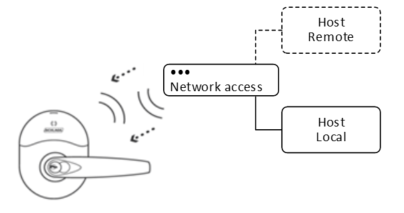
Software Alliance Members wishing to implement support for this mode of operation need to create and host a web server capable of providing database files to the calling-in device(s). The Lock ENGAGE Services Section contains the RESTful endpoints an ENGAGE device may use when initiating communication to the hosting server. The data exchanged in the body of these HTTP/HTTPS requests follows the defined JSON format; examples are given throughout this document for informational purposes with the complete set of JSON data structures defined in the ENGAGE - JSON Data Structures document.
SAMs must register each site their host server will manage with Allegion ENGAGE web services. This can be achieved programmatically as specified in Appendix B. This allows for the sites respective ENGAGE device(s) to receive the associated site key for all future transactions during the commissioning process. The API for registering a partner site and its associated key with Allegion ENGAGE web services, as well as other useful site level operations, is described in Appendix B of this document. All sites must be registered with Allegion ENGAGE web services regardless of whether the devices will be operating in standalone mode(s) or Real-Time Mode(s).
There are two real-time modes an ENGAGE device may operate under: RSI or IP mode. These are given the designations of 410-RSI and 410-IP respectively (four-ten). The respective mode is enabled during commissioning and should correspond to how the Gateway is intended to function in the network (either hardline Ethernet IP or RS-485 RSI mode).
An ENGAGE Gateway is required to bridge either of the means of communication (RS-485 or Ethernet) to the BLE form that ENGAGE battery powered devices utilize for all real-time data exchange.
.png)
Associating a device to a particular Gateway, referred to as linking an edge device to the Gateway, can be performed programmatically (see Appendix C) or via the Allegion ENGAGE mobile application.
NOTE: Both the edge device(s) and the Gateway must be commissioned before linking can occur and each Gateway is capable of supporting ten real-time (persistent BLE) connections at once. Additionally, any previous mode (WiFi) configuration settings are cleared during the linking process. This is necessary for the site key, which is used for data encryption / decryption, to be loaded into each device.
In RSI real-time mode, the ENGAGE device operates as a slave device under RSI protocol with its true underlying communication transport being made transparent to the master system. As such, once commissioned and linked, all further operations are governed by the RSI protocol; refer to the Schlage AD-SERIES & ENGAGE RSI RS-485 Protocol Specification for details.
In IP real-time mode, ENGAGE devices run autonomously just like standalone mode (See Standalone Modes (200 and 210) Section) running event schedules and granting access based upon the configured embedded access control database. All transactional (audit) event data and device status is also available immediately. Immediate modification to the access control database or the current configuration of the ENGAGE device can be made without the need to wait for a scheduled call-in by the device.
In IP real-time mode, the ENGAGE Gateway acts as a web server. A host connects to the Gateway and, through a defined set of RESTful endpoints over standard HTTPS, pushes or pulls information to/from linked edge devices; the entire API of Gateway endpoints is defined in Appendix C. It is important to note that the Gateway does not validate information sent through it, intending to operate as a store and forward bridge as much as possible, and thus the audits generated in response to operations by the edge device itself should be consulted to validate proper processing occurred.
Additionally, the ENGAGE Gateway can be configured to act as an IP client using WebSockets protocol. In this mode of operation the Gateway attempts to open a WebSocket connection with the IP Host’s webserver. In this mode of operation the underlying communication utilizes the same RESTful endpoints as utilized when the Gateway is operating as a webserver, however this communication is now wrapped in the WebSocket protocol. This mode of operation allows for the IP Host server to be publicly addressable and does not require for advanced network configurations or devices to be on the same network subnet. When the ENGAGE Gateway is configured to act as an IP client there is also additional functionality of a subscription service available to the IP Host. For more information regarding this mode of operation see the ENGAGE – WebSockets document.
Sites must be created through the API for the site key to be known by the SAM and ENGAGE. Creating a new site with the mobile application will not allow for a SAM to control the devices directly. Only ENGAGE managed and RSI sites can be created through the mobile app. SAM Managed 200, 210, and 410IP sites must be created via API.
WiFi Call-in:
For the standard periodic WiFi call-in, devices perform three RESTful calls in the following order:
PUT /swordfish/lock/Config
NOTE: – supported by NDE firmware version 2.6 and newer
GET /swordfish/lock/db/{timestamp}
POST /swordfish/lock/audit
See Appendix A: ENGAGE Edge Device Services API for more details on these calls and more specific information regarding HTTP and REST.
For ENGAGE 6.0 and later Firmware, only firmware updates and installations are prevented during a low battery condition. PUT Config, GET db, POST audit, POST alert, and GET certificates are all allowed during low battery conditions.
HTTP 1.1.
Currently required by the device firmware, the device completes the PUT to Config with HTTP 1.0, however it does not complete the GET db or the POST audit.
“Content-Length:”
Content length must be sent as a case sensitive string in the HTTP header in order for the ENGAGE edge device to properly process the GET /db.
HTTP Response
The HTTP response to POST /swordfish/lock/audit must be a 201 or 202 to indicate successful reception of the audit payload. 201 should be used when the device first calls in to report its audits and the audit file is created on the SAM host system. 202 should be used for subsequent updates from the device when the host audit file is updated. A 200 response should only be used when the response contains a payload of information. The response to POST /swordfish/lock/audit should not contain any payload information and therefore should not be a 200.
ENGAGE Edge devices (NDE, LE, RMRU, etc)
ENGAGE Edge devices which provide WiFi functionality do not natively support static IP addressing. If a software alliance member wishes to force a static IP address assignment on a per edge device basis, this may be accomplished via MAC reservations on the host router configurations. The edge devices connect to the WiFi access point and request an IP address via DHCP negotiation.
Firewall Exceptions:
Devices make use of standard HTTP (port 80) / HTTPS (port 443) for outgoing calls to the host. As such, most networks capable of internet access routing should operate without the need for router configuration changes.
The ENGAGE Gateway acts a web server providing secured incoming communication on port 443. Intra-LAN devices connecting to the Gateway may need internal routing tables configured. Remote (internet) hosts connecting to the Gateway will need firewall exceptions [port forwarding] to successfully complete connectivity.
Firewall Exceptions can be removed when the Gateway is configured to act as a WebSocket client, this will require that the IP Host provide a WebSocket Server.
NDE Max Transmission Rate:
The NDE has a max supported transmission rate of 24Mbps. As such, routers that allow for min 2.4 GHz rate configurations need to ensure that no value above 24Mbps is set as required/mandatory or the NDE will not be able to connect to the access point.
Zeroconf:
Zeroconf enables dynamic configuration of IPv4 link-local address without DHCP or static IP assignment (RFC-3927) as well as device and service advertisement for discovery (RFC-6762 and RFC-6763).
The ENGAGE Gateway supports Zeroconf networking, advertising its HTTPS service as ‘ENGAGEGateway v1.0’. This service can be used to locate Gateways and their associated IP addresses.
Note the ENGAGE Gateway will always obtain a link-local address (169.254.x.x) at power-on. This means that the Gateway is capable of responding to two distinct IP addresses should DHCP or static IP address assignment be made as well.
WebSockets:
Gateway firmware versions 01.49.12 and later have implemented the capability to act as an IP websocket client communicating with an IP host (set up by Allegion ENGAGE Alliance Partners) which supports the WebSocket Protocol version 13 as standardized by the IETF as RFC 6455.
This feature allows Gateways which reside on a different subnet from the host, or would traditionally require port forwarding, to bypass the network firewall in order to initiate full-duplex communication with an IP host which is located at a publically addressable IP address.
Communication is performed over TCP port 443 using standard TLS security.
The IP host must contain a unique X.509 root certificate and private key used to authenticate itself to gateway clients during TLS session establishment and provide HTTP services with for a limited number of URLs for use by the Gateway.
The Gateway will download and validate the server’s X.509 certificate using the root certificate authority’s HMAC-SHA1 which uses the Site Key for encryption.
Upon the completion of commissioning a Gateway for websocket communication, the Gateway will authenticate itself to the IP host prior to establishing a connection. At a minimum the Gateway will re-authenticate itself every 24 hours.
The Gateway will drop the connection if it has existed for more than 24 hours and will reestablish connection automatically any time a connection is dropped or does not exist.
The IP host must create a unique, temporary Basic Authentication password (per Gateway) used by the Gateway to establish a secure websocket connection, and must decline all websocket connection requests (HTTP Upgrade requests) by HTTP clients not having the correct Basic credentials.
The ENGAGE WebSocket Sub protocol is an application level protocol layered over the base websocket protocol that defines the structure and contents of a frame’s Application Data payload. Sub protocol negotiation occurs during connection establishment using the Sec-WebSocket-Protocol request header field.
Request messages emulate the request content conveyed by HTTP in the RESTful API utilized by non websocket enabled Gateways.
Magnetic Door Position Sensor (NDE Only):
The DPS is only monitored once every 3 seconds to maximize battery life.
For security reasons the device will annunciate a magnetic tamper audit if the DPS sensor loses its calibration due to a strong magnetic field being present.
As there is a considerable amount of metal inside of the device, holding the REX lever is considered by the device as opening the door, even if the door remains closed. This is due to the change in the relative magnetic field around the device when the chassis moves due to the movement of the lever.
Battery Levels:
As the device is used and the battery is drained, the device may annunciate a low or critical battery audit. Please refer to the ENGAGE - JSON Data Structures document for specific battery level information.
Battery life estimates assume one (1) WiFi update per day operation and take into account the droop that is inherent to the chemistry of alkaline batteries in order to prevent brownout in the worst-case conditions.
While devices maintain an active connection to the Gateway when operating in real-time modes, battery consumption is kept to a minimum by the depowering of select, unused portions of the device. These portions are re-energized when commands are received that require processing. As such, the often common practice of an access control panel periodically resending device commands should be avoided; excessive drain on the battery will occur if redundant commands or configurations are transmitted continuously to a device.
Cap Sense (Credential Card Presentation Detection):
Baseline upon power up and every minute thereafter to adjust for changing conditions. If something is placed in front of the device for a period of time it will “blind” the device.
NDE Firmware versions 02.09.08 and later and LE Firmware versions 01.04.83 and later support an adjustable “Cap Sense” feature to allow for improved reader detection. Please change this setting to “High” or “Max” with the iOS or Android Mobile Application.
Tamper:
To prevent corruption of data if batteries are pulled during a “write” operation, when the tamper is active, much of the device functions are disabled. It will trigger a WiFi Alert Event, but the device will cease operation for a few minutes until the time-out clears the tamper flag and allows the device to resume normal operations.
On Board LED (May not be applicable for all devices)
The LED on the back on the mainboard (visible when removing the battery cover on NDE) is used to communicate that the tamper is active.
Switch Status messages over RSI protocol (ENGAGE Gateway)
The NDE might send all status messages at once, whereas AD could send them in sequence.
The account creation and site identification are the prerequisite steps to setting up communications between the device and the Alliance Partner server (host) system.
You can create an account using either the ENGAGE Web Application or the ENGAGE Mobile Application.
For Web; enter the URL https://portal.allegionengage.com/signin into your web browser.
For Mobile; download/install the Allegion ENGAGE mobile App from one of these two app stores:
Get the ENGAGE™ Mobile App from the iTunes App Store (iOS)
Get the ENGAGE™ Mobile App from the Google Play Store (Android)
Launch/Open the Application.
Select “Create an Account”.
Agree to the Terms and Conditions.
Select the site type you would like for this account. If this is going to be a Software Alliance Member managed account please select “Third Party Software”, otherwise please select “ENGAGE Managed”.
Create your ENGAGE account using a valid email address and enter the Site/Facility name. A unique site key is assigned to the site.
ENGAGE sends an email request to verify your new account submission.
Follow the instructions in the email and confirm your new account.
Registration is now complete.
Log into the Application.
Set Host Configuration (direct device to communicate to the Alliance Partner’s or hosting server).
i. Select My Account from the icons displayed
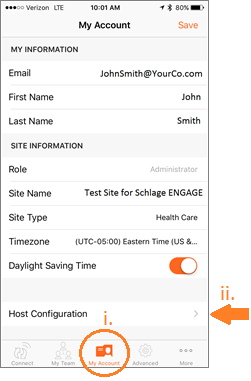
NOTE: This is an example of how the Host Configuration may look while using iOS for iPhone. It may differ slightly for other devices such as Android or iOS for iPad.
ii. Click on Host Configuration
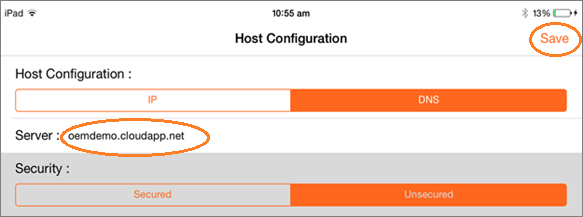
NOTE: The host config settings are applied as a last step in commissioning of a device so it can be set to the external server address prior to commissioning.
Via the My Team feature, the device owner invites the installer via email to his team and grants a specific role to the Installer. ENGAGE generates an invitation email which notifies the installer of their new access privilege.
Allegion recommends that the actual device owner be given “Administrator” privileges and can then invite the installer to the site as a “Manager”
The Installer downloads the ENGAGE mobile application to their mobile device, creates their account or logs in and follows the steps to authorize their ENGAGE device(s).
Implement ENGAGE device services and hosting on an External server.
Communication paths between the server and the device are secured by the SSL certificate in the Alliance Partner server when Secured mode is enabled (HTTPS).
See Appendix A.
Communication payloads to and from a device use JSON to express information. The ENGAGE - JSON Data Structures document provides details and additional examples on JSON data structures used by ENGAGE devices. The following JSON data structure represents how a payload might look if configuration records were being sent to the device.
"config": {
   "model": "",
   "relock": 3,
   "doorProp": 20,
   "ada": 30,
   "firstManIn": 0,
   "dstEnable": 0,
   "dstStart": "3022",
   "dstEnd": "B012",
   "battFail": "asIs",
   "bprEn": "T",
   "rtcTime": "20140701163241"
 },
See the ENGAGE - JSON Data Structures document for more details and examples.
BLE:
The application layer encrypts the data using AES 256 encryption and different keys depending upon the destination of the data. For example, if the device is communicating with the mobile app, the application encryption will be encrypted with the temporary key given to the device, and MAPP, by the ENGAGE Server.
AES-256:
Encryption using the site key or the temp key leverage AES-256 with:
IV: zeros
Block size: 16 bytes
CBC
No padding (Manually pad to block size)
Key size: 32 bytes
TLS:
ENGAGE will secure communications to the MAPP and Alliance Partner systems using TLS 1.0 or greater.
When devices are talking directly to the Alliance Partner host server inbound web traffic will have to be allowed through. Additionally, the SSL certificate used by the Alliance Partner system must be signed by the Comodo root certificate, we recommend acquiring a Thawte issued certificate, or the server must implement root certificate change functionality (refer to Lock ENGAGE Services Section) as a factory device only has the Comodo root certificate default.
The ENGAGE Gateway employs a self-signed TLS server certificate using TLS version 1.2. Each Gateway device has its own unique certificate which is signed by the Schlage Manufacturing location. Basic authentication is used to authenticate host connections to the Gateway.
WiFi:
Devices support OPEN, WEP, WPA, and WPA2 wireless security protocols to encrypt the WiFi communications between the device and wireless router. Devices support 802.1x when the system utilizes PEAP – MSCHAPv2.
During the initial set up process for a device, there is a period of time when the device is not configured to communicate with a MAPP. To complete the process of commissioning, the ENGAGE server needs to send the device an encrypted payload which contains the site key to enable the device to decrypt messages from the ENGAGE server. In this case, ENGAGE encrypts the site key payload using the Production Encryption Key (PEK) for the device and secures the communication between ENGAGE and the MAPP using TLS 1.x.
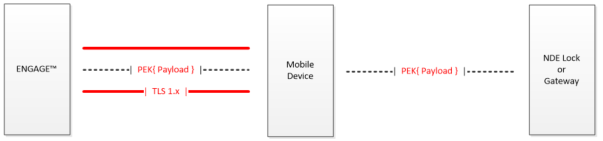
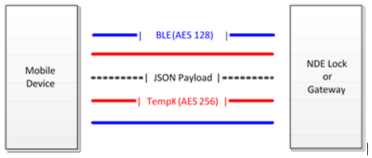
All of the communications between the MAPP and device will be doubly encrypted. The transport layer will be encrypted using standard BLE encryption using AES 128. In addition, the payload will be encrypted at the application layer using AES 256. The key for the application layer will be an ENGAGE generated session key (Temporary Key), given to the device and MAPP. The below figure shows the encryption scheme used to secure the MAPP to device communications.
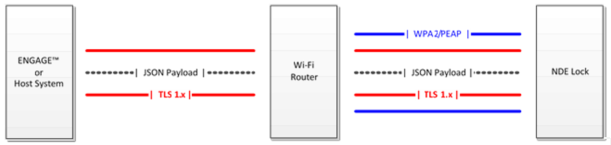
The WiFi enabled ENGAGE devices have the capability to contact ENGAGE directly to retrieve database updates, upload audit files, and download firmware updates. The encryption protocol between the devices and ENGAGE will utilize TLS 1.0 or greater. The WiFi link between the device and wireless router is secured via the configured wireless security protocol (WEP, WPA2. Etc.) The passwords and credentials to access the wireless network are entered during the commissioning process. Figure 3 shows the encryption scheme used to secure communications between ENGAGE and the edge device.
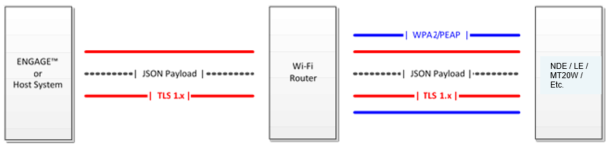
ENGAGE devices have the capability to communicate directly to an Alliance Partner hosted system. The encryption protocol between the Alliance Partner system and the device will be implemented via TLS utilizing a Comodo certificate on the Alliance Partner’s server. The Alliance Partner system will need to implement the device APIs that have been developed for the ENGAGE platform. The below figure shows the encryption scheme used to secure communications between the OEM system and the ENGAGE devices.
ENGAGE devices contain a single factory default root SSL certificate for authenticating and securing IP connections to host servers. It is required that host servers either use a certificate based off of this root certificate or implement root certificate change functionality (see the Device ENGAGE Services Section for information on this feature) for encrypted communication to occur. The default embedded certificate is currently the root certificate for many Comodo certificates.
The following represents the PEM version of the certificate programmed into the device.
-----BEGIN CERTIFICATE-----
MIIENjCCAx6gAwIBAgIBATANBgkqhkiG9w0BAQUFADBvMQswCQYDVQQGEwJTRTEU
MBIGA1UEChMLQWRkVHJ1c3QgQUIxJjAkBgNVBAsTHUFkZFRydXN0IEV4dGVybmFs
IFRUUCBOZXR3b3JrMSIwIAYDVQQDExlBZGRUcnVzdCBFeHRlcm5hbCBDQSBSb290
MB4XDTAwMDUzMDEwNDgzOFoXDTIwMDUzMDEwNDgzOFowbzELMAkGA1UEBhMCU0Ux
FDASBgNVBAoTC0FkZFRydXN0IEFCMSYwJAYDVQQLEx1BZGRUcnVzdCBFeHRlcm5h
bCBUVFAgTmV0d29yazEiMCAGA1UEAxMZQWRkVHJ1c3QgRXh0ZXJuYWwgQ0EgUm9v
dDCCASIwDQYJKoZIhvcNAQEBBQADggEPADCCAQoCggEBALf3GjPm8gAELTngTlvt
H7xsD821+iO2zt6bETOXpClMfZOfvUq8k+0DGuOPz+VtUFrWlymUWoCwSXrbLpX9
uMq/NzgtHj6RQa1wVsfwTz/oMp50ysiQVOnGXw94nZpAPA6sYapeFI+eh6FqUNzX
mk6vBbOmcZSccbNQYArHE504B4YCqOmoaSYYkKtMsE8jqzpPhNjfzp/haW+710LX
a0Tkx63ubUFfclpxCDezeWWkWaCUN/cALw3CknLa0Dhy2xSoRcRdKn23tNbE7qzN
E0S3ySvdQwAl+mG5aWpYIxG3pzOPVnVZ9c0p10a3CitlttNCbxWyuHv77+ldU9U0
WicCAwEAAaOB3DCB2TAdBgNVHQ4EFgQUrb2YejS0Jvf6xCZU7wO94CTLVBowCwYD
VR0PBAQDAgEGMA8GA1UdEwEB/wQFMAMBAf8wgZkGA1UdIwSBkTCBjoAUrb2YejS0
Jvf6xCZU7wO94CTLVBqhc6RxMG8xCzAJBgNVBAYTAlNFMRQwEgYDVQQKEwtBZGRU
cnVzdCBBQjEmMCQGA1UECxMdQWRkVHJ1c3QgRXh0ZXJuYWwgVFRQIE5ldHdvcmsx
IjAgBgNVBAMTGUFkZFRydXN0IEV4dGVybmFsIENBIFJvb3SCAQEwDQYJKoZIhvcN
AQEFBQADggEBALCb4IUlwtYj4g+WBpKdQZic2YR5gdkeWxQHIzZlj7DYd7usQWxH
YINRsPkyPef89iYTx4AWpb9a/IfPeHmJIZriTAcKhjW88t5RxNKWt9x+Tu5w/Rw5
6wwCURQtjr0W4MHfRnXnJK3s9EK0hZNwEGe6nQY1ShjTK3rMUUKhemPR5ruhxSvC
Nr4TDea9Y355e6cJDUCrat2PisP29owaQgVR1EX1n6diIWgVIEM8med8vSTYqZEX
c4g/VhsxOBi0cQ+azcgOno4uG+GMmIPLHzHxREzGBHNJdmAPx/i9F4BrLunMTA5a
mnkPIAou1Z5jJh5VkpTYghdae9C8x49OhgQ=
-----END CERTIFICATE-----
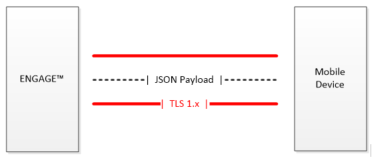
The MAPP will need to contact ENGAGE to retrieve a temporary key / app token to communicate with the device via BLE. The communications between ENGAGE and the MAPP will be secured using TLS 1.x. The below figure shows the encryption scheme used to secure communications between ENGAGE and the MAPP.
All RSI communication is governed and documented in the AD-SERIES & ENGAGE RSI RS-485 Protocol Specification document.
For IP-mode communication the Gateway will act as web server, rather than a client. The communications are protected using a TLS 1.2 self-signed certificate. This certificate is loaded into the Gateway during manufacturing and is unique to the individual Gateway.
After commissioning the Gateway using an ENGAGE mobile application, the IP host must establish a connection with the Gateway and request new login credentials from the Gateway. The Gateway will require authentication from the host using HTTP Basic Authentication. The Gateway will generate a username based on its serial number and a randomly generated password. This guarantees that each Gateway will require unique authentication credentials, so an attack upon one Gateway will not divulge authentication credentials on another Gateway. The IP host must accept the credentials before any further functionality is available on the Gateway. The API used for fetching and accepting the unique username and password is defined in the Gateway Configuration and Setup Section.
Note that the Gateway can also be configured as a WebSocket client instead of a HTTP server. See Schlage ENGAGE – WebSockets document for more details on this mode of operation.
The root certificate corresponding to the Gateway’s certificate that is used by the IP-host client is shown in PEM format.
-----BEGIN CERTIFICATE-----
MIID4jCCAsqgAwIBAgIBATANBgkqhkiG9w0BAQsFADCBkzELMAkGA1UEBhMCVVMx
CzAJBgNVBAgMAklOMSIwIAYDVQQKDBlTY2hsYWdlIExvY2sgQ29tcGFueSwgTExD
MS0wKwYDVQQLDCRTY2hsYWdlIExvY2sgQ2VydGlmaWNhdGlvbiBBdXRob3JpdHkx
JDAiBgNVBAMMG1NjaGxhZ2UgTG9jayBFTkdBR0UgUm9vdCBDQTAeFw0xNTAyMjYx
NzE5MTZaFw00NTAyMjUxNzE5MTZaMIGTMQswCQYDVQQGEwJVUzELMAkGA1UECAwC
SU4xIjAgBgNVBAoMGVNjaGxhZ2UgTG9jayBDb21wYW55LCBMTEMxLTArBgNVBAsM
JFNjaGxhZ2UgTG9jayBDZXJ0aWZpY2F0aW9uIEF1dGhvcml0eTEkMCIGA1UEAwwb
U2NobGFnZSBMb2NrIEVOR0FHRSBSb290IENBMIIBIjANBgkqhkiG9w0BAQEFAAOC
AQ8AMIIBCgKCAQEA1vYat3xi1R3NN7mKAAChlnWbva+2tIFiY5tWSU5UGzs3Ge7p
cFWZjns5Nkw89lFzKg7KazEhe6RkE+BIzJ/r1UxA8mCo2ZI9PEZgomrlRCvqpWdO
JO89UF0Psw/qPxzGMYl2ArhB3pSR7AUQrc9vdbysoRTMN9NG8ThJEcp2TJ3trw3e
bwK66DPW9CWCZb2jt+Tg4f7GZs0778JM8L7KSiNu8TjHlZlhg9UL5j9842u3Q8+c
pXT1Jh4pwcVYL6l4T9CrdLqJ8+RrrUIJB3jMOW3H9ws5yXgXNzegoY4U90bXHPLL
zqEYI5Zd9R5CoFIX/vmR/BfmjPhBDzinoyV0xwIDAQABoz8wPTAdBgNVHQ4EFgQU
7BeUZQJ22nthb6Ci7M4gANT2sgMwDwYDVR0TBAgwBgEB/wIBATALBgNVHQ8EBAMC
AQYwDQYJKoZIhvcNAQELBQADggEBALNW9eD5bO5GT3EQLB5gR7+CNAZH7cQJdJW3
7UI0s9ajFMYJfPVMRn/oENNRWAfFAYb8RcULqVQedTrDkmMV9o0bTq/COeg4OvVz
yXeLHuttx1HKOyyg4snDIGKd7zAXqMaS7fF4rwu2AEHIJvCa0cGI5s5mCX7NoF+Z
NtehAC/XbcbJOrmaSE33io0MZWa362MfOzXTjio8TpWwf1vAZOTjtkuKFHwUUuVY
CrSlQfZ3IKrgIfWjxHXX5HFFqyP9m1/U9/XQcvsyDEODXuyVpBc/ufOOCl4K9GYT
eUaA317YqoCVZmm9mO+j3SDy5NsgI+os5apwUTHrNwAv1U1DpIk=
-----END CERTIFICATE-----
The device will authenticate with the host server via:
The device establishes a TLS connection with the host.
The device sends the host its serial number and an encrypted payload containing the serial number and timestamp and unencrypted the current revision of the security subsystem within the device. The payload’s encrypted section is encrypted with the device’s Site Key.
The host looks up the serial number and locates the Site Key.
The host decrypts the payload, and verifies:
The serial number inside the payload matches the one outside.
The timestamp is within an acceptable time window (set by host) to prove that the login attempt is current.
Once the login is verified, the device can communicate with the host.
| S/N:SK( Timestamp, S/N ):Security Rev |
|---|
| S/N:SK( Timestamp, S/N ):Security Rev | |||
|---|---|---|---|
| Unencrypted | SK Encrypted – CBC with IV(0) | Security Version | Total (including delimiters) |
| S/N | Various | Character | |
| 32 | 64 | 1 | 99 Bytes |
| 32 Byte CBC Encryption Block # | Contents | Bytes |
|---|---|---|
| 1 | Timestamp+Zeros | 25+7 |
| 2 | S/N | 32 |
Timestamp is in the form of yyyymmddhhmmss and padded with zero’s to fill the 32 byte block.
The server will look up the Site Key based on the S/N, and verify the encrypted S/N matches the unencrypted S/N and validate the timestamp to prevent replay spoofing attacks against the server to try to gain access to ENGAGE.
The goal of the commissioning process is to assign a site key to all of the device(s) within the site.
Prerequisites to commission a device are:
Device is powered up
Device is reset to FDR
Device is broadcasting
The mobile app is launched
The installer who will commission the device has been added to and selected the respective site
The installer who will commission the device is in the vicinity of the device
Each device has a unique AES-256 key (production encryption key). This “production key” is used to securely assign the device to a single account or “site”.
Select the Connect icon in the app.
Click the add device icon (+) in the upper right corner of the screen.
Turn the interior lever of the device to be added to your site; this causes the device to start advertising.
Click OK on the prompt to turn the lever.
The app lists the available devices in the vicinity that could be commissioned. If the app does not list the device that needs to be captured, refresh the screen by pulling down the screen and releasing it.
Select the device that needs to be captured and select “Add”.
Select “Create New” to capture the device.
Configure the device as necessary.
Note that commissioning of a Gateway, LE device, or other ENGAGE enabled device follows a similar process. The NDE lock has been specifically called out in this document as it was the first commercially marketed ENGAGE enabled device.
Note that during the commissioning of an ENGAGE Gateway, if the Gateway is configured for RSI mode and later needs to communicate via IP mode (or vice-versa), the Gateway will need to be reset to FDR.
This section gives an example of how the data is structured by the device when a request is made for the device parameters. Note these are examples to show how the JSON schema works. Refer to the Schlage ENGAGE - JSON Data Structures document for up-to-date examples.
When a MAPP connects to a device (such as a lock or Gateway), the MAPP can request the device to report its current configuration. This is an example of the data structure that would be returned by the device.
{
    "battV":
    {
             "main":"5.87",
             "li":"2.99"
    },
    "fwVer":
    {
             "main":"01.03.11",
             "credRdr":"01.02.10",
             "ble":"01.02.10",
             "wifi":"01.05.10",
             "mainBl":"00.01.03",
             "credRdrBl":"00.01.01"
    },
    "wifiStngs":
    {
             "ssid":"01.03.11",
             "psswd":"\@113G10N",
             "usrNm":"Br549",
             "wifiSec":"entrprs",
             "encrypt":"wep",
             "kyIndx":4,
             "dscvryTyp":"ipAddr",
             "scrCnn": "http",
             "ip":"196.23.43.113",
             "dns":"firstChoice",
             "altDNS":"secondChoice"
    },
    "lckPrmtrs":
    {
             "nm":"corner office",
             "mdl": "sf",
             "lckSn":"1122334455",
             "mnSn":"2233445566",
             "mfgDt":"20140607113022",
             "daysInUse":145,
             "hwVer":"c1",
             "type":"strm",
             "relock":1,
             "doorProp":20,
             "ada":30,
             "firstManIn":0,
             "dstEnable":0,
             "dstStart": "3022",
             "dstEnd": "B012",
             "battFail": "sec",
             "rtcTime": "20140527140629",
             "dbDwnLdTm":"20140528020000"
    },
    "rdrPrmtrs":
    {
             "bprEn": "T",
             "crSn":"4455667788",
             "mfgDt":"20140607113522",
             "daysInUse":145,
             "hwVer":"c1"
    }

}
The following JSON data structure represents how the data structure might look if the configuration records were being sent to the device.
"config": {
  "model": "",
  "relock": 3,
  "doorProp": 20,
  "ada": 30,
  "firstManIn": 0,
  "dstEnable": 0,
  "dstStart": "3022",
  "dstEnd": "B012",
  "battFail": "asIs",
  "bprEn": "T",
  "rtcTime": "20140701163241"
},
Putting all the records together, the following might represent the JSON data structure for a sample database that could be sent to update an existing device database.
{
 "db": {
  "usrRcrd": {
   "deleteAll": 1,
   "delete": null,
   "update": [],
   "add": [
    {
     "usrID": "64",
     "adaEn": 0,
     "actDtTm": "20140101000000",
     "expDtTm": "20200101000000",
     "fnctn": "norm",
     "crSch": [1,3],
     "primeCr": "12345",
     "prCrTyp": "card",
     "scndCr": null,
     "scndCrTyp": null
    },
    {
     "usrID": "146",
     "adaEn": 1,
     "actDtTm": "20100101000000",
     "expDtTm": "20200101000000",
     "fnctn": "norm",
     "crSch": [1,3],
     "primeCr": "112233445566",
     "prCrTyp": "card",
     "scndCr": null,
     "scndCrTyp": null
    },
    {
     "usrID": "149",
     "adaEn": 1,
     "actDtTm": "20100101000000",
     "expDtTm": "20200101000000",
     "fnctn": "toggle",
     "crSch": [1],
     "primeCr": "badbeef",
     "prCrTyp": "card",
     "scndCr": null,
     "scndCrTyp": null
    },
    {
     "usrID": "148",
     "adaEn": 0,
     "actDtTm": "20100101000000",
     "expDtTm": "20200101000000",
     "fnctn": "norm",
     "crSch": [1],
     "primeCr": "223333445555",
     "prCrTyp": "card",
     "scndCr": null,
     "scndCrTyp": null
    }
   ]
 },
 "schedules": [
  {
   "days": [ "Su", "Mo","Tu","We","Th","Fr","Sa"],
   "strtHr": 0,
   "strtMn": 0,
   "lngth": 1439
  },
  {
   "days": [
   "Mo",
   "Tu",
   "We",
   "Th",
   "Fr"
  ],
   "strtHr": 8,
   "strtMn": 0,
   "lngth": 540
  },
  {
   "days": [
   "Mo",
   "We",
   "Fr"
  ],
   "strtHr": 8,
   "strtMn": 0,
   "lngth": 240
  }
 ],
 "holidays": [
  {
   "strtDtTm": "20141223000000",
   "endDtTm": "20141227000000",
   "action": "pass"
  },
  {
   "strtDtTm": "20140703000000",
   "endDtTm": "20140705000000",
   "action": "rstrctSec"
  }
 ],
 "autoUnlock": [
   {
   "action": "pass",
   "strtHr": 8,
   "strtMn": 0,
   "days": ["Mo","Tu","We","Th","Fr"]
  },
  {
   "action": "sec",
   "strtHr": 8,
   "strtMn": 0,
   "days": ["Mo","Tu","We","Th","Fr"]
  }
 ]
},
 "config": {
   "model": "",
   "relock": 3,
   "doorProp": 20,
   "ada": 30,
   "firstManIn": 0,
   "dstEnable": 0,
   "dstStart": "3022",
   "dstEnd": "B012",
   "battFail": "asIs",
   "bprEn": "T",
   "rtcTime": "20140701170122"
  },
  "dbDwnLdTm": "20140702210122",
  "nxtDbVerTS": "0x8d16386bfaec212"
}
This section defines the API for managing an edge device or an MT20W. This API can be implemented by Software Alliance Members and the devices can be pointed at it.
NOTE: Authentication of a device for these requests uses the serial number and a timestamp encrypted with the device's site key.
The ENGAGE hostname for these services is https://api.allegionengage.com, however Alliance partners must do their own implementation of Device Services API to support WiFi enabled devices.
Note that a device may wait up to 2 minutes for an HTTP response after initiating a GET, PUT, or POST operation but only up to 10 seconds for subsequent data after receiving the HTTP header.
Posts alerts from a device to the host server.
Authentication as defined in Device (210 Mode) and MT20W Authentication Section.
None
Body
Type: application/json
Schema:
{ "type":"object", "\$schema": "http://json-schema.org/draft-03/schema", "id": "http://jsonschema.net", "required":false, "properties": { "name": { "description": "Name of the lock", "type":"string", "required":false }, "asyncEvent": { "Event": { "description": "Audit event data", "type":"string", "required":true }, "Timestamp": { "description":"Timestamp", "type": "string", "required":true } } } }
Example:
{"asyncEvent":{"time":20140223070000,"event":21111111}}
Posts audits to the specified device.
Authentication as defined in Device (210 Mode) and MT20W Authentication Section.
None
Body
Type: application/json
Example:
{ asyncEvents: [ {"event" : 11111111,"time" : 20051013130309}, {"event" : 21121231,"time" : 20051013130325} ], "nxtDbVerTS" : "0x8d1a1399bddb51d" }
HTTP status code 201
Created - Audits posted successfully
HTTP status code 400
Bad Request - Something went wrong while posting audits
HTTP status code 401
Unauthorized - Credentials were not provided or are invalid
HTTP status code 404
Not found - Lock, for which audits are to post, not found
Gets the database – including commanded configurations -- for a device, 0 means EVERY record, otherwise we use the last program date timestamp of the device. If there is not a last program timestamp we revert to EVERY record.
Authentication as defined in Section 5.3
- timestamp: required (string)
HTTP status code 200
OK - Database retrieved successfully
Body
Type: application/json
Example:
{ db: { usrRcrd: { deleteAll: 1 delete: null update: [0] add: [0] } schedules: [2] 0: { days: [7] 0: "Su" 1: "Mo" 2: "Tu" 3: "We" 4: "Th" 5: "Fr" 6: "Sa" strtHr: 0 strtMn: 0 lngth: 1439 } 1: { days: [1] 0: "Mo" - strtHr: 0 strtMn: 0 lngth: 1440 } holidays: [0] autoUnlock: [1] 0: { action: "sec" strtHr: 0 strtMn: 0 days: [1] 0: "Mo" } } config: { model: "" relock: 3 doorProp: 20 ada: 30 firstManIn: 0 dstEnable: 0 dstStart: null dstEnd: null battFail: "asIs" bprEn: "T" rtcTime: "20140718142516" } dbDwnLdTm: "20140719085516" nxtDbVerTS: "0x8d1707d1ebcb056" }
HTTP status code 401
Unauthorized - Credentials were not provided or are invalid
HTTP status code 404
Not found - Lock not found
Resource for the networked device to upload current device properties and configurations. Body of payload corresponds to Retrievable Parameters section of Schlage ENGAGE - JSON Data Structures document.
The server receiving the request MUST return a status 200 to the device otherwise an audit will be uploaded that states an issue with uploading properties.
Authentication as defined in Device (210 Mode) and MT20W Authentication Section.
None
Body
Type: application/json
Schema: see the Retrievable Parameters section of the ENGAGE - JSON Data Structures documentation.
Example body request:
{"battV":{"main":"05.94","li":"0"},"fwVer":{"lock":"02.06.08","main":"02.06.08","mainBl":"01.04.00","credRdr":"02.00.35","credRdrBl":"01.02.09","ble":"01.04.127-1.3.0","wifi":" 4.72.r1722","macAdr":"00:06:66:6f:ac:0c","recoveryFwVer":"01.08.23"},"lockPrmtrs":{"name":"Lock 1","mdl":"nde","type":"strm","lckMode":"210","lckSn":"a100000000004e06","mainSn":"a100000000004e06","hwVer":"A0", "daysInUse":39,"mfgDt":"20151020","relock":3,"doorProp":20,"ada":30,"firstManIn":0,"dstEnable":0,"dstStart":"0000", "dstEnd":"0000","battFail":"sec","rtcTime":"20160112102340","dbDwnldTm":"200000000000","fwUrl":"","fwDwnLdTm":"200000000000", "fwImpTm":"200000000000","nxtDbVerTS":"0x08d22651fb4300a2","wifiAlertEn":"T"},"rsiPrmtrs":{"rsiHrtbtTm":40,"rsiRtryTm":5, "rsiSubqtDly":2,"rsiFrstDly":3,"ipbLongPress":5,"rsiCommFailSfMd":"disbld","relockMethod":"tmr","cacheMemMd":"full", "pinReqMode":"disbld","cacheMemBts":0,"maxCacheEntries":25,"ipbOnlineCfg":"disbld","ipbOfflineCfg":"disbld","rsiApmType":14, "rsiRdrType":67,"ipbLedBlink":"F","renInquiry":"F","clrCache":"T","dnyAccs":"F","autoPrg":"F"},"rdrPrmtrs":{"bprEn":"T", "daysInUse":39,"sn":"0000000000013393","hwVer":"A0","mfgDt":"20151020","configCrdPrsntd":"F","proxConfHID":"T","proxConfGECASI":"T", "proxConfGE4001":"F","proxConfGE4002":"T","proxConfAWID":"T","iClsUID40b":"T","uid14443":"F","mi14443":"T","noc14443":"T", "uid15693":"T","iCls15693":"F","iClsFrmt":"disbld","pivCnfg":"75bPIV"}}
HTTP status code 200
OK – upload accepted
Upon a certificate validation error, an ENGAGE enabled device will perform a non-secured request for updated root certificate information. This standard HTTP GET request is made to the configured host (URL assigned during commissioning of the device) using the defined format.
The defined format and more detailed information for this device resource can be found in the standalone ENGAGE – Lock Root Certificate Update App Note document.
This section details how to integrate and use the aptiQ MT20W enrollment reader within a Software Alliance Member managed system including details critical to implementing MT20W credential services and hosting by a SAM server.
The MT20W with WiFi connectivity enables SAMs to create a system supporting No Tour with supported products such as Schlage Control, NDE, LE, etc.
For an end user, the process to use the MT20W is as follows:
Create an ENGAGE account via the Partner API and a site key (REK) known by the Alliance Partner.
Commission the MT20W on that site with the ENGAGE mobile app. Configure the WiFi settings and host URL.
Now the MT20W connects to the WiFi and sends all credential information directly to the specified host. MT20W uses the host URL as a base to invoke the credential API’s.
The host sends the data to be written to the smart type credential directly to MT20W.
Communication paths between the server and lock are secured by the Comodo server certificate in the SAM server.
Figure 6 is a bounce diagram that illustrates the API interaction between the MT20W and the host. Note that all interactions inside of the dashed red line represent interactions specific to hosting a No Tour enabled site. For specifics on how to implement No Tour, refer to the Schlage ENGAGE – SAM No Tour Integration document.
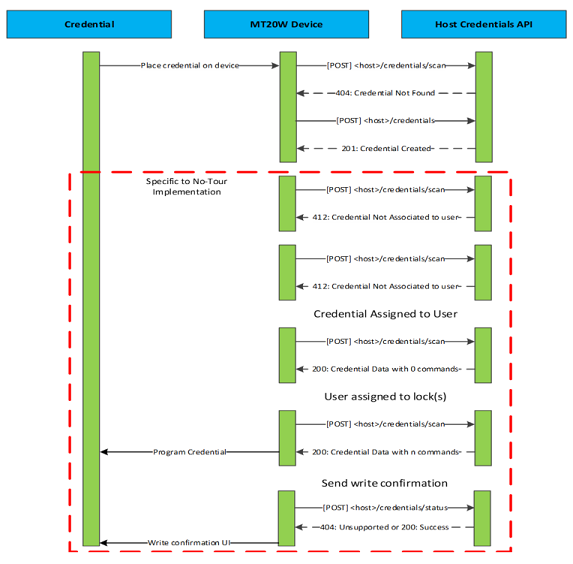
This resource is requested by the MT20W each time that a card is presented to the reader.
Body
Type: application/json
Schema:
{
"primary": "string",
"badgeId": "string",
"cardFormat": "string"
}
Example:
{
"primary": "SYLlKMxuJufanUE20or+qQ==",
"badgeId": "22",
"cardFormat": "smart"
}
HTTP status code 200
OK – Credential data included
HTTP status code 404
Not found – Credential not found
HTTP status code 412
Precondition failed – Credential not associated to user or non-writeable credential (prox)
In this example the “primary” json tag is the padded and encoded primary credential ID reported in base 64 format.
"SYLlKMxuJufanUE20or+qQ=="
In hexadecimal is “4982E528CC6E26E7DA9D4136D28AFEA9” (https://conv.darkbyte.ru/)
This is then decrypted with the site key.
“19B2DEDBA6621D297A293E9015B52406F221DB1384D1A1CFB01B09C36D35C54C”
Which decrypted returns:
“B2000B00FFFFFFFFFFFFFFFFFFFFFFFF” (http://aes.online-domain-tools.com/)
The first 16 data entries represent the actual credential ID.
For details of the credential data that should be included with a 200 response please see the Schlage ENGAGE – SAM No Tour Integration document. This response from the host may be up to 624 bytes of data (48 bytes per sector and 13 sectors of data).
The "badgeId": "22" field is for display purposes only. This ID, is printed on the credential and used as an identifier to match a credential in the stocklist (after registration) with the physical credential.
The "cardFormat": "smart" field is used to identify that the scanned credential is capable of being written to. Only this credential format can be used with no-tour feature. When prox type credentials are scanned using MT20W this field will be set to “prox”.
This resource is requested by the MT20W each time that POST /api/credentials/scan results in a HTTP response of 404.
Body
Type: application/json
Schema:
{
"primary": "string",
"badgeId": "string",
"cardFormat": "string"
}
Example:
{
"primary": "SYLlKMxuJufanUE20or+qQ==",
"badgeId": "22",
"cardFormat": "smart"
}
HTTP status code 201 – CREATED
This resource is requested after the MT20W has written No Tour data to a credential.
Body
Type: application/json
Schema:
{
"primary": "string",
"badgeId": "string",
"status": "string",
"crc16": "string"
}
Example: Write success
{
"primary": "SYLlKMxuJufanUE20or+qQ==",
"badgeId": "22",
"status": "0000",
"crc16": "BEB3",
}
Example: Write failure
{
"primary": "SYLlKMxuJufanUE20or+qQ==",
"badgeId": "22",
"status": "0001",
"crc16": "BEB3",
}
HTTP status code 200 – OK
HTTP status code 404 – Not Found
"status" – Bit field, hex string representing a success/failure code
0x0000 – Success
Bit 0 – Overall success/failure bit
Bit 1-15 – Unused
“crc16” – xmodem CRC16 for valid no-tour sector data combined.
| Portal environment hostname | https://partner.lockwebserv.com |
|---|---|
| Pilot environment hostname | https://pilot-oem-integration.lockwebserv.com |
It is suggested that Alliance Partners use a value of at least 30 seconds when implementing a timeout on ENGAGE services responses.
Base-64 encoded username:password passed in the Authorization header
Authorization: Basic Base64Encode(username:password)
This API returns a list of sites that the requester has access to and can only be accessed by a partner account type. ENGAGE managed login types are not able to access this API.
Basic Authentication, must be a partner managed account type
HTTP status code 200
OK
Body
Type: application/json
Response Parameters
Type: application/json
SiteReference = string
- Site reference identifier
Name = string
- Friendly name of the site
IsEngageManaged = boolean
- If the site access management uses ENGAGE. It is most common for an externally managed site, that this is false.
Example response body:
[{"SiteReference":"b0dd6808-b37f-4615-99e6-803ed5654e35","Name":"Default
site","IsEngageManaged":false},{"SiteReference":"91dc57fe-5e71-46fd-adc4-0aa28fca861d","Name":"ACME
Hammers","IsEngageManaged":true},{"SiteReference":"d3eb2914-2438-404b-9d4a-7688b5ff1e63","Name":"ACME
Saws","IsEngageManaged":false}]
This API returns a list of all Software Alliance Members which are recognized by Allegion as officially integrating into the ENGAGE platform. This is utilized when registering a new site in order for Allegion to provide site and devices registered to sites information to our officially recognized SAMs.
This API can only be accessed by a partner account type. ENGAGE managed login types are not able to access this API.
Basic Authentication, must be a partner managed account type
HTTP status code 200
OK
Body
Type: application/json
Response Parameters
Type: application/json
Text = string
- Pretty Print SAM name identifier
Value = string
- String to be utilized for the tag “SiteSoftwareKey” in POST /engage/sites/register
Example response body:
[[{"Text":"ENGAGE","Value":"engage"},{"Text":"AccessNsite","Value":"accessnsite"},{"Text":"Avigilon","Value":"avigilon"},
{"Text":"BadgePass","Value":"badgepass"},{"Text":"Blackboard","Value":"blackboard"},{"Text":"Brivo","Value":"brivo"},
{"Text":"CBORD","Value":"cbord"},{"Text":"CDVI","Value":"cdvi"},{"Text":"Feenics","Value":"feenics"},{"Text":"Galaxy",
"Value":"galaxy"},{"Text":"Identicard","Value":"identicard"},{"Text":"iMatrix Solutions/EZDoor","Value":"imatrix-solutions"},
{"Text":"JCI","Value":"jci"},{"Text":"Kastle","Value":"kastle"},{"Text":"Keri","Value":"keri"},{"Text":"Mavin","Value":"mavin"},
{"Text":"Open Options","Value":"open-options"},{"Text":"RS2","Value":"rs2"},{"Text":"S2","Value":"s2"},{"Text":"Sielox","Value":
"sielox"},{"Text":"Software House","Value":"softwarehouse"},{"Text":"Stratis","Value":"stratis"},{"Text":"TouchNet (Heartland)",
"Value":"touchnet"},{"Text":"Vanderbilt","Value":"vanderbilt"}]
This API registers a new site with the provided base64 encoded site key and can only be accessed by a partner account type. ENGAGE managed login types are not able to access this API.
Once the site is created, the site key cannot be changed.
The response contains the reference ID for the newly created site. This is the unique identifier for this site.
Basic Authentication, must be a partner managed account type
Body Parameters
Type: application/json
SiteName = string (required)
- Friendly name of site that is displayed on mobile and web apps.
Base64Key = string (required)
- The 32-byte Site Key encryption key. The value is a hexadecimal value that is encoded in Base64 format.
NOTE: The value should be Base64 encoded starting as a hexadecimal string of characters, not an ASCII representation of a hexadecimal string.
IsEngageManaged = boolean (optional)
- If set to TRUE, the site will be an Allegion ENGAGE managed site. If set to FALSE a partner managed site type will be created. If parameter is not included with request, the site will be created as a partner managed site type.
DefaultHostAddress = string (optional)
- A URL to change the site’s default hostname location. Value must be a valid URL including http or https. Only valid when IsEngageManaged == FALSE. This is an optional feature of site creation that is intended to reduce occurrences of manual errors created during commissioning of devices that will make client connection (e.g. WiFi) requests to a partner managed server for database updates and audit posting.
SiteSoftwareKey = string (optional)
- This string should be identical to the “Value” string provided by GET /engage/lookupsitesoftware
POST /engage/sites/register HTTP/1.1

Host: partner.lockwebserv.com

Content-Type: application/json

Authorization: Basic c2l0ZUFkbWluQHNvZnR3YXJlLmNvbTpFTkdBR0UxMjM0NTY=

{

    "SiteName":"New Site",

    "Base64Key":"AQIDBAUGBwgJCgsMDQ4PEBESExQVFhcYGRobHB0eHyA=",

    "IsEngageManaged":"False",

    "DefaultHostAddress":"http://www.securitycompany.com/",

    “SiteSoftwareKey”:”identicard”

}
HTTP status code 201
OK – New site created
Body
Type: application/json – reference ID for site
Example:
"ca530998-d21a-494b-b637-ba38ad42fd2d"
HTTP status code 400
Bad Request - most likely arguments passed in are invalid.
Example:
"The site software key provided ‘invalidSAM' is invalid."
HTTP status code 401
Unauthorized - Credentials were not provided or are invalid.
HTTP status code 500
Something happened, we are looking into it.
This API allows new (or existing) ENGAGE accounts to be invited to an existing SAM managed site. The invited user receives an email at the email address provided in the JSON body of the request, with a link to the ENGAGE portal.
If the user does not have an existing account with ENGAGE they can create their account and it will automatically be linked to the site which was provided in the JSON body of this request. If the user already has an existing account with ENGAGE they can log in with the existing credentials and access to the site will be given based upon the role which was provided in the JSON body of this request.
NOTE: The user that accepts the invite has the option to use a different email address.
Basic Authentication, must be a partner managed account type
None
Type: application/json
Email = string (required)
- Email that the invite will be sent to. Note: The user that accepts the invite has the option to use a different email address.
Role = string (required)
The type of role that will be included in the invitation. Valid options:
“Operator”
“Manager”
“SiteAdmin”
SiteReference = string (required)
- The reference ID of site the invite will be assigned to.
POST /engage/sites/invite HTTP/1.1

Host: partner.lockwebserv.com

Content-Type: application/json

Authorization: Basic c2l0ZUFkbWluQHNvZnR3YXJlLmNvbTpFTkdBR0UxMjM0NTY=

{

"Email":"john.smith\@acme.com",

"Role":"Operator",

"SiteReference":"a4ede79c-4348-4617-8aab-a88be1cef4e0"

}
HTTP status code 201
Created
Body
Type: application/json
ReferenceID = string
- Reference ID of the invite.
Example Response
"6b096140-51b2-4560-bf44-ea8d540da67d"
This API allows the authorized site account to update the name of the site. Typically this would be the site name that is displayed in the ENGAGE mobile app and should reflect the partner system’s site name.
Basic Authentication, must be a partner managed account type
siteReference = string (required)
- Reference ID of the site
Type: application/json
Name = string (required)
- The desired name change
IsEngageManaged = boolean (optional)
PUT /engage/sites/28bf5e95-bc41-4462-8623-9d26be7e3c35 HTTP/1.1

Host: partner.lockwebserv.com

Content-Type: application/json

Authorization: Basic c2l0ZUFkbWluQHNvZnR3YXJlLmNvbTpFTkdBR0UxMjM0NTY=

{

"Name": "New Name",

”IsEngageManaged”: false

}
HTTP status code 200
OK – site name successfully changed
Body
Type: application/json
Type: application/json
siteReference = string (required)
- Reference ID of the site
Name = string (required)
- The desired name change
IsEngageManaged = string
{

"SiteReference": "28bf5e95-bc41-4462-8623-9d26be7e3c35",

"Name": "New Name",

"IsEngageManaged": "false"

}
This API allows an authorized site admin to delete an existing site. The user account must be a SAM managed account type and must be an “admin” in the site that the delete request is being issued for.
The site must not contain any other “Operator”, “Manager”, or “SiteAdmin”.
The site must not contain any commissioned ENGAGE devices.
NOTE: The SAM API’s, ENGAGE MAPP, and ENGAGE Web APP will not allow access to a user that is not associated with any site, even if the Basic Auth, or log in credentials are valid for that user. It is therefore recommended to not delete the last site that you are a SiteAdmin on until you have created at least one new site that you are an authorized SiteAdmin, Manager, or Operator.
NOTE: Requests to this endpoint can be made only by a SiteAdmin.
Basic Authentication, must be a partner managed account type
ROLE: SiteAdmin only
siteReference = string (required)
- Reference ID of the site
Body Parameters
- NONE
DELETE /engage/sites/28bf5e95-bc41-4462-8623-9d26be7e3c35 HTTP/1.1

Host: partner.lockwebserv.com

Content-Type: application/json

Authorization: Basic c2l0ZUFkbWluQHNvZnR3YXJlLmNvbTpFTkdBR0UxMjM0NTY=
HTTP status code 204
No Content – Site Deleted
HTTP status code 403
Forbidden – Role is not allowed to perform action
HTTP status code 412
Precondition Failed – Please see the possible response body below
"Cannot delete Site. Remove all other Operators and try again"
- There is another “Operate”, “Manager”, or “SiteAdmin” on this site. Please delete these and try again.
“Cannot delete Site. Remove all Devices and try again.”
- Site contains commissioned device. Need to delete all devices
This API returns a list of operators that have access to a given site and their access privilege (role) and can only be accessed with a partner account type. ENGAGE managed login types are not able to access this API.
Basic Authentication, must be a partner managed account type
HTTP status code 200
OK
Type: application/json
Type: application/json
Username = string
- Email address of the given user
Role = string
The type of role that will be included in the invitation. Valid options:
“Operator”
“Manager”
“SiteAdmin”
FirstName = string
LastName = string
OperatorId = string
- OperatorId is a unique 64 bit integer value on a per site basis. Therefore, the same user will have a different OperatorId for each site: they are an “Operator”, “Manager”, or “SiteAdmin”
[{"UserName":"primary\@security.com","Role":"SiteAdmin","FirstName":"John","LastName":"Smith",”OperatorId”:14380},
{"UserName":"manager\@security.com","Role":"Manager","FirstName":"Jane","LastName":"Doe",”OperatorId”:14381},
{"UserName":"operator\@security.com","Role":"Operator","FirstName":"Tim","LastName":"Jones",”OperatorId”:14382}]
This API deletes a SiteAdmin, Manager, or Operator from a site. A SiteAdmin may delete any other role (SiteAdmin, Manager, or Operator). A Manager may only delete an Operator. An Operator does not have privileges to delete others.
This API can only be accessed with a partner account type. ENGAGE managed login types are not able to access this API.
NOTE: The SAM API’s, ENGAGE MAPP, and ENGAGE Web APP will not allow access to a user that is not associated with any site, even if the Basic Auth, or log in credentials are valid for that user. It is therefore recommended to not delete the last site that you are a SiteAdmin on until you have created at least one new site that you are an authorized SiteAdmin, Manager, or Operator.
Basic Authentication, must be a partner managed account type
operatorId = string (required)
- OperatorId is a unique 64 bit integer value on a per site basis. Therefore, the same user will have a different OperatorId for each site: they are an “Operator”, “Manager”, or “SiteAdmin”
- NONE
DELETE /engage/sites/operators/14830 HTTP/1.1

Host: partner.lockwebserv.com

Content-Type: application/json

Authorization: Basic c2l0ZUFkbWluQHNvZnR3YXJlLmNvbTpFTkdBR0UxMjM0NTY=
HTTP status code 204
No Content
HTTP status code 403
Forbidden – The role of the authenticated user does not allow this action. (Role is specific to the same site of the operator being deleted.)
HTTP status code 404
Not Found – The operator with the id provided is not found.
This API creates device default settings for the specified device type in the requested site. The existing default settings for each device type as defined in ENGAGE are used.
Basic Authentication, must be a partner managed account type
Required:
siteReference = [string]
deviceType = [string]
None
Code: 200
Content:
{"TimeStamp":"636542823615744462","Defaults":[{"DeviceType":"nde","Settings":[{"Key":"relockDelay","Value":"3"},
{"Key":"adaRelockDelay","Value":"30"},{"Key":"proppedDoorTrigger","Value":"20"},{"Key":"firstPersonIn","Value":"false"},
{"Key":"beeper","Value":"true"},{"Key":"failMode","Value":"Secure"},{"Key":"commFailMode","Value":"AsIs"},{"Key":"lockType",
"Value":"Storeroom"},{"Key":"wifiAlertEn","Value":"true"},{Key":"jagSectors","Value":"4"},{"Key":"cntrlDecTimeout","Value":"50"},
{"Key":"credSecNum","Value":"1"}]}]}
Scenario: Invalid token or Unauthorized user
Code: 401 Unauthorized
Content:.{“Message": "Authentication failed."}Scenario: Device type specified in request is not found or invalid i.e. device types which are not included in site defaults feature.
Code:.404 Not Found
Content: "DeviceType not found"
Scenario: Site defaults for specified device type already exists
Code: 412 Precondition Failed
Content: "The device type already has default settings for the facility."Scenario: If site reference not valid
Code: 400 Bad request.
Content: "Invalid SiteReference."Scenario: If site reference is not found in Database.
Code: 400 Bad Request
Content: "Invalid Facility reference”
This API updates device default settings in the requested site. The API accepts the settings to be updated as data parameters.
Basic Authentication, must be a partner managed account type
Required:
siteReference = [string]
Optional:
deviceType = [string]
TimeStamp , Defaults ,DeviceType ,Settings are required fields. Timestamp can be obtained from GET site defaults API. Timestamp is used to prevent concurrency issue.
Without optional parameter , data parameter can have multiple device type setting objects and settings to be updated in each device type. Sample PUT parameter
{"TimeStamp":"636543483076841449","Defaults":[{"DeviceType":"nde","Settings":[{"Key":"relockDelay","Value":"3"},
{"Key":"adaRelockDelay","Value":"30"},{"Key":"proppedDoorTrigger","Value":"20"},{"Key":"firstPersonIn","Value":"false"},
{"Key":"beeper","Value":"true"},{"Key":"failMode","Value":"Secure"},{"Key":"commFailMode","Value":"AsIs"},
{"Key":"lockType","Value":"Storeroom"},{"Key":"wifiAlertEn","Value":"true"},{"Key":"jagSectors","Value":"4"},
{"Key":"cntrlDecTimeout","Value":"50"},{"Key":"credSecNum","Value":"1"}]},{"DeviceType":"be467","Settings":
[{"Key":"relockDelay","Value":"3"},{"Key":"beeper","Value":"true"},{"Key":"jagSectors","Value":"4"},
{"Key":"cntrlDecTimeout","Value":"50"},{"Key":"credSecNum","Value":"1"}]}]}
If optional parameter ‘deviceType’ is specified in request url, sample PUT parameter:
{"TimeStamp":"636543483076841449","Defaults":[{"DeviceType":"be467","Settings":[{"Key":"relockDelay","Value":"3"},
{"Key":"beeper","Value":"true"},{"Key":"jagSectors","Value":"4"},{"Key":"cntrlDecTimeout","Value":"50"},
{"Key":"credSecNum","Value":"1"}]}]}
Code: 200
Content:
PUT response for multiple device types
{"TimeStamp":"636542823615744462","Defaults":[{"DeviceType":"nde","Settings":[{"Key":"relockDelay","Value":"3"},
{"Key":"adaRelockDelay","Value":"30"},{"Key":"proppedDoorTrigger","Value":"20"},{"Key":"firstPersonIn","Value":"false"},
{"Key":"beeper","Value":"true"},{"Key":"failMode","Value":"Secure"},{"Key":"commFailMode","Value":"AsIs"},
{"Key":"lockType","Value":"Storeroom"},{"Key":"wifiAlertEn","Value":"true"},{Key":"jagSectors","Value":"4"},
{"Key":"cntrlDecTimeout","Value":"50"},{"Key":"credSecNum","Value":"1"}]}]}
PUT response for multiple device types
Scenario: Invalid token or Unauthorized user
Code: 401 Unauthorized
Content: {“Message": "Authentication failed." }Scenario: Device type specified in request is not found or invalid i.e. device types which are not included in site defaults feature.
Code: 404 Not Found
Content: "DeviceType not found"Scenario: Site defaults for specified device type already exists
Code: 412 Precondition Failed
Content: "The device type already has default settings for the facility."Scenario: If site reference not valid
Code: 400 Bad request.
Content: "Invalid SiteReference."Scenario: If site reference is not found in Database.
Code: 400 Bad Request
Content: "Invalid Facility reference”
This API creates device default settings for the specified device type in the requested site.
If device default settings exist for a site, this API fetches these settings. If no default settings exist, then it creates default settings and sends them in response.
Basic Authentication, must be a partner managed account type
Required:
siteReference = [string]
Optional:
deviceType = [string
None
Success Response:
Code: 200
Content:
GET response for multiple device types
{"TimeStamp":"636543491417840775","Defaults":[{"DeviceType":"nde","Settings":[{"Key":"relockDelay","Value":"3"},
{"Key":"adaRelockDelay","Value":"30"},{"Key":"proppedDoorTrigger","Value":"20"},{"Key":"firstPersonIn","Value":"false"},
{"Key":"beeper","Value":"true"},{"Key":"failMode","Value":"Secure"},{"Key":"commFailMode","Value":"AsIs"},
{"Key":"lockType","Value":"Storeroom"},{"Key":"wifiAlertEn","Value":"true"},{"Key":"jagSectors","Value":"4"},
{"Key":"cntrlDecTimeout","Value":"50"},{"Key":"credSecNum","Value":"1"}]},{"DeviceType":"gwe","Settings":[]},
{"DeviceType":"be467","Settings":[{"Key":"relockDelay","Value":"3"},{"Key":"beeper","Value":"true"},
{"Key":"jagSectors","Value":"4"},{"Key":"cntrlDecTimeout","Value":"50"},{"Key":"credSecNum","Value":"1"}]},
{"DeviceType":"fe410","Settings":[{"Key":"relockDelay","Value":"3"},{"Key":"beeper","Value":"true"},
{"Key":"jagSectors","Value":"4"},{"Key":"cntrlDecTimeout","Value":"50"},{"Key":"credSecNum","Value":"1"}]},
{"DeviceType":"lems","Settings":[{"Key":"relockDelay","Value":"3"},{"Key":"adaRelockDelay","Value":"30"},
{"Key":"proppedDoorTrigger","Value":"20"},{"Key":"firstPersonIn","Value":"false"},{"Key":"beeper","Value":"true"},
{"Key":"failMode","Value":"Secure"},{"Key":"commFailMode","Value":"AsIs"},{"Key":"lockType","Value":"Storeroom"},
{"Key":"wifiAlertEn","Value":"true"},{"Key":"blinkIntLed","Value":"0"},{"Key":"jagSectors","Value":"4"},
{"Key":"cntrlDecTimeout","Value":"50"},{"Key":"credSecNum","Value":"1"}]},{"DeviceType":"lemd","Settings":
[{"Key":"relockDelay","Value":"3"},{"Key":"adaRelockDelay","Value":"30"},{"Key":"proppedDoorTrigger","Value":"20"},
{"Key":"firstPersonIn","Value":"false"},{"Key":"beeper","Value":"true"},{"Key":"failMode","Value":"Secure"},
{"Key":"commFailMode","Value":"AsIs"},{"Key":"lockType","Value":"Storeroom"},{"Key":"wifiAlertEn","Value":"true"},
{"Key":"blinkIntLed","Value":"0"},{"Key":"rapidBlink","Value":"0"},{"Key":"jagSectors","Value":"4"},
{"Key":"cntrlDecTimeout","Value":"50"},{"Key":"credSecNum","Value":"1"}]},{"DeviceType":"lemb","Settings":
[{"Key":"relockDelay","Value":"3"},{"Key":"adaRelockDelay","Value":"30"},{"Key":"proppedDoorTrigger","Value":"20"},
{"Key":"firstPersonIn","Value":"false"},{"Key":"beeper","Value":"true"},{"Key":"failMode","Value":"Secure"},
{"Key":"commFailMode","Value":"AsIs"},{"Key":"lockType","Value":"Storeroom"},{"Key":"wifiAlertEn","Value":"true"},
{"Key":"blinkIntLed","Value":"0"},{"Key":"rapidBlink","Value":"0"},{"Key":"jagSectors","Value":"4"},
{"Key":"cntrlDecTimeout","Value":"50"},{"Key":"credSecNum","Value":"1"}]},{"DeviceType":"rmru","Settings":
[{"Key":"proppedDoorTrigger","Value":"20"},{"Key":"dogOnNextExit","Value":"FALSE"},{"Key":"beeper","Value":"TRUE"},
{"Key":"wifiAlertEn","Value":"TRUE"},{"Key":"blinkIntLed","Value":"FALSE"},{"Key":"failMode","Value":"Secure"}]},
{"DeviceType":"cte","Settings":[{"Key":"relockDelay","Value":"3"},{"Key":"adaRelockDelay","Value":"30"},
{"Key":"proppedDoorTrigger","Value":"20"},{"Key":"lockType","Value":"Storeroom"},{"Key":"wifiAlertEn","Value":"true"},
{"Key":"jagSectors","Value":"4"},{"Key":"doorPropEn","Value":"FALSE"},{"Key":"immRelockEn","Value":"FALSE"},
{"Key":"dpsEn","Value":"FALSE"},{"Key":"lineVMain","Value":""},{"Key":"lineVPower","Value":""},
{"Key":"firstPersonIn","Value":"false"}]}]}
GET response for a device type (Ex:nde)
{"TimeStamp":"636543491417840775","Defaults":[{"DeviceType":"nde","Settings":[{"Key":"relockDelay","Value":"3"},
{"Key":"adaRelockDelay","Value":"30"},{"Key":"proppedDoorTrigger","Value":"20"},{"Key":"firstPersonIn","Value":"false"},
{"Key":"beeper","Value":"true"},{"Key":"failMode","Value":"Secure"},{"Key":"commFailMode","Value":"AsIs"},
{"Key":"lockType","Value":"Storeroom"},{"Key":"wifiAlertEn","Value":"true"},{"Key":"jagSectors","Value":"4"},
{"Key":"cntrlDecTimeout","Value":"50"},{"Key":"credSecNum","Value":"1"}]}]}
Scenario: Invalid token or Unauthorized user
Code: 401 Unauthorized
Content: { "Message": "Authentication failed." }Scenario: Device type specified in request is not found or invalid i.e. device types which are not included in site defaults feature.
Code: 404 Not Found
Content: "DeviceType not found"Scenario: If site reference is not found in Database.
Code: 404 Not found
Content: "Facility not found”
This API creates reader default settings for the specified reader type in the requested site.
If reader default settings exist for a site, the API fetches these settings. If no default settings exist, then it creates default settings and sends them in response.
Basic Authentication, must be a partner managed account type
siteReference = string (required)
Reference ID of the site
None
Type: application/json
Code: 200
Content:
{"Timestamp":"636543500716797787","Settings":[{"Key":"proxConfHID","Value":"1"},{"Key":"proxConfGE4001","Value":"0"},
{"Key":"proxConfGE4002","Value":"1"},{"Key":"proxConfAWID","Value":"1"},{"Key":"proxGECASI","Value":"1"},
{"Key":"uid14443","Value":"0"},{"Key":"mi14443","Value":"1"},{"Key":"noc14443","Value":"1"},{"Key":"uid15693","Value":"1"},
{"Key":"iClsUID40b","Value":"0"},{"Key":"mip14443","Value":"1"},{"Key":"rdrSense","Value":"norm"}]}
Response Parameters
Timestamp = string
Timestamp value required if the user desires to change editable device parameters.
Settings = array
Reader’s key settings
Scenario: Invalid token or Unauthorized user
Code: 401 Unauthorized
Content: { "Message": "Authentication failed." }Scenario: If site reference is not found in Database.
Code: 404 Not found
Content: "Facility not found”
This API updates reader default settings in the requested site. The API accepts the settings to be updated as data parameters.
Basic Authentication, must be a partner managed account type
siteReference = string (required)
Reference ID of the site
Timestamp = string (required)
The most recent value on record. If the supplied value is out of date, the request will not be successful.
Timestamp is used to prevent concurrency issue.
Timestamp can be obtained from GET site reader defaults API.
Settings = array
Reader’s key settings
Sample PUT request:
{"timestamp":"636540315746752940","settings":[{"key":"proxConfHID","value":"0"},{"key":"proxConfGE4001","value":"1]}
HTTP status code 200
OK – FriendlyName successfully changed
Content:
Sample PUT response
{"Timestamp":"636543502367485696","Settings":[{"Key":"proxConfHID","Value":"0"},{"Key":"proxConfGE4001","Value":"1"},
{"Key":"proxConfGE4002","Value":"1"},{"Key":"proxConfAWID","Value":"1"},{"Key":"proxGECASI","Value":"1"},
{"Key":"uid14443","Value":"0"},{"Key":"mi14443","Value":"1"},{"Key":"noc14443","Value":"1"},{"Key":"uid15693","Value":"1"},
{"Key":"iClsUID40b","Value":"0"},{"Key":"mip14443","Value":"1"},{"Key":"rdrSense","Value":"norm"}]}
HTTP status code 400
Scenario: Invalid token or Unauthorized user
Code: 401 Unauthorized
Content: { "Message": "Authentication failed." }Scenario: If site reference not valid.
Code: 400 Bad Request.
Content: "Invalid SiteReference."Scenario: If site reference is not found in Database.
Code: 400 Bad Request
Content: "Invalid Facility reference”Scenario: If any of the mandatory parameters in request model of PUT is not passed, then the respective model validation error is thrown. Ex. If timestamp is not specified then
Code: 400 Bad Request.
Content: {"Message": "The Timestamp field is required."}Similarly, for other required fields.
Scenario: To prevent concurrency issue, the timestamp validation exists. Hence if the timestamp passed in request model doesn’t match existing timestamp. ( Latest timestamp can be obtained from GET site defaults call ).
Code: 404 Bad Request
Content: "The timestamp of the site default reader settings to update does not match the existing timestamp.”Scenario: Trying to update the device default before creating.
Code: 404 Not Found.
Content: “Site reader defaults not found”Scenario: Passing empty array of settings in request model or empty Defaults array.
Code: 400 Bad Request.
Content: {"Message": " Reader Defaults Request Model is not valid"}Scenario: Empty key or invalid Key.
Code: 404 Not found.
Content: “Reader setting not found”
This API creates reader default settings for the requested site. The existing reader default settings as defined in ENGAGE are used.
Basic Authentication, must be a partner managed account type
Required:
siteReference = [string]
None
Code: 200
Content:
{"Timestamp":"636543507614841249","Settings":[{"Key":"proxConfHID","Value":"1"},{"Key":"proxConfGE4001","Value":"0"},
{"Key":"proxConfGE4002","Value":"1"},{"Key":"proxConfAWID","Value":"1"},{"Key":"proxGECASI","Value":"1"},
{"Key":"uid14443","Value":"0"},{"Key":"mi14443","Value":"1"},{"Key":"noc14443","Value":"1"},{"Key":"uid15693","Value":"1"},
{"Key":"iClsUID40b","Value":"0"},{"Key":"mip14443","Value":"1"},{"Key":"rdrSense","Value":"norm"}]}
Scenario: Invalid token or Unauthorized user
Code: 401 Unauthorized
Content: {“Message": "Authentication failed." }Scenario: Site default reader setting for specified site already exists
Code: 412 Precondition Failed
Content: "The device type already has default settings for the facility."Scenario: If site reference not valid
Code: 400 Bad request.
Content: "Invalid SiteReference."Scenario: If site reference is not found in Database.
Code: 400 Bad Request
Content: "Invalid Facility reference”
This API retrieves an ordered list (array) of all devices on a given site. Each list entry contains information about the given device.
Basic Authentication, must be a partner managed account type
siteReference = string (required)
- Reference ID of the site
page = integer (optional)
- The specific page in the device collection. If not specified, value is assumed to be 1.
items = integer (optional)
- The number of device records to return per page. If not specified, value is assumed to be 10.
GET /engage/devices/site/2fca6a73-8766-4ff2-8ebf-aa5a1cd11fa2?page=1&items=3
HTTP status code 200
OK
Type: application/json
DeviceReference = string
- Unique identifier for device
FriendlyName = string
- Name given to the device during commissioning
DeviceType = string
- ENGAGE enabled device type. Corresponds to the “mdl” tag defined in the ENGAGE - JSON Data Structures document.
SerialNumberShort = string
- 8 byte version of device serial number; hexadecimal format
SerialNumberLong = string
- 16 byte version of device serial number; hexadecimal format
Timestamp = string
- Timestamp value required if the user desires to change editable device parameters.
[{"DeviceReference":"773c5963-f600-4f4f-b53f-2296e96bf0ff","FriendlyName":"Gateway","DeviceType":"gwe",
"SerialNumberShort":"B100000000000212","SerialNumberLong":"0000000000000000B100000000000212","Timestamp":"635857249394447548"},
{"DeviceReference":"5583a2d9-9363-4c43-9fc8-275d48329b66","FriendlyName":"NDE","DeviceType":"nde",
"SerialNumberShort":"A100000000000928","SerialNumberLong":"0000000000000000A100000000000928","Timestamp":"635857250464507366"},
{"DeviceReference":"71e403e7-c3d7-481c-b3aa-802dd568f56d","FriendlyName":"Schlage Control","DeviceType":"be467",
"SerialNumberShort":"E100000000000972","SerialNumberLong":"0000000000000000E100000000000972","Timestamp":"635857250953413665"}]
This API allows the authorized site account to delete a device from a given site, allowing the device to be recommissioned on another ENGAGE site.
Basic Authentication, must be a partner managed account type
DeviceReference = string (required)
- Unique identifier for device
siteReference = string (required)
- Reference ID of the site
DELETE /engage/devices/901a82c6-38ab-4b96-95b1-8d1674b855c8/site/cbe0bdbb-ee98-4af7-85f4-3ebb5130c2bb HTTP/1.1
None
HTTP status code 204
No Content – Device was deleted successfully
HTTP status code 404
Device does not exist
“Device not found”
This API allows the authorized site account to update the FriendlyName for a device record.
Basic Authentication, must be a partner managed account type
DeviceReference = string (required)
- Unique identifier for device
siteReference = string (required)
- Reference ID of the site
Type: application/json
FriendlyName = string (required)
- The new FriendlyName desired by the user. The FriendlyName must be less than 32 ASCII characters
Timestamp = string (required)
- The most recent value on record. If the supplied value is out of date, the request will not be successful. The most recent value can be retrieved from the Site Device List resource.
HTTP status code 200
OK – FriendlyName successfully changed
HTTP status code 400
Bad Request - Something went wrong
“Attempted Update Failed Concurrency Check” – The Timestamp in the JSON body does not match the “Timestamp” from Site Device List resource.
Type: application/json
“DeviceReference” = string
- Unique identifier for device
“FriendlyName” = string
- Name given to the device during commissioning
“DeviceType” = string
- ENGAGE enabled device type. Corresponds to the “mdl” tag defined in the ENGAGE - JSON Data Structures document.
“SerialNumberShort” = string
- 8 byte version of device serial number; hexadecimal format
“SerialNumberLong” = string
- 16 byte version of device serial number; hexadecimal format
“Timestamp” = string
- Timestamp value required if the user desires to change editable device parameters.
PUT /engage/devices/553af9eb-0633-4c61-bf2c-dd67bf9c01b5/site/2fca6a73-8766-4ff2-8ebf-aa5a1cd11fa2 HTTP/1.1

Host: partner.lockwebserv.com

Content-Type: application/json

Authorization: Basic Authorization: Basic c2l0ZUFkbWluQHNvZnR3YXJlLmNvbTpFTkdBR0UxMjM0NTY=

{"FriendlyName":"New Name","Timestamp":"635882358105748197"}
This API allows the authorized site account to retrieve the corresponding ENGAGE siteReference identifier given the short or long serial number of a given device that has been commissioned.
It fails if the device has not been commissioned or the user making the request does not have authorized access to the corresponding ENGAGE site.
Basic Authentication, must be a partner managed account type
hexSerialNumber = string (required)
- The short or long values of the device serial number, corresponding to Partner API URI parameters SerialNumberShort or SerialNumberLong.
GET /engage/devices/B100000000001234/siteReference
HTTP status code 200
OK – Device found and site reference is included
Type: application/json
“SiteReference = string (required)
- The reference ID of site the device has been commissioned to.
{"SiteReference": "2fca6a73-8766-4ff2-8ebf-aa5a1cd11fa2"}
This API gets the historical list of firmware versions for a given device type. Each entry contains information and download location for a given version.
Basic Authentication, must be a partner managed account type
deviceType = string (required)
- ENGAGE enabled device type. Corresponds to the “mdl” tag defined in the ENGAGE - JSON Data Structures document.
page = integer (optional)
- The specific page in the Firmware collection. Default is 1.
items = integer (optional)
- The number of Firmware records to return per page. Default is 10.
GET /engage/firmware/nde?items=1000&page=1 HTTP/1.1
HTTP status code 200
OK
HTTP status code 404
Device type does not exist
Type: application/json
[{"name":"Releasepkg_2.4.17.bin","description":"jpevenso.allegion pilot\@gmail.com : Posting 410 Production release FW version
2.4.17","deviceType":"nde","extendedVersion":"0.1","isPublic":false,"releaseDate":"2015-08-17T22:51:57","version":"2.4.17","links":
[{"href":"http://orcapilot.lockwebserv.com/api/Firmware/nde/2.4.17?v=2","rel":"self"}]},{"name":"Releasepkg_2.3.28.bin",
"description":"jpevenso.allegion pilot\@gmail.com : OEM Release to Pilot","deviceType":"nde","extendedVersion":"0.1",
"isPublic":false,"releaseDate":"2015-06-11T21:11:54","version":"2.3.28","links":
[{"href":"http://orcapilot.lockwebserv.com/api/Firmware/nde/2.3.28?v=2","rel":"self"}]}]
Virtual Devices are intended to act as a place holder for devices that have yet to be commissioned by an installer. By pre-populating virtual device information Allegion Software Alliance Members can pre-define device names to be used by their host software. While the current iteration of Virtual Devices only allows for device names to be predetermined, future iterations may include other functionality such as a pre-defined device configuration.
NOTE: If Virtual Devices are used to pre-define device names, the ENGAGE MAPP will not allow the user to modify a device name.
This API registers a list of virtual devices for a given site. Each list entry contains the name for each virtual device.
NOTE: Each POST request overwrites any previously existing virtual devices. To delete all current entries, send an empty array to that endpoint. Removing virtual devices from a site does not affect devices that have already been commissioned to that site.
Basic Authentication, must be a partner managed account type
siteReference = string (required)
- Reference ID of the site
Type: application/json
name = string (required)
A pre-determined device name (friendly name) to be commissioned by the user. This field must be less than 32 ASCII characters
Empty or white space entries will be ignored
Duplicate name entries will be ignored
Names which have already been commissioned to this site will be ignored
POST //engage/devices/virtual/site/670dea61-d638-ffff-bffe-e5ffca3e9601 HTTP/1.1

Host: partner.lockwebserv.com

Authorization: Basic c2FtcGxlVXNlck5hbWU0X0FQSWRvY0BnbWFpbC5jb206cEFzU3cwckQhIw==

Content-Type: application/json

[

{"name":"Conference Room 1A"},

{"name":"Front Entry"}

]
HTTP status code 201
Created
Body
Type: application/json
Example
"2 virtual devices have been added."
Retrieves a list of virtual devices for a given site.
Basic Authentication, must be a partner managed account type
siteReference = string (required)
- Reference ID of the site
page = integer (optional)
- The specific page in the device collection. If not specified, value is assumed to be 1.
items = integer (optional)
- The number of virtual device records to return per page. If not specified, value is assumed to be 5000.
None
GET //engage/devices/virtual/site/670dea61-d638-ffff-bffe-e5ffca3e9601 HTTP/1.1

Host: partner.lockwebserv.com

Authorization: Basic c2FtcGxlVXNlck5hbWU0X0FQSWRvY0BnbWFpbC5jb206cEFzU3cwckQhIw==
HTTP status code 200
OK
Type: application/json
Note: Entries are sorted alphabetically by name
“CreatedUtcTicks” = integer
The value of this property represents the number of 100-nanosecond intervals that have elapsed since 12:00:00 midnight, January 1, 0001 (0:00:00 UTC on January 1, 0001, in the Gregorian calendar)
Refer to the official Microsoft documentation for more information: https://msdn.microsoft.com/en-us/library/system.datetime.ticks(v=vs.110).aspx
http://tickstodatetime.com can be used to convert to a human readable timestamp
“Name” = string
The “name” of the device from the POST request
Entries are sorted alphabetically by name
[
 {
  "CreatedUtcTicks": 636288574297046848,
  "Name": "Conference Room 1A"
 },
 {
  "CreatedUtcTicks": 636288574297046848,
  "Name": "Front Entry"
 }
]
The ENGAGE Gateway implements a general 30 second timeout for all commands below; it is suggested that Alliance Partners use a similar value when implementing a timeout on Gateway responses. In particular, the /edgeDevices/{linkId}/database resource can take many seconds to complete for large databases which must be first transferred and then queued by the Gateway before a response is returned to the initiating client.
Due to the Gateway’s webserver implementation, extraneous forward slashes (/) used in endpoint URLs shown below are ignored; while this would be a non-standard use case in a machine-to-machine developed solution, it is noted herein for clarity’s sake.
This resource is used to initialize basic authentication between IP host and the ENGAGE Gateway. Every GET request results in a new password being randomly generated, and previous randomly generated passwords are forgotten.
This resource is only available after commissioning and before accepting a username/password pair.
Accepting the username/password pair (using PUT /gateway/newCredentials), causes this resource to disappear from the Gateway API. An error response is given if an attempt to access this API resource is executed after the username/password pair has been accepted.
Default username: EngageGatewayDefaultUser
Default password: EngageGatewayDefaultPassword
Basic Authentication: Default username and password.
URI Parameters
- None
HTTP status code 200
Response parameters:
Type: application/json
credentials = parent
- If successful, this parameter, and children are included.
usr = string
- Proposed username to be used by client. Format: “gateway_(8-byte serial number)
pwd = string
- Proposed password to be used by client. Randomly generated password for every request.
HTTP status code 403
Response parameters:
Type: application/json
- statusMessage = “Credentials already established”
NOTE: 403 status is only used if the unique credentials are used. If default username/credentials are used, a 401 response is returned.
{"credentials":{"usr":"gateway_a0b100000000003f","pwd":"eh1b1yeDuWdnHZXnYjLxN4yRdkll158f"}}
This resource is used to initialize basic authentication between IP host and the ENGAGE Gateway. This should be used sequentially after a GET against the same resource. If multiple GETs are done prior to PUT, the Gateway will use the last password generated.
This resource is only available after commissioning and before accepting a username/password pair.
Accepting the username/password pair, causes this resource to disappear from the Gateway API.
Default username: EngageGatewayDefaultUser
Default password: EngageGatewayDefaultPassword
Basic Authentication: Default username and password. Please note this is not the usr:pwd pair that was returned in the body of GET /gateway/newCredentials. All future Gateway operations will use the unique username and password pair which the Gateway generated.
URI Parameters
- None
HTTP status code 201
Response parameters:
Type: application/json
- statusMessage = “Gateway username / password changed”
HTTP status code 403
Response parameters:
Type: application/json
- statusMessage = “Credentials already established”
NOTE: – 403 status is only used if the unique credentials are used. If default username/credentials are used, a 401 response is returned.
This resource returns the time of the Gateway and network of linked devices.
Basic Authentication: unique credentials defined and accepted during setup.
URI Parameters
- None
HTTP status code 200
Response parameters:
Type: application/json
gatewayTime = string, parent tag to follow
rtcTime = definition in the ENGAGE - JSON Data Structures document, section titled “Gateway Configuration”
dstEnable = definition in the ENGAGE - JSON Data Structures document, section titled “Gateway Configuration”
dstStart = definition in the ENGAGE - JSON Data Structures document, section titled “Gateway Configuration”
dstEnd = definition in the ENGAGE - JSON Data Structures document, section titled “Gateway Configuration”
{"gatewayTime":{"rtcTime":"20150720142459","dstEnable":"true","dstStart":"3022","dstEnd":"B012"}}
This resource writes new configurations to the ENGAGE Gateway. The JSON object gatewayConfig is used, as defined in the ENGAGE - JSON Data Structures document.
Basic – unique credentials defined and accepted during setup.
URI Parameters:
Type: application/json
- gatewayConfig = parent tag + children tags, definition in the ENGAGE - JSON Data Structures document, section titled “Gateway Configuration”
HTTP status code 200
Response parameters:
- None
{"gatewayConfig":{"genGatewayConfig":{"deviceName":"new GW Name","rtcTime":"20150720140000","dstEnable":"true","dstStart":"3022",
"dstEnd":"B012","fwurl":"","fwDwnldTm":"","fwImplTm":""},"gatewayIpModeConfig":{"discoveryMethod":"zeroConf","fixedIpAddr":"",
"defGatewayIpAddr":"","netmask":"","ipDnsAddr":"","altDnsAddr":""}}}
This resource is used to retrieve Gateway configurations and read-only parameters. The JSON object gatewayDeviceInfo is returned, as defined in the ENGAGE - JSON Data Structures document.
Basic – unique credentials defined and accepted during setup
URI Parameters
- None
HTTP status code 200
Response Parameters:
Type: application/json
- gatewayDeviceInfo = parent tag + children tags, definition in the the ENGAGE - JSON Data Structures document, section titled “Device Information Records (Gateway)”
{"gatewayDeviceInfo":{"fwVer":{"main":"1.49.10","ble2":"0.0.7","mainBl":"2014.10.0.2","macAdr":"00409D63028E",
"ethernetMacAdr":"00409D63028D"},"wifiStngs":{"wifiEnable":"","ssid":"","psswd":"","usrNm":"","wifiSec":"","kyIndx":""},
"gatewayParameters":{"hostProtocol":"ipEngage","deviceName":"Gateway IP Mode","mdl":"GWE","mainSn":"a0b1000000000206",
"mfgDt":"20150515","hwVer":"01","daysInUse":"00031","gwUpTime":"017","rtcTime":"20170109134639","sshEnable":"false",
"dstEnable":"true","dstStart":"3022","dstEnd":"B012","fwurl":"","fwDwnldTm":"","fwImplTm":""},"ipv4Interfaces":
{"ethernetProperties":{"assignedIpAddr":"10.44.95.46","defGatewayIpAddr":"10.44.92.1","netmask":"255.255.252.0"},
"wifiClientProperties":{"assignedIpAddr":"","defGatewayIpAddr":"","netmask":""}},"gatewayRsiModeConfig":
{"rsdAddress":"","lowDoor":"","highDoor":""},"gatewayIpModeConfig":{"discoveryMethod":"dhcp","fixedIpAddr":"",
"defGatewayIpAddr":"","netmask":"","ipDnsAddr":"","altDnsAddr":"","ipServerURL":"","caServerURL":"","wsKeepAlive":"0"},
"gatewayFeatureList":["rsiMode","ipServerMode","ipClientMode","lockFwUpgrade"],"edgeDeviceFwUrls":
[{"fwurl":"","mdl":"nde","fwDwnldTm":"","fwImplTm":"","fwVer":"","status":{"fwDwnld":"","fwUpdate":""},"extendedStatus":
[{"linkId":"dev00000","deviceId":"a100000000002479","deviceName":"testNDE","mdl":"nde","fwVer":"02.08.12","fwUpdateStatus":"",
"fwUpdateStartTm":"","fwTransferCmpltPercentage":0,"fwUpdateCmpltTm":"","fwUpdateCancelTm":"","retries":0}]}]}}
Issuing a GET against this resource triggers a BLE scan of nearby advertising ENGAGE devices. Every GET triggers a real time scan which utilizes Gateway BLE radio, so it takes a moment for scanning to complete. Issuing too many scans back to back is not recommended.
A scan is required prior to posting to the edgeDevices resource as described in the Linking and Controlling Edge Devices Section.
In heavy 2.4GHz traffic environments and depending on the advertising rates of ENGAGE edge devices, some devices might not be returned in the scan list, so a second request might be needed.
The response is the gatewayScanList JSON object defined in the ENGAGE - JSON Data Structures document.
If the Gateway has the maximum number of devices linked, it will be unable to scan for new devices to link to, and an error will be returned.
Basic – unique credentials defined and accepted during setup
URI Parameters
- None
HTTP status code 200
Response Parameters:
Type: application/json
- gatewayScanList = parent tag + children tags, definition in the ENGAGE - JSON Data Structures document, section titled “Gateway Scan List”
HTTP status code 409
Response parameters:
Type: application/json
- statusMessage = “Linked devices at maximum”
HTTP status code 500
Response parameters:
Type: application/json
- statusMessage = “Request timed out”
{"gatewayScanList":[{"mainSn":"a100000000001234","deviceName":"Front Door","signalQuality":"Med","modelType":"nde"},
{"mainSn":"a100000000005678","deviceName":"Storage Closet","signalQuality":"Med","modelType":"nde"}]}
Posting to this resource is a request to create a link between the Gateway and the targeted edge device using BLE.
As a pre-requisite, the scanList resource (see the GET /gateway/scanList Section) must be accessed prior to this. Using the scanList resource forces the Gateway to do an active BLE scan. Posting to this resource is dependent on a previous successful scan, and the target device was included in the scan list.
The body of this resource must contain the deviceID JSON tag which specifies the serial number of the intended edge device. This serial number should be the same as was reported from the scanList JSON tag “mainSn”.
NOTE: Linking a device to the Gateway is a lengthy process and a delay must be inserted between the linking operation (after reception of a response from the Gateway to this command) and the sending of another command to the newly linked device. This delay should be at least 10 seconds to account for worst-case conditions and to avoid an error being returned by the Gateway in response to the subsequent command.
Basic – unique credentials defined & accepted during setup
URI Parameters:
- None
Body:
Type: application/json
- deviceId = definition in the ENGAGE - JSON Data Structures document, section titled “Gateway Edge Device Link List”
Example:
{"deviceId":"a000000000000123"}
HTTP status code 201
Response Parameters
Type: application/json
linkInfo = parent tag
linkId = definition in the ENGAGE - JSON Data Structures document, section titled “Gateway Edge Device Link List”
deviceId = definition in the ENGAGE - JSON Data Structures document, section titled “Gateway Edge Device Link List”
deviceName = definition in the ENGAGE - JSON Data Structures document, section titled “Gateway Edge Device Link List”
linkCommStatus = definition in the ENGAGE - JSON Data Structures document, section titled “Gateway Edge Device Link List”
modelType = definition in the ENGAGE - JSON Data Structures document, section titled “Gateway Edge Device Link List”
{"linkInfo":{"linkId":"dev00001","deviceId":"a000000000000123","deviceName":"Front Door","linkCommStatus":"Connected",
"modelType":"nde"}}
HTTP status code 400
Response parameters:
Type: application/json
statusMessage = multiple detailed status message, value(s) defined below
- “Invalid device ID in JSON body” indicates, bad device ID in JSON body. This error response can also be given if the deviceId contained in the body is already liked to the respective Gateway.
HTTP status code 500
Response parameters:
Type: application/json
statusMessage = multiple detailed status message, value(s) defined below
- “Link failed to connect” indicates, request to link to edge device that was not in the “scanList” response
This resource retrieves the list of currently linked edge devices. The response contains the JSON object linkList as defined in the ENGAGE - JSON Data Structures document.
NOTE: The tag “linkCommStatus” should be used to determine if the edge device is currently connected to the Gateway.
Basic – unique credentials defined and accepted during setup
URI Parameters
- None
HTTP status code 200
Response parameters:
Type: application/json
- linkList = parent tag, as defined in the ENGAGE - JSON Data Structures document, section titled “Gateway Edge Device Link List”
Example:
{"linkList":[{"linkId":"dev00001","linkCommStatus":"Connected","deviceName":"Front Door","modelType":"nde",
"deviceId":"a000000000000123","macAddr":"00:01:02:03:04:05","macType":"public","battV":{"main":"5.23","li":"0"}}]}
This resource sends a broadcast lock control command to all locks in the linkList that support the lock control command issued. This command puts the edge device into the commanded state until a recalculation of state event occurs (unless the commanded state is a frozen state). This recalculation of state event occurs whenever a special credential (lockdown, toggle, etc.) is presented or a holiday, auto-unlock, or time change is sent to the edge device.
The body of the command is the JSON object lockControl as defined in the ENGAGE - JSON Data Structures document.
NOTE: When sending lockControl HTTP requests, edge device audits should be consulted to ensure the edge device was able to receive the request and has transitioned into the requisite state.
Gateway FW versions: Prior to 1.24: If the edge devices are configured with their own access control database and they are not wirelessly connected to the Gateway when this command is issued, the Gateway does not store the lock control command.
Gateway FW versions: 1.24 to latest: Lock state change commands are now cached in the Gateway and delivered upon reconnect to the edge device. Exception: Momentary unlock commands are not cached in the Gateway. Momentary unlock messages can only be delivered when edge device is connected to the Gateway.
Basic – unique credentials defined and accepted during setup
URI Parameters
- None
Body
Type: application/json
- lockControl = parent tag + children tags, definition in the ENGAGE - JSON Data Structures document, section titled “Device Control” related to the Gateway structures
Example:
{"lockControl":{"lockState":{"nextLockState":"frozenSecure"}}}
HTTP status code 200
Response parameters:
- None
HTTP status code 202
Type: application/json
- statusMessage = “Command cached for, deviceId: [(list)]”, indicates that one or more of the edge devices are currently disconnected from the Gateway. The list is contained in the ordered array.
HTTP status code 400
Response parameters:
Type: application/json
statusMessage = multiple detailed status message, value(s) defined below
“Relock delay out of bounds” indicates, relock delay sent in JSON body is out of bounds
“Invalid JSON tag” indicates, invalid tag name sent in JSON body
“Invalid JSON tag value”, indicates, invalid tag value in JSON body
HTTP status code 409
Response parameters:
Type: application/json
- statusMessage = “Lock(s) offline, momentary unlock command is not executed for, deviceId[(list)]”, indicates momentary unlock command sent to locks currently connected, however momentary unlock messages are not cached.
This resource is used to retrieve current status of all edge devices.
The body of the response is the JSON object lockStatus as defined in the ENGAGE - JSON Data Structures document.
Basic – unique credentials defined and accepted during setup
URI Parameters
- None
HTTP status code 200
Response parameters:
Type: application/json
edgeDevice = parent tag, array containing ordered list of status for each linkId. Each array entry scheme as follows:
linkId = definition in the ENGAGE - JSON Data Structures document, section titled “Gateway Edge Device Link List”
sensorStatus = parent tag + children; as defined in the ENGAGE - JSON Data Structures document, section titled “Lock Status” related to the Gateway structures
lockStatus = parent tag + children; as defined in the ENGAGE - JSON Data Structures document, section titled “Lock Status” related to the Gateway structures
{"edgeDevice":[{"linkId":"dev00001","sensorStatus":{"rexActive":"F","fdrActive":"F","tamperOpen":"T","magTamperDetected":"T",
"rtcBatteryStatus":"normal","locked":"T","primaryBatteryStatus":"normal","doorOpen":"F"},"lockStatus":{"currentLockState":"sec"}},
{"linkId":"dev00003","sensorStatus":{"rexActive":"F","fdrActive":"F","tamperOpen":"F","magTamperDetected":"F","rtcBatteryStatus":
"normal","locked":"T","primaryBatteryStatus":"normal","doorOpen":"T"},"lockStatus":{"currentLockState":"frznSec"}}]}
This resource is used to delete an existing link. The linkId can be retrieved using the /edgeDevices/linkList resource.
Deleting the link at the Gateway does not notify the edge device, other than the BLE connection being disconnected. Without further action by the administrator the edge device behaves as if it has lost a BLE connection with the Gateway.
Basic – unique credentials defined and accepted during setup
URI parameters:
Type: path parameter
- linkId = linked edge device identifier, as defined in the ENGAGE - JSON Data Structures document, section titled “Gateway Edge Device Link List”
HTTP status code 200
Response parameters:
- None
This resource is used to selectively push an access control database change to a specified linked edge device. The payload is the JSON object db as defined in the ENGAGE - JSON Data Structures document.
The Gateway sends anything that is in the body to the linked edge device. That means the Gateway does not error check the contents of the database. Error checking is done by the edge device, so audit trails should be checked to validate database updates.
A successful response indicates that the edge device has accepted a single test message and the Gateway will begin sending the content to the target edge device. It does not indicate that the message has been completely received by the target edge device.
Overall transfer status can be monitored with the resource /edgeDevice/{{linkId}}/dbDownloadStatus.
Depending on the size of the database, this operation can take considerable time as the maximum transfer rate of the Gateway to a device over BLE is 768 bytes/sec. As such, it is suggested that db data be ‘minified’ by removing all whitespace from the JSON. As an example, a 5000 user database having a size of 984K would have a best case transfer time of ~22 minutes; performing this test in an office environment where there are many 2.4GHz devices and access points competing for bandwidth, the transfer time has been measured to typically be ~50 minutes.
NOTE: An edgeDevice stores the database information into non-volatile memory. It is therefore not advised that database transfers be performed on a highly frequent periodic basis; rather, it is ideal to only send a new database when a change has occurred. Up to 500 “delta” add/mod/delete db operations can be sent as well before a complete database should be sent again with all credential entries. This avoids dominating available bandwidth continuously and reduces transfer times.
If the edge device is not connected when this resource is requested the Gateway will not store the message. (See NOTE: below)
NOTE: For Gateway firmware version 1.49.24 and later, NDE firmware version 2.8.16 and later, and LE firmware version 2.09.05 and later, this resource supports a database “resume” functionality. If the edge device is disconnected either when this resource is requested, or at any time during the database download, the Gateway attempts to restart the database transfer from the last packet that was successfully sent, once the respective edge device is re-connected. This process is serialized, therefore for a Gateway which has multiple linked edge devices, the device-0 database download will progress until it either completes or disconnects, at which time the device-1 database download will begin and progress until it either completes or disconnects. This round-robin process continues until all the databases have been sent to their respective edge devices.
If a database change must be made immediately to a linked edge device and the Gateway is currently transferring a database to another linked edge device, the resource PUT /edgeDevices/{linkId}/config can be utilized to “jump the line” and send the request immediately to that edge device. Details of how to implement the config endpoint are shown below, with the notable exception that the JSON body message would contain the “db” JSON tag instead of the “config” JSON tag if used for this purpose.
NOTE: While this is allowed, it is NOT a recommended method to be implemented programmatically. In addition, the JSON body size limit for the config endpoint still holds true when sending a database through the config endpoint. For this reason, it is not recommended that the config endpoint be utilized for modifying databases with more than one user addition, modification, or deletion at a time.
Consideration should be given to canceling a database download currently in que, in the event that the config endpoint must be utilized to modify the database door file.
While the “status” tag has been added to the /dbDownloadStatus endpoint to indicate the status of the database resume functionality, edge device audits should still be checked at the completion of the database download to ensure that the database has been properly received and processed by the edge device.
For firmware versions 1.51.22 and later, the Gateway has implemented a 36 hour timeout on database messages that are not able to be transmitted successfully to the edge device. Please check the edge device audits for successful processing of the JSON body.
Basic – unique credentials defined and accepted during setup
URI parameters:
Type: path parameter
- linkId = linked edge device identifier, as defined in the ENGAGE - JSON Data Structures document, section titled “Gateway Edge Device Link List”
Body:
Type: application/json
- db = parent tag + children, as defined in the ENGAGE - JSON Data Structures document, section titled “Lock JSON Messages” in sections defining the related components of the “db” tag.
{"db":{"usrRcrd":{"deleteAll":1,"delete":[],"update":[],"add":[{"usrID":"17856","adaEn":0,"actDtTm":"20150303000000",
"expDtTm":"21350101000000","fnctn":"norm","crSch":[1],"primeCr":"bc477b6b51700a797fda79646cafb160","prCrTyp":"card",
"scndCr":null,"scndCrTyp":null}]},"schedules":[{"days":["Su","Mo","Tu","We","Th","Fr","Sa"],"strtHr":0,"strtMn":0,"lngth":1439}],
"holidays":[],"autoUnlock":[]},"nxtDbVerTS":"0x8d22651fb4300a2"}
HTTP status code 202
NOTE: A 202 message indicates the request was accepted by Gateway and transfer will begin. A 202 does not indicate that it has been delivered to the target edge device.
HTTP status code 503
Response parameters:
Type: application/json
- statusMessage = “Currently processing another database”, indicates Gateway or edge device is processing another database.
This resource is used to selectively cancel an access control database change to a specified linked edge device that is currently either processing or in queue to be downloaded. For Gateway firmware version 1.49.24 and later, NDE firmware version 2.8.16 and later, and LE firmware version 2.09.05 and later.
Basic – unique credentials defined and accepted during setup
URI parameters:
Type: path parameter
- linkId = linked edge device identifier, as defined in the ENGAGE - JSON Data Structures document, section titled “Gateway Edge Device Link List”
HTTP status code 200
The database download which was previously in progress has been canceled by the Gateway
For ENGAGE Gateway Firmware version 1.50.08 only:
The Gateway will report HTTP status code 200 if the database transfer has already been completed and processed by the edge device, or if no database transfer has been initiated yet.
Response parameters:
Type: application/json
- none
HTTP status code 403
Database transfer cannot be canceled. Please see the following response options:
Response parameters:
Type: application/json
“Currently processing previous database”
“Database is not in progress”
For ENGAGE Gateway Firmware version 1.50.08 only:
HTTP status code 503
The database download cannot be canceled because the edge device has received the database completely and is currently processing the database.
Response parameters:
Type: application/json
- none
This resource is used to return the status of a previous edge device database transfer which was requested with the resource /edgeDevices/{linkId}/database.
Gateway FW Versions 1.49.24 to latest: Include an additional JSON tag “status”
Basic – unique credentials defined and accepted during setup
URI parameters:
Type: path parameter
- linkId = linked edge device identifier, as defined in the ENGAGE - JSON Data Structures document, section titled “Gateway Edge Device Link List”
HTTP status code 200
Response parameters:
Type: application/json
downloadStatus = parent JSON object
“status” = string (1.49.24 to latest)
“pending”: Database download to this edge device (linkId) is pending and will be initiated shortly. This can be caused by either:
Database download to another edge device may have been in progress. The Gateway now serializes database transfers to edge devices and transfers databases to one edge device at a time.
If this resource is requested immediately after issuing PUT /edgeDevices/{linkId}/database
“inProgress”: The Gateway is currently transferring the database to this edge device.
“suspended”: The database download to this device is suspended but will be resumed soon. This can be caused by the edge device disconnecting from the Gateway during a database transfer.
“failed”: Something went wrong with the transfer and the IP Host should re-try the database download request.
“completed”: The database update to the edge device has completed successfully.
“canceled”: The IP host has canceled the most recent database download request.
“”No previous status available
downloadPercentComplete = integer
Range 0 to 100, indicates current transfer percentage of database from Gateway to the edge device. The value is reset after a new transfer request has been made and accepted by Gateway.
0 indicates transfer has not started.
Value of 100 indicates transfer is complete, but not yet processed by edge device.
Value of -1 indicates there has been an interruption in transfer to edge device. Host should retry database update request using /edgeDevices/{linkId}/database
processPercentComplete = integer
Range 0 to 100, indicates processing status of edge device after transfer of database from Gateway to edge device. The value is reset after a new transfer request has been made and accepted by the Gateway.
0 indicates the device has not yet begun to process the database update, or the transfer is not yet complete.
100 indicates the processing is complete, and the host should request updated audits from edge device to confirm database processed correctly.
1.38 to 1.48:
{"downloadStatus":{"downloadPercentComplete":58,"processPercentComplete":0}}
1.49.24 to latest:
{"downloadStatus":{"status":"inProgress","downloadPercentComplete":58,"processPercentComplete":0}}
This resource is used to selectively push configuration changes to a specified linked edge device. The payload is the JSON object config as defined in the ENGAGE - JSON Data Structures document.
The Gateway sends anything that is in the body to the linked edge device. This means that the Gateway does not error check the contents of this change. Error checking is done by the edge device, so the audit trails should be checked to validate configuration updates.
For firmware versions 1.50.08 and later: if the edge device is not connected when the command is sent, the Gateway caches the message and tries to send it once the device reconnects. Firmware versions prior to this do not store the message if the device is disconnected when the HTTP request is received.
This resource has a limit on the JSON body message size of 2kb. Minified JSON corresponding to the “config” tag as defined in the ENGAGE - JSON Data Structures document should fall well within this limit.
For firmware versions 1.51.22 and later, the Gateway has implemented a 36 hour timeout on config messages that are not able to be transmitted successfully to the edge device. Check the edge device audits for successful processing of the JSON body.
Basic – unique credentials defined and accepted during setup
URI parameters:
Type: path parameter
- linkId = linked edge device identifier, as defined in the ENGAGE - JSON Data Structures document, section titled Gateway Edge Device Link List.
Type: application/json
- config = parent tag + children as defined in the ENGAGE - JSON Data Structures document, section titled Device Parameters, sub-section Modifiable Parameters.
{"config":{"model":"","relock":3,"doorProp":20,"ada":30,"firstManIn":0,"dstEnable":1,"dstStart":"3022","dstEnd":"B012",
"battFail":"sec","bprEn":"T","rtcTime":null,"proxConfHID":"T","proxConfGE4001":"T","proxConfGE4002":"F","proxConfAWID":"T",
"proxConfGECASI":"T","uid14443":"F","mi14443":"T","noc14443":"T","uid15693":"T","iClsUID40b":"T"}}
HTTP status code 200
The JSON body of the response was successfully sent to the requested edge device. Check the edge device audits for successful processing of the JSON body.
HTTP status code 202
The edge device was not connected to the Gateway at the time that the resource was requested. The Gateway will continue to attempt to send the message once the device re-connects. Check the edge device audits for successful processing of the JSON body.
HTTP status code 500
The Gateway was unable to process the request.
HTTP status code 503
The Gateway is already sending another config or a database to the selected device. Consider canceling the other operation.
Response parameters:
- None
This resource is used to selectively cancel an edge device configuration change to a specified linked edge device that is currently either processing or in queue, to be downloaded. For Gateway firmware version 1.51.22 and later.
NOTE: Transfers from the Gateway to the edge device from PUT /edgeDevices/{linkId}/config are sent to the edge device in 1024-byte segments. Because of the JSON body size limitation of 2k for PUT /edgeDevices/{linkId}/config if the Gateway has already started the JSON transfer to the edge device when this resource is requested, it is not probable that the message transfer will be able to be interrupted. This resource will be best utilized when the Gateway has queued the JSON transfer to the respective edge device. (i.e., if the Gateway is currently transferring a config to linkId 0004 and this resource is requested for linkId other than 0004, this resource will be most effective)
Basic – unique credentials defined and accepted during setup
URI parameters:
Type: path parameter
- linkId = linked edge device identifier, as defined in the *ENGAGE - JSON Data Structures document, section titled Gateway Edge Device Link List.
HTTP status code 200
The config download which was previously in progress has been canceled by the Gateway
Response parameters:
Type: application/json
- none
HTTP status code 403
Config transfer cannot be canceled. Please see the following response options:
Response parameters:
Type: application/json
“Currently processing previous config”
“Config is not in progress”
This resource is used to selectively request all of the parameters from a single edge device. The response is defined by the JSON object edgeDevice in the ENGAGE - JSON Data Structures document.
The returned result is a cached version from when the last time the edge device parameters were retrieved by the Gateway. Any change in configuration results in this information being refreshed.
Returned results are defined by the edge device and are unique to the model of edge device.
Basic – unique credentials defined and accepted during setup
URI parameters:
Type: path parameter
- linkId = linked edge device identifier, as defined in ENGAGE - JSON Data Structures document, section titled Gateway Edge Device Link List.
HTTP status code 200
Response parameters:
Type: application/json
- edgeDevice = parent tag and children, as defined in the ENGAGE - JSON Data Structures document, subsection titled Linked Edge Device Data.
{"edgeDevice":{"linkId":"dev00001","config":{"battV":{"main":"5.23","li":"0"},"fwVer":{"lock":"02.04.17","main":"02.04.17",
"mainBl":"01.04.00","credRdr":"02.00.29","credRdrBl":"01.02.09","ble":"01.03.108","wifi":"4.62.r1606","macAdr":
"00:01:02:03:04:05"},"lockPrmtrs":{"name":"Front Door","mdl":"unknown","type":"strm","lckMode":"410ip","lckSn":
"a000000000000123","mainSn":"a000000000000123","hwVer":"00","daysInUse":242,"mfgDt":"ffffffff","relock":7,"doorProp":20,
"ada":30,"firstManIn":0,"dstEnable":255,"dstStart":"ffff","dstEnd":"ffff","battFail":"sec","rtcTime":"20150814162605",
"dbDwnldTm":"200000000000","fwUrl":"","fwDwnLdTm":"200000000000","fwImpTm":"200000000000"},"rdrPrmtrs":{"bprEn":"T","sn":
"1112131415161718","hwVer":"00","mfgDt":"191a1b1c","configCrdPrsntd":"F","proxConfHID":"T","proxConfGECASI":"T","proxConfGE4001":
"T","proxConfGE4002":"F","proxConfAWID":"T","iClsUID40b":"T","uid14443":"F","mi14443":"T","noc14443":"T","uid15693":"T",
"iCls15693":"F","iClsFrmt":"disbld","pivCnfg":"75bPIV"}}}}
This resource is used to retrieve all the audits received by the linked edge device. Audit structure is defined in the ENGAGE - JSON Data Structures document and the meaning of audits are defined in the ENGAGE - Audits document.
The audits are pushed in real-time from the edge device to the Gateway. Once transferred to the edge device it is expected that the audits are removed from the edge device and reside only inside the Gateway memory. It is possible however that an audit may be reported to the Gateway twice if the edge device was disconnected from the Gateway before the communication of audits was completed. Alliance partners may wish to filter these duplicate messages if the display of duplicate audits is undesirable.
NOTE: It is important to note that the Gateway does not validate information sent through it, intending to operate as a store and forward bridge as much as possible, and thus the audits generated in response to operations by the edge device itself should be consulted to validate proper processing occurred.
In addition, it is recommended that our Alliance Partners store at least the last 30 days of all generated audits from ENGAGE devices in order to provide verification of events.
Basic – unique credentials defined and accepted during setup
URI parameters:
Type: path parameter
- linkId = linked edge device identifier, as defined in the ENGAGE - JSON Data Structures document, section titled “Gateway Edge Device Link List”
HTTP status code 200
Response parameters:
Type: application/json
edgeDevice = parent tag, object containing ordered list of audits as follows:
linkId = definition in the ENGAGE - JSON Data Structures document, section titled “Gateway Edge Device Link List”
audits = parent tag array, as defined in the ENGAGE - JSON Data Structures document
overwriteIndex = zero based index for the location of the “oldest” audit. This tag only appears after the Gateway has received more than 200 audits from the edge device without the audits being requested from the IP Host.
{"edgeDevice":{"linkId":"dev00001","audits":[{"event":"05020000","time":"20150814163754"},{"event":"000045c0","time":
"20150814163754"},{"event":"0f060000","time":"20150814163800"}]}}
Using this resource clears the Gateway’s memory for all audits associated with the specified link Id. The Gateway uses an individual circular buffer of audits for each edge device, overwriting oldest entries should the queue of a particular device not be serviced in a timely fashion. The size of this buffer is 2000 audits, the same as a lock.
Gateway FW versions: Prior to 1.38: If audits are added after a GET, and a DELETE is issued unread audits may be deleted.
Gateway FW versions: 1.38 to latest: If the audit trail for a given linkId has not been previously requested (GET /edgeDevices/{linkId}) the audit trail will not be deleted.
Basic – unique credentials defined and accepted during setup
URI parameters:
Type: path parameter
- linkId = linked edge device identifier, as defined in the ENGAGE - JSON Data Structures document, section titled “Gateway Edge Device Link List”
HTTP status code 200
This resource behaves as GET /edgeDevices/{linkId}/audits with the notable exception that it retrieves the audits from all of the edge devices linked to the respective Gateway.
NOTE: This resource is only applicable to Gateway firmware versions 1.50.06 and later.
Basic – unique credentials defined & accepted during setup
URI parameters: None
HTTP status code 200
Response parameters:
Type: application/json
edgeDevices = parent tag, array containing ordered list of audits per edge device as follows:
linkId = definition in the ENGAGE - JSON Data Structures document, section title “Gateway Edge Device Link List”
audits = parent tag array, as defined in the ENGAGE - JSON Data Structures document
overwriteIndex = zero based index for the location of the “oldest” audit. This tag only appears after the Gateway has received more than 2000 audits from the edge device without the audits being requested from the IP Host.
{"edgeDevices":[{"linkId":"dev00001","audits":[{"event":"0f040000","time":"20170315124158"}]},{"linkId":"dev00000",
"audits":[{"event":"0f000000","time":"20170315124113"},{"event":"0f040000","time":"20170315124205"}]}]}
This resource behaves as DELETE /edgeDevices/{linkId}/audits with the notable exception that it deletes the Gateway’s memory of audits for all of the edge devices linked to the respective Gateway.
NOTE: This resource is only applicable to Gateway firmware versions 1.50.06 and later.
Basic – unique credentials defined and accepted during setup
URI parameters:
- None
HTTP status code 200
HTTP status code 409
Response parameters:
Type: application/json
- statusMessage = “audits are not deleted for, linkId:[(list)]”, indicates that audits were not deleted for one or more edge devices.
This resource is a lock control command to a specific lock in the edgeDevice list. This command puts the edge device into the commanded state until a recalculation of state events occurs (unless the commanded state is a frozen state). This recalculation of state events occurs whenever a special credential (lockdown, toggle, etc.) is presented or a holiday, auto-unlock, or time change is sent to the edge device.
The body of the command is the JSON object lockControl as defined in the ENGAGE - JSON Data Structures document.
NOTE: When sending lockControl HTTP requests, edge device audits should be consulted to ensure the edge device was able to receive the request and has transitioned into the requisite state.
Gateway FW versions: Prior to 1.24: If the edge devices are configured with their own access control database and they are not wirelessly connected to the Gateway when this command is issued, the Gateway will not store the lock control command.
Gateway FW versions: 1.24 to latest: lock state change commands are now cached in the Gateway and delivered upon reconnect to the edge device. Exception: momentary unlock commands are not cached in the Gateway. Momentary unlock messages can only be delivered when the edge device is connected to the Gateway
Basic – unique credentials defined and accepted during setup
URI Parameters:
- None
Body:
Type: application/json
- lockControl = parent tag + children tags, definition in ENGAGE - JSON Data Structures document, section titled “Device Control” related to the Gateway structures
{"lockControl":{"lockState":{"nextLockState":"frozenSecure"}}}
HTTP status code 200
Response parameters:
- None
HTTP status code 202
Type: application/json
- statusMessage = “Command cached”, indicates the target edge device is not currently connected to Gateway, and the message will be delivered upon reconnection.
HTTP status code 400
Response parameters:
Type: application/json
statusMessage = multiple detailed status message, value(s) defined below
“Relock delay out of bounds” indicates, relock delay sent in JSON body is out of bounds
“Invalid JSON tag” indicates, invalid tag name sent in JSON body
“Invalid JSON tag value”, indicates, invalid tag value in JSON body
HTTP status code 409
Response parameters:
Type: application/json
- statusMessage = “Lock offline, momentary unlock command is not executed for, deviceId[(list)]”, indicates momentary unlock command was not delivered due to the edge device not being currently connected to Gateway.
This resource is used to retrieve current status of the specified edge device.
The body of the response is the JSON object lockStatus as defined in the ENGAGE - JSON Data Structures document.
Basic – unique credentials defined and accepted during setup
URI parameters:
Type: path parameter
- linkId = linked edge device identifier, as defined in the ENGAGE - JSON Data Structures document, section titled “Gateway Edge Device Link List”
HTTP status code 200
Response parameters:
Type: application/json
edgeDevice = parent tag, children tag as follows:
linkId = definition in Schlage ENGAGE - JSON Data Structures document
sensorStatus = parent tag + children; as defined in the ENGAGE - JSON Data Structures document, section titled “Lock Control” related to the Gateway structures
lockStatus = parent tag + children; as defined in ENGAGE - JSON Data Structures document, section titled “Lock Status” related to the Gateway structures
{"edgeDevice":{"linkId":"dev00001","sensorStatus":{"rexActive":"F","fdrActive":"F","tamperOpen":"T","magTamperDetected":"T",
"rtcBatteryStatus":"normal","locked":"T","primaryBatteryStatus":"normal","doorOpen":"F"},"lockStatus":{"currentLockState":"sec"}}}
Gateway Firmware Versions 1.52.XX and later.
This resource is used to retrieve the current real-time clock (rtc) time from the specified edge device. When this resource is requested the Gateway requests the rtc time from the lock, sends this information to the host (in the response to this request), and caches this time for the next 8 hours. If any further requests of this endpoint are issued within 8 hours, the Gateway responds with the previously cached rtc time for that edge device. This 8 hour window prevents consecutive requests from waking the lock to send updated rtc time. For further requests after 8 hours the Gateway requests the rtc time from the lock, sends this information to the host (in the response to this request), and caches this time for the next 8 hours.
The time resolution reported is in minutes, therefore the seconds field always returns 00. If the edge device is disconnected from the Gateway when this resource is requested the Gateway returns the cached rtc value. Therefore it is recommended that the connection status of the edge device be consulted via the linkList resource if the rtc value in the response is the same as was sent previously and 8 hours have elapsed since the last request.
Basic – unique credentials defined and accepted during setup.
URI parameters:
HTTP status code 200
Response parameters:
Type: application/json
rtcTime = definition in ENGAGE – JSON Data Structures document.
- If the request is received while the edge device is disconnected and the Gateway does not have a cached time value, the returned value will be “”.
{"rtcTime”:”20170405051500}
The Gateway diagnostics were intended to provide our Software Alliance Members, Integrators, and Installers with additional information about message flow through the ENGAGE Gateway as well as time based network statistics to allow for trouble shooting purposes in sites which are already running.
While these Gateway resources are being published herein, these SHOULD NOT be implemented programmatically. Their final design will most certainly change. While one of the core tenants of the ENGAGE platform of interconnected devices, is to maintain backwards compatibility, the design provided in this section WILL NOT maintain backwards compatibility until the design has been finalized. These are being published only to provide a “sneak peek” at what the intention may be for future functionality. This paragraph of text shall be removed from this document once the design has been finalized and is available for programmatic implementation.
Available in Gateway Firmware Versions 1.50.08 and later.
**Refer to the above Gateway Diagnostics introduction paragraph regarding programmatic implementation and backwards compatibility.
This resource is used to retrieve a time based log of network statistics organized by linkId. Results are categorized by the following time frames:
Quarter Hourly for the past Hour
Hourly for the past Week
Daily for the past Month
NOTE:
For each respective edge device, the quarter hourly information (x4) must be fully populated before the first hourly information is populated. In addition, the hourly information (x168) must be fully populated before the first daily information is populated. For example, after a lock has been linked to a Gateway for 3 days, all the quarter hourly information and 72 of the hourly entries will be filled, however none of the daily entries will be filled.
Basic – unique credentials defined and accepted during setup
URI Parameters
- None
HTTP status code 200
Response Parameters:
Type: application/json
“tx” = The number of transmissions sent to the device
“rx” = The number of transmissions received from the device
“rssi” = The mathematical mean of the RSSI values
“display_time” = the time at which the snapshot was taken
“disc” = The number of times this device disconnected from the Gateway
“rec” = The number of times this device re-connected to the Gateway
“ret” = The number of messages which did not pass the CRC check and had to be retried
“mac” = The MAC address of the device
“name” = The friendly name of the device
The JSON body of the return from this request is the equivalent of 29355 lines of JSON (if EOL characters were not removed). Only a small snippet of this JSON is shown below for conciseness.
{"json_version":"WNL_V00.01","Wireless Network Log":{"quarter-hourly":[[{"tx":0,"rx":0,"rssi":0,"display_time":
"20170314095626","disc":0,"rec":0,"ret":0,"mac":"XX:XX:XX:XX:XX:XX","name":"NULL"},{"tx":0,"rx":0,"rssi":0,"display_time":
"20170314095626","disc":0,"rec":0,"ret":0,"mac":"XX:XX:XX:XX:XX:XX","name":"NULL"},{"tx":0,"rx":0,"rssi":0,"display_time":
"20170314095626","disc":0,"rec":0,"ret":0,"mac":"XX:XX:XX:XX:XX:XX","name":"NULL"},{"tx":0,"rx":0,"rssi":0,"display_time":
"20170314095626","disc":0,"rec":0,"ret":0,"mac":"XX:XX:XX:XX:XX:XX","name":"NULL"},{"tx":0,"rx":0,"rssi":0,"display_time":
"20170314095626","disc":0,"rec":0,"ret":0,"mac":"XX:XX:XX:XX:XX:XX","name":"NULL"},{"tx":0,"rx":0,"rssi":0,"display_time":
"20170314095626","disc":0,"rec":0,"ret":0,"mac":"XX:XX:XX:XX:XX:XX","name":"NULL"},{"tx":16,"rx":80,"rssi":0,"display_time":
"20170314095626","disc":0,"rec":0,"ret":16,"mac":"00:0B:57:1D:58:47","name":"LE-01"},{"tx":16,"rx":80,"rssi":0,"display_time":
"20170314095626","disc":0,"rec":0,"ret":16,"mac":"00:0B:57:0B:DA:B3","name":"LE-02"},{"tx":16,"rx":80,"rssi":0,"display_time":
"20170314095626","disc":0,"rec":0,"ret":16,"mac":"00:0B:57:1C:FE:54","name":"LE-03"},{"tx":16,"rx":80,"rssi":0,"display_time":
"20170314095626","disc":0,"rec":0,"ret":16,"mac":"00:0B:57:1D:51:8D","name":"LE-04"}]],

[…],

"hourly":[[{"tx":0,"rx":0,"rssi":0,"display_time":"20170314084033","disc":0,"rec":0,"ret":0,"mac":"00:07:80:13:E4:22","name":
"NULL"},{"tx":0,"rx":0,"rssi":0,"display_time":"20170314084033","disc":0,"rec":0,"ret":0,"mac":"00:07:80:78:2F:80","name":
"NULL"},{"tx":0,"rx":0,"rssi":0,"display_time":"20170314084033","disc":0,"rec":0,"ret":0,"mac":"00:07:80:13:93:45","name":
"NULL"},{"tx":0,"rx":0,"rssi":0,"display_time":"20170314084033","disc":0,"rec":0,"ret":0,"mac":"00:07:80:13:9C:E4","name":
"NULL"},{"tx":0,"rx":0,"rssi":0,"display_time":"20170314084033","disc":0,"rec":0,"ret":0,"mac":"00:07:80:1F:15:CF","name":
"NULL"},{"tx":0,"rx":0,"rssi":0,"display_time":"20170314084033","disc":0,"rec":0,"ret":0,"mac":"00:07:80:1F:5B:00","name":
"NULL"},{"tx":189,"rx":945,"rssi":-68,"display_time":"20170314084033","disc":0,"rec":0,"ret":189,"mac":"00:0B:57:1D:58:47",
"name":"LE-01"},{"tx":189,"rx":947,"rssi":-67,"display_time":"20170314084033","disc":0,"rec":0,"ret":190,"mac":
"00:0B:57:0B:DA:B3","name":"LE-02"},{"tx":188,"rx":943,"rssi":-73,"display_time":"20170314084033","disc":0,"rec":0,"ret":188,
"mac":"00:0B:57:1C:FE:54","name":"LE-03"},{"tx":188,"rx":943,"rssi":-75,"display_time":"20170314084033","disc":0,"rec":0,
"ret":188,"mac":"00:0B:57:1D:51:8D","name":"LE-04"}]],

[…],

"daily":[[{"tx":0,"rx":0,"rssi":0,"display_time":"20170307123205","disc":0,"rec":0,"ret":0,"mac":"XX:XX:XX:XX:XX:XX","name":
"NULL"},{"tx":0,"rx":0,"rssi":0,"display_time":"20170307123207","disc":0,"rec":0,"ret":0,"mac":"XX:XX:XX:XX:XX:XX","name":
"NULL"},{"tx":0,"rx":0,"rssi":0,"display_time":"20170307132734","disc":0,"rec":0,"ret":0,"mac":"XX:XX:XX:XX:XX:XX","name":
"NULL"},{"tx":0,"rx":0,"rssi":0,"display_time":"20170307123219","disc":0,"rec":0,"ret":0,"mac":"XX:XX:XX:XX:XX:XX","name":
"NULL"},{"tx":0,"rx":0,"rssi":0,"display_time":"20170307132731","disc":0,"rec":0,"ret":0,"mac":"XX:XX:XX:XX:XX:XX","name":
"NULL"},{"tx":0,"rx":0,"rssi":0,"display_time":"20170307132732","disc":0,"rec":0,"ret":0,"mac":"XX:XX:XX:XX:XX:XX","name":
"NULL"},{"tx":0,"rx":0,"rssi":0,"display_time":"19700101000000","disc":0,"rec":0,"ret":0,"mac":"XX:XX:XX:XX:XX:XX","name":
"NULL"},{"tx":0,"rx":0,"rssi":0,"display_time":"19700101000000","disc":0,"rec":0,"ret":0,"mac":"XX:XX:XX:XX:XX:XX","name":
"NULL"},{"tx":0,"rx":0,"rssi":0,"display_time":"19700101000000","disc":0,"rec":0,"ret":0,"mac":"XX:XX:XX:XX:XX:XX","name":
"NULL"},{"tx":0,"rx":0,"rssi":0,"display_time":"19700101000000","disc":0,"rec":0,"ret":0,"mac":"XX:XX:XX:XX:XX:XX","name":
"NULL"}]]}}
**Refer to the above Gateway Diagnostics introduction paragraph regarding programmatic implementation and backwards compatibility.
This resource is used to view the message flow into and out of the ENGAGE Gateway.
Basic – unique credentials defined and accepted during setup
URI Parameters
- None
HTTP status code 200
Response Parameters:
Type: application/json
Example:
[05:05:00:01:06:482][dev00000][Dev Connection][Connected]

[05:05:00:01:11:165][dev00000][Dev Info][OK]{"battV":{"main":" 5.81","li":

[05:05:00:01:16:336][dev00000][Data Tx Status][FW Xfer Resumed]
Generic error message responses used in the Gateway API:
Type: application/json
Response parameters:
- statusMessage = detailed status message, value(s) defined below
HTTP status code 400
statusMessage = “Invalid URI”
HTTP status code 401
statusMessage = “Authorized users only”
Generic error message where the URI includes the linkId URI parameter:
Type: application/json
Response parameters:
- statusMessage = detailed status message, value(s) defined below
HTTP status code 403
statusMessage = “Device ID does not exist”
Last Modified: October 21, 2019