Allegion Developer Portal
Allegion Developer Portal

| REVISION CONTROL RECORD | |||
|---|---|---|---|
| VER | DATE | DESCRIPTION OF CHANGE | AUTHOR |
| 0.00 | 5/16/2018 | Initial Internal Release | R. Verde |
| 1.0 | 6/22/2018 | Minor wording modifications and initial external release | T. Holt |
Table of Contents
Introduction 3
Modifying the Server URL with ENGAGE Mobile APP 4
Upgrade Firmware 5
Re- connect to the MT20W and modify the Server settings back to the original SAM settings 5
This document provides instructions on how our SAM partners can upgrade firmware on the MT20W Enrollment Reader for ENGAGE 6.X with the ENGAGE mobile application. It is understood for this process that the MT20W has been already commissioned in an ENGAGE Partner Managed Account. This documented process is in addition to the FW update process over WiFi, and is intended for SAMs who do not want to host the MT20W’s firmware on their own server.
Connect to MT20W via the ENGAGE Mobile App
In the ENGAGE MAPP, Select “Settings” and then “WiFi”
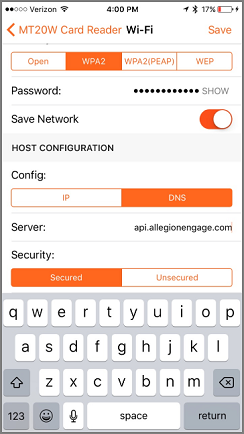
Under Host Configuration, select “DNS” and edit “Server” with the information provided in the screen capture below.
Under Security, select “Secured”.
Select "Save"
Click on “Upgrade Firmware” and then “Update” to start the firmware upgrade process
MT20W will disconnect from the MAPP during the upgrade