Allegion Developer Portal
Allegion Developer Portal

| REVISION CONTROL RECORD | |||
|---|---|---|---|
| VER | DATE | DESCRIPTION OF CHANGE | AUTHOR |
| 0.00 | 9/1/2017 | Initial Internal Release for Comments | T. Holt |
| 0.01 | 9/11/2017 | Internal Update based on Comments | T. Holt |
| 0.02 | 10/09/2017 | Internal Update based on Comments | T. Holt |
| 0.03 | 10/11/2017 | Internal Update based on Comments | T. Holt |
| 0.04 | 12/19/2017 | Internal Update based on Software Team | S. Kaufman |
| 0.05 | 01/24/18 | Updated to remove “off” as a valid value for the “hmacType” tag. | A. Kamath |
| 0.06 | 1/31/2018 | HMAC Enable Validation | S. Kaufman |
| 0.07 | 3/5/2018 | Changed Focus to JSON Message Authentication to support the SAM API document. - Removed references to Gateway functionality - Removed Ethernet functionality | M. Nichols |
| 0.08 | 3/5/2018 | Sections 7.6.1.2.2, 7.6.1.1, and 7.6.2.2 have the following text added- “Hexadecimal digits must be in lower-case (i.e. “e”, not “E”).” | M. Nichols |
| 0.09 | 3/7/2018 | Improved illustrations and points of clarity | M. Nichols |
| 0.10 | 3/23/2018 | Corrected audit illustrations Improved audit examples Added door file examples | M. Nichols |
| 0.11 | 4/11/2018 | Added Server Command Section Simplified HMAC Explanation Corrected illustrations | M. Nichols |
| 0.12 | 4/23/2018 | Minor Formatting Changes Wording changes for clarification | T. Holt |
| 0.13 | 4/25/2018 | Corrected Figures 1, 5, 6, and 15 Corrected Figures 15- Removed Multiple Audits per Message Added content to Section 6.1 Corrected Sections 8.1.2, 8.1.3 Corrected Section 9.4 Corrected Sections 9.5.1- Single Failure Audit Per JSON Message Corrected Sections 9.5.2- Single JSON Message gets one audit fault reason | M. Nichols |
| 0.14 | 4/27/2018 | Section 2- Add “reader” to not applicable Figure 2 Figure 3 Section 8.1- Clarification Section 8.2- Added audit for object content fault Figure 15 Figure 16 Added section 9.4 Section 9.5.2- Added definition for the genPrmtrs Object is formatted, the hmacData Object is formatted correctly, and the genPrmtrs and hmac Data Object included when configured disabled faults Figure 19 Sections 9.5.3.5- 9.5.3.8- HMAC Validation Examples Added Sections 10.2-10.6- Door Files for Each Product | M. Nichols |
| 1.0 | 4/30/2018 | Document positioned for release Figure 2 Section 8.14- Clarification Renumbered existing figures start at 15 (15 becomes 19) Added Figures 15 and 16 Removed existing sections 9.5.3.5 and 9.5.3.6 Added section 8.1.3.22 | M. Nichols |
| 1.1 | 5/3/2018 | Grammar items corrected throughout the document Added JSON Message to Certificate Section Added NDE and LE JSON Door File Examples | M. Nichols |
1 Abstract 6
2 Key Takeaways 6
3 Introduction 6
4 Prerequisites 7
5 Keyed-Hashing for Message Authentication (HMAC) for JSON Message Authentication 8
5.1 Keyed-Hashing Authentication Origins 8
5.2 Keyed-Hashing for JSON Message Authentication (HMAC) 8
6 JSON Message Authentication Details 10
6.1 Message Digest Matching 10
6.2 Timeliness 10
6.3 Message Processing Only by the Targeted Device 10
6.4 Authentication of Received JSON Messages 10
6.5 Encoding Transmitted JSON Messages 15
7 HMAC Algorithm Details and Examples 17
7.1 Secure Hash Algorithm 1 (SHA-1) 17
7.2 Definition of HMAC Variables 17
7.3 Calculating Hash Message Authentication Code (HMAC)- Pre-Processing 18
7.4 Calculating Hash Message Authentication Code (HMAC) - Real-Time Processing 19
7.5 Verification of HMAC Function Output 21
8 Definition of JSON Tags 22
8.1 General Parameters JSON Object 22
8.1.1 “genPrmtrs” JSON Object Example 22
8.1.2 Serial Number Designation 22
8.1.3 Message Timestamp 23
8.1.4 HMAC Enable 25
8.2 HMAC Data JSON Object 26
8.2.1 “hmacData” JSON Object Example 26
8.2.2 “hmacData” 26
8.2.3 HMAC Type 26
8.2.4 Note on Order of HMAC Related JSON Objects 27
8.3 Example of HMAC Generation 27
8.3.1 Verification of HMAC Function Output 28
8.3.2 Example of HMAC Generation 29
9 HMAC Application Guide 31
9.1 HMAC Application Table 31
9.2 Server Commands 31
9.3 WiFi Operation 33
9.3.1 WiFi Operation Using JSON Message Authentication 33
9.3.2 WiFi Operation Without JSON Message Authentication 34
9.3.3 Alerts 34
9.3.4 Certificate Download 35
9.4 MAPP Operation 35
9.4.1 MAPP Door File Updates 36
9.4.2 MAPP Audit Requests 37
9.5 HMAC Validation Audits and Notification of HMAC Failure 37
9.5.1 HMAC Validation Audit Events 37
9.5.2 HMAC Validation Audit Data Bit Encoding 38
9.5.3 HMAC Validation Audit Examples 40
10 Door Files Examples 44
10.1 RURM 44
10.2 Control 44
10.3 CTE 45
10.4 NDE 45
10.5 LE 46
10.6 NDE Reader 47
10.7 LE Reader 47
10.8 MT20W 47
10.9 Gateway 47
The focus of this document is the deployment of JSON Message Authentication by an IP Host, BLE enabled mobile application, or ENGAGE device.
The implementation of such protection requires JSON structures that provide securing methods beyond currently deployed methods. The enhancements focus on ensuring the desired receiver gets the JSON message exactly as transmitted and consumes the message while the message has not expired or occurred in the past. The result is the assurance of JSON data integrity and authenticity.
The additional authentication methods only apply to JSON communications. An application guide is provided at the end of this document.
The HMAC JSON message authentication functionality ensures:
The data payload is verified to not be corrupted.
Only the intended device processes a message.
The message is current and relevant.
The principle behind the HMAC JSON authentication is the creation of a HMAC-SHA-1 message digest (sometimes referred to as a hash value, or keyed hash message authentication code) based on a Secure Hash Algorithm 1 (SHA-1).
The HMAC message authentication functionality requires:
A General Parameters JSON Object.
A Hash Message Authentication Code (HMAC) Data JSON Object.
If HMAC authentication is enabled.
Each time a message has been received or a message has been queued to transmit, an HMAC must be calculated from the raw message.
An audit is created for every authentication
The HMAC JSON message authentication does not occur within gateways- the JSON message transitions through the gateway without being altered or authenticated.
The purpose of this document is to describe the JSON message authentication functionality for the exchange of JSON messages by an IP Host, BLE enabled mobile application, or ENGAGE device.
The message authentication implementation provides focus on ensuring the desired receiver gets the JSON message exactly as transmitted and consumes the message while the message has not expired or occurred in the past. The result is the assurance of JSON data integrity and authenticity beyond the use of Transport Layer Security (TLS).
The principle behind the JSON message authentication is the comparison of message digests (sometimes referred to as a hash value, or keyed hash message authentication code) - one calculated and sent by the transmitting device and the other calculated by the receiving device from the received message. Secure Hash Algorithm 1 (SHA-1) is utilized but other hashing algorithms exist. The symmetrical key will be used as an authenticity value, that is sent with a JSON message, so the receiver can ensure the data’s integrity and authenticity before acting upon the message’s content. For the purposes of this document and other ENGAGE™ enabled product documents, the “message digest” shall be referred to as the “HMAC-SHA-1”.
The message authentication functionality requires a General Parameters JSON Object that will contain a Hash Message Authentication Code (HMAC) enable flag, a serial number designating the JSON message’s target device, and a JSON message timestamp to ensure that a message cannot be re-sent to the specified device.
The message authentication functionality additionally requires a Hash Message Authentication Code (HMAC) Data JSON Object that will contain the digest value and a keyed hash type (SHA-1). The Hash Message Authentication Code (HMAC) is a specific type of Message Authentication Code (MAC) that utilizes the cryptographic “hash” function (SHA-1) and a secret cryptographic key.
The secret cryptographic key is the site key. Each site is provided a unique 32-byte key. The site key should be protected and not distributed. If for any reason a site key has become compromised all devices should be removed from that site, and the site should be deleted. The devices must then be recommissioned to a new site utilizing a new site key. Due to the work required to complete this task if the site key is for any reason compromised, the site key should be held in a secure manner. It is the responsibility of the Software Alliance Member to securely store and protect the site key.
The audience should be familiar with the following documents:
ENGAGE - JSON Data Structures
ENGAGE - Software Alliance Member API Integration
ENGAGE - Web Sockets App Note
ENGAGE - Audits
Keyed-Hashing for Message Authentication (HMAC) was developed by an IBM working group in February 1997. The development and resulting algorithm is published in IBM document RFC2104.
The message authentication method was developed with the idea that any of the current and future hashing functions could be utilized. The cryptographic strength, of HMAC, depends on the properties of the underlying hash function.
The IBM working group had the following main goals:
To use, without modifications, available hash functions available as open source code.
To preserve the original performance, without degradation, of the hash function.
To utilize keys in a simple way.
To allow for easy replacement of the underlying hash.
The Keyed-Hashing for Message Authentication (HMAC) function produces a digest based on the dynamic contents of JSON messages. The digest and the hashing method, along with the source message, are embedded in the JSON message objects.
The transmitting device embeds the digest, the hashing method used, and the target message within the transmitting JSON Objects. The receiving device extracts the digest, the hashing method used, and the source message. A digest is calculated from the source message using the specified hashing method. The extracted and calculated digest are compared to validate the message contents.
The formal definition of the Keyed-Hashing for Message Authentication (HMAC) can be found online at https://tools.ietf.org/html/rfc2104 using the subject “RFC2104”.
The implementation of the secure hash algorithm “Secure Hash Algorithm 1” (SHA-1) should be based on existing open source libraries such as OpenSSL and can be found at https://www.openssl.org/.
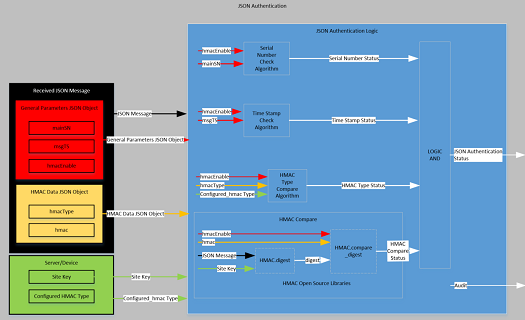
The JSON Message Authentication is based on three separate factors.
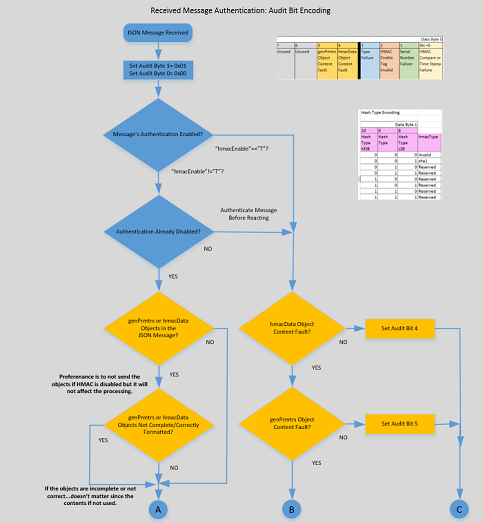
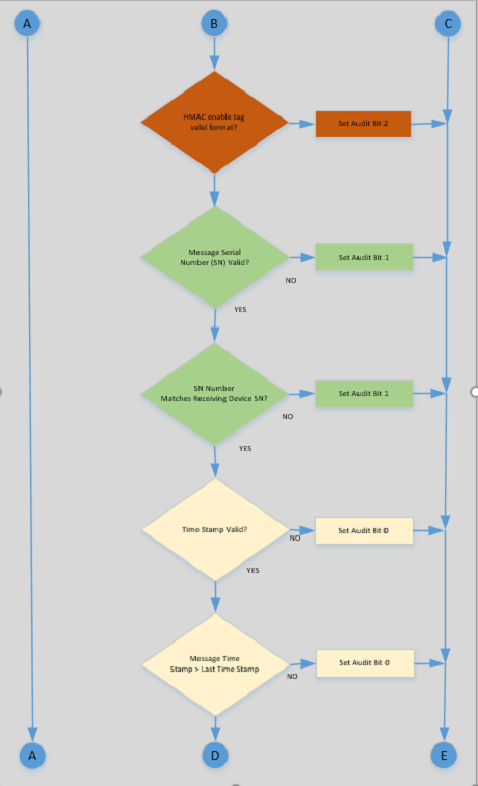
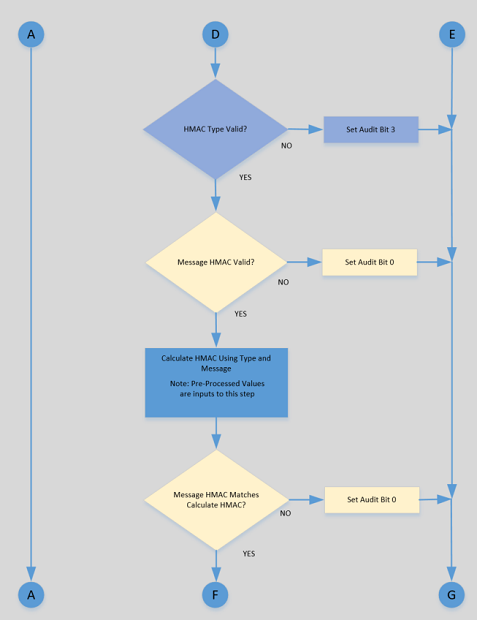
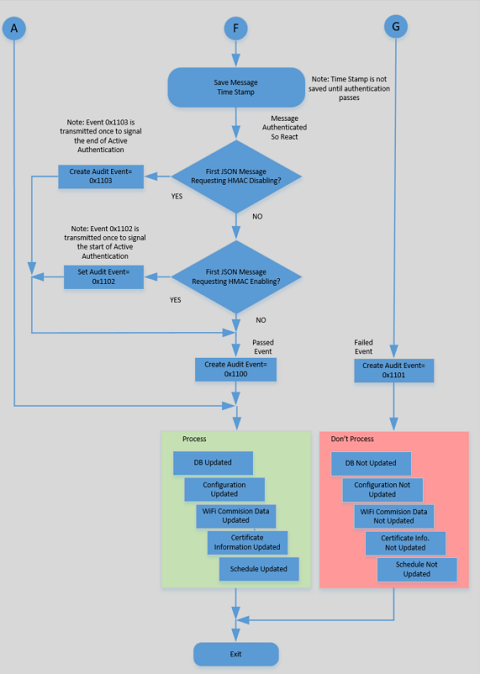
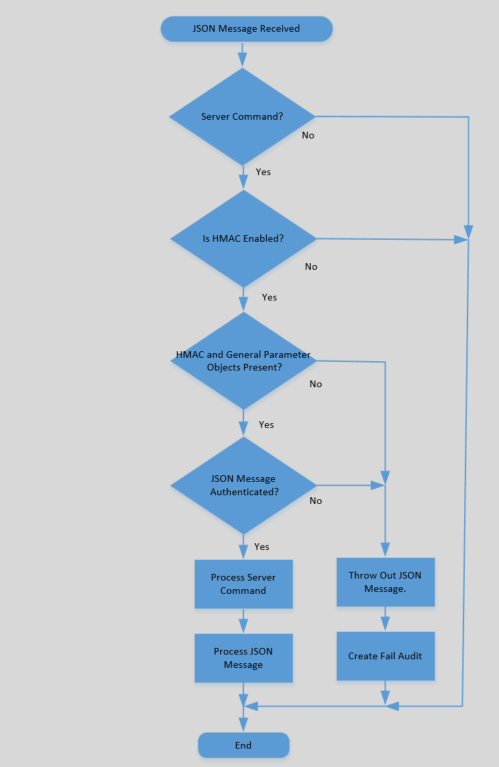
The following illustration utilizes a proposed decision flow that is prescribed for proper JSON Message Authentication by a receiving device. The authentication is only valid if the receiving message signals for the formal validation.
Firmware processes HMAC tags in the order they are received. The first erroneous HMAC tag that is encountered would cause processing to be halted and the corresponding audit event to be recorded. The flowchart illustrates the processing content but is not intended to imply the HMAC tag processing order.
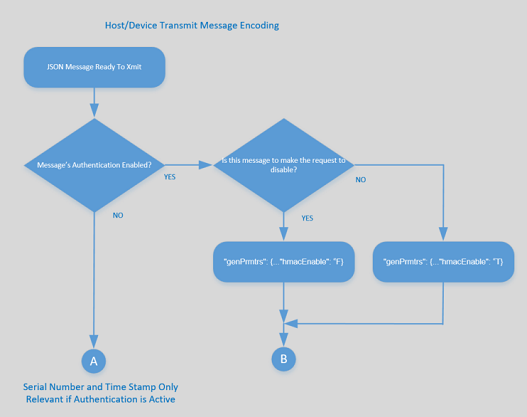
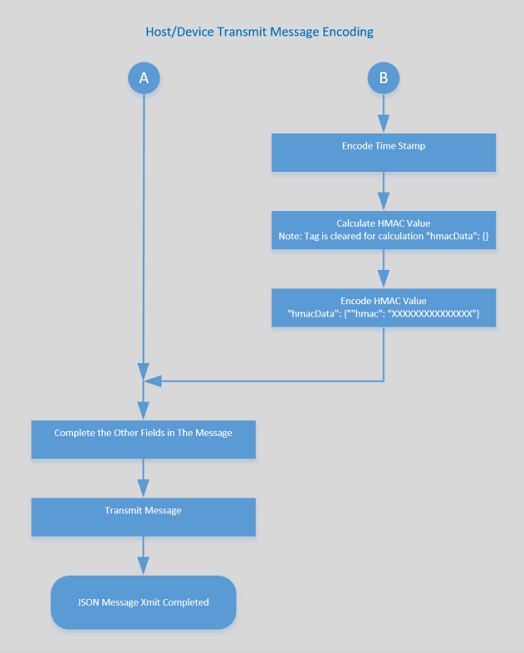
The following illustration utilizes a proposed encoding flow that is prescribed for proper JSON Message Authentication.
The Secure Hash Algorithm 1 (SHA-1) is an algorithm which produces a unique value of size L (20 bytes for SHA-1) from an input (array of hexadecimal values representing a text-based message).
The algorithm utilizes a specific “digest” (the value obtained from a hash function) B (64 bytes). The size difference, between the block size and the secret key, dictates the number of padding bytes required to fill the block. The implementation of the secure hash algorithm “Secure Hash Algorithm 1” (SHA-1) should be based on existing open source libraries such as OpenSSL that can be found at https://www.openssl.org/.
This section has been included for completeness sake and to provide the reader with an understanding of the how HMAC works. As previously stated, the implementation of the secure hash algorithm “Secure Hash Algorithm 1” (SHA-1) should be based on existing open source libraries such as OpenSSL that can be found at https://www.openssl.org/.
The formula and variable definition of an HMAC is as follows:
HMAC(K,M) = H[(K’ xor opad) || H[(K’ xor ipad) || M]]
Where:
H is the defined hash function
K is the secret key
M is the message to be authenticated
K’ is a secret key of length B derived from K
B is the byte length of the hash input blocks known as the “block size”
L is the byte length of the hash output known as the “digest size”
|| denotes concatenation
xor denotes the exclusive or function
ipad is the inner padding the value of which is the byte 0x36 repeated B times
opad is the outer padding the value of which is the byte 0x5C repeated B times
For the purposes of integration with the Schlage ENGAGE platform these variables are defined as follows:
HMAC(K,M) = H[(K’ xor opad) || H[(K’ xor ipad) || M]]
Where:
H is the SHA-1 Hash function which has a block size B of 64 bytes
K is the Site Key for each ENGAGE™ site (32 bytes)
M is the message to be authenticated
K’ is K padded at the end with 32 bytes of 0x00 for a total of 64 total bytes (K || 0x00*32)
B is the byte length of the hash input blocks known as the “block size” which is 64 for SHA-1
L is the byte length of the hash output known as the “digest size” which is 20 for SHA-1
|| denotes concatenation
xor denotes the exclusive or function
ipad is the inner padding the value of which is the byte 0x36 repeated B times
opad is the outer padding the value of which is the byte 0x5C repeated B times
To improve the efficiency of message authentication, three elements of the encoding can be calculated at power up or once when the site key is known. In the chart below, the pre-processed elements are shown as K’, X, and Y. Each is based on the site key (K).
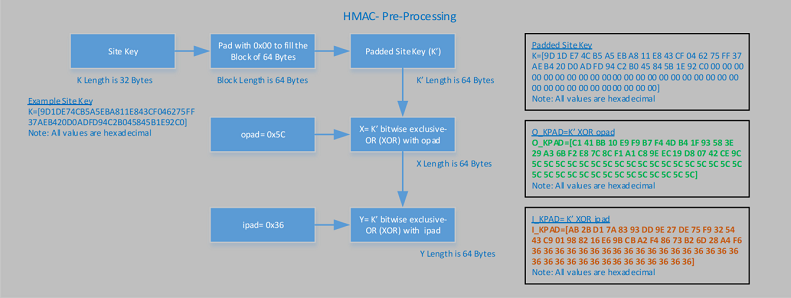
Each time a message has been received or a message has been queued to transmit, an HMAC must be calculated from the raw message. The pre-processed elements (K’, X, and Y) are utilized.
JSON Messages are text-based and must be converted to the corresponding array of one-byte character values. The character array is concatenated with the pre-processed element “Y” to create element “V”.
The next step is to calculate the Inner-Message Digest (IMD) element applying the open source library function “SHA-1” and the element “V”.
The next steps are utilizing the IMD value is to create element “Z” through the concatenation of element “X” and the element “IMD”.
Finally, the message digest is created by applying the open source “hash” library function “SHA-1” and the element “Z”.
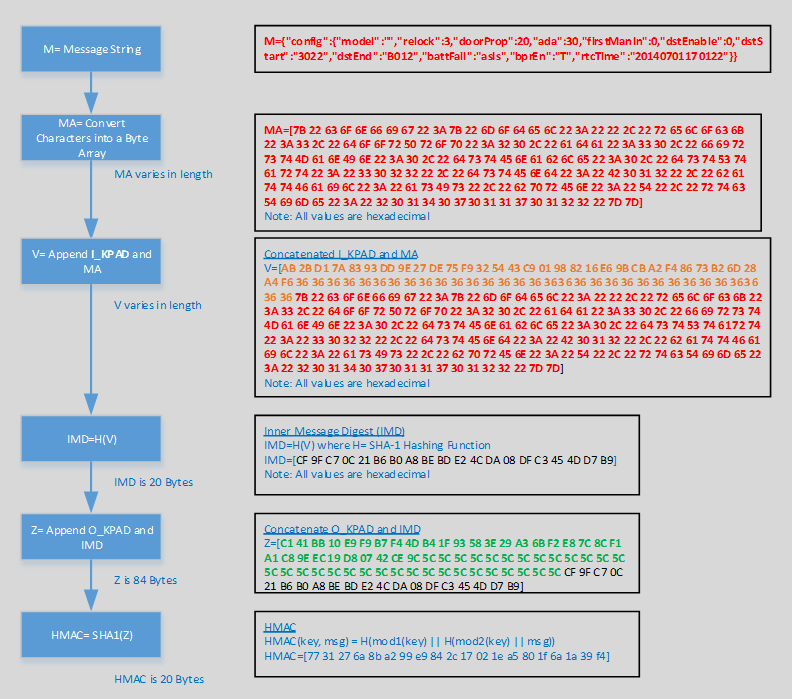
An online HSM calculator at https://www.fileformat.info/tool/hash.htm can be used to verify the implementation of the algorithm and the individual elements. This example illustrates the use of the original JSON message text string.
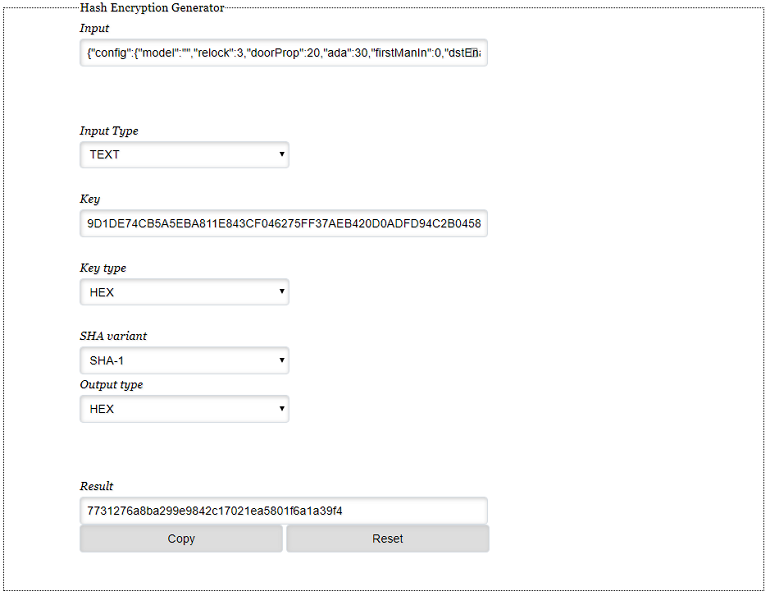
NOTE: The Input (Message), Key (Site Key), and Result (HMAC) should align between Figure 9 and Figure 10 above.
For ENGAGE devices to receive and process the SHA-1 HMAC of a message, there are four JSON tags which must be defined as follows:
To isolate the general parameters of a device, the general parameters JSON object is required and this object and all its content are required when JSON Message Authentication is enabled for the site.
A “genPrmtrs” JSON object must contain the following JSON tags:
“mainSN”
“msgTS”
“hmacEnable”
Details for each of these tags are outlined in the following sub-sections.
If the authentication is not enabled, then the General Parameters JSON Object is not included in the JSON Message.
If the authentication is not enabled and the General Parameters JSON Object is included in the JSON message, then no audit occurs and the JSON message is acted on.
If the authentication is enabled and the General Parameters JSON Object is not included in the JSON message, then an audit is generated (Bit 5) and the JSON message is not acted on.
"genPrmtrs”: {"mainSN":"00802300444d5814","msgTS":"0x123456781234567", “hmacEnable”:“T”}
To ensure that the message is received by the device for which it was intended, a serial number designation is supplied.
“mainSN” tag – String/16: The lower 8 bytes, in hexadecimal format, contain the device serial number for which the message is intended.
The ENGAGE Gateway does not validate messages sent through it to an edge device.
An ENGAGE device, utilizing the HMAC-based JSON Message authentication, is required to utilize its own serial number to populate the mainSN tag.
The lower 8 bytes of the device serial number value match with the “mainSN” value (case insensitive).
The “mainSN” tag is encased in quotation marks “”.
The “mainSN” tag contains only hexadecimal digits.
The “mainSN” tag hexadecimal digits are not case sensitive.
The “mainSN” tag value is exactly 8 bytes.
The “mainSN” tag is included inside a genPrmtrs parent JSON tag.
If the Serial Number Designation check fails, the ENGAGE device records a failed HMAC event with the serial number failure bit set as defined in the Schlage – Engage Audits workbook.
If the Serial Number Designation check fails, the ENGAGE device does not process the JSON message further.
To ensure that a message cannot be re-sent to the lock specified within the “mainSN” JSON tag, a message timestamp value must be sent with the message.
Each message sent includes a new message timestamp value.
The device’s initial timestamp value is set from the host’s clock when the HMAC-based authentication is enabled from the MAPP. The time value is stored within the device.
The host is required to populate the “msgTS” tag with a real-time timestamp when creating a HMAC-based JSON Message.
If the message timestamp, from the “msgTS” tag in the received message, is greater than the previously stored timestamp, then the HMAC validation check is passed and the timestamp is stored.
The received timestamp from the host is stored if HMAC validation passes and the next JSON message generated by the ENGAGE device is incremented by 1 when reported. (NOTE: The ENGAGE device does not report the “real” timestamp, only the previously stored timestamp plus 1, however the timestamp provided by the host must be the “real” timestamp.)
The timestamp tag “msgTS” is a String/17: Hexadecimal value, which starts with 0x, followed by 15 hex digits. (i.e. “0x8d16357eef73a69”).
The “msgTS” tag is encased in quotation marks “”.
The “msgTS” tag contains only hexadecimal digits.
The “msgTS” tag hexadecimal digits must be in lower-case (i.e. “e”, not “E”).
The “msgTS” tag value’s first byte must be 0x, followed by 15 hex digits.
The “msgTS” tag is included inside a genPrmtrs parent JSON tag.
If the “msgTS” tag check fails, the ENGAGE device records an audit that is defined in the Schlage – Engage Audits workbook document.
If the timestamp check fails, the ENGAGE device does not process the JSON message further and rejects the entire JSON payload.
The extracted timestamp is retained across a power cycle in the ENGAGE device. If the device experiences a power loss, the generated timestamp resumes where it last left off.
A Factory Default Reset of the device turns the HMAC-based JSON Message authentication off; and the generated timestamp resets to 0 for the next utilization.
When HMAC-based JSON Message authentication is set to disable, the internal, saved timestamp is reset to 0.
The local generated timestamp is stored in ENGAGE devices’ retrievable parameters, if the previous HMAC-based authentication passes.
If the HMAC processing is configured to be active, then the TimeStamp is required in the message.
The following is an example of receiving the timestamp tag and using the previously saved failures to authenticate the received message.
Host sends message to a device to enable HMAC authentication with hashing type set to “sha1” and a new HMAC timestamp 0x8d16357eef73a69.
If the result of the receiving device’s HMAC-based JSON Message Authentication is a pass, then the receiving device performs the following:
Records a “Validation On” event.
Requires all future JSON messages to be validated using the HMAC-based JSON Message Authentication.
Requires the next timestamp to be greater than 0x8d16357eef73a69.
If the result of the receiving device’s HMAC-based JSON Message Authentication is a fail, then the device does:
Host sends next message to the device with timestamp number 0x8d16357eef73a71 (Assumption- Step a= Passed).
The timestamp validation within the HMAC-based JSON Message Authentication passes because the timestamp is greater than the saved value for step (a) passed.
Host sends a message to the device with timestamp 0x8d16357eef73a70 (Assumption: Step 1= Passed).
If the result of the receiving device’s HMAC-based JSON Message Authentication is a pass, then the receiving device:
If the result of the receiving device’s HMAC-based JSON Message Authentication is a fail, then the device:
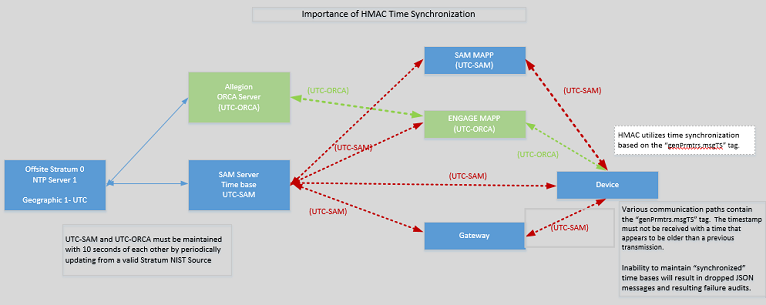
Message Timestamp Synchronization
The SAM and ORCA Server time bases are based on a verifiable NIST source (i.e. time.nist.gov or time-a.nist.gov NTP).
The inability to maintain time bases results in dropped HMAC audits.
A message’s HMAC-based JSON Message Authentication is enabled by using the “hmacEnable” tag.
If the tag value is “T”, then HMAC validation is required on the received message.
If the tag value is “F”, then HMAC validation is not required unless previously enabled.
If the HMAC processing is configured to be active, then all HMAC processing is to be executed.
If the “hmacEnable” tag is “F”, then the TimeStamp is not required in the message.
The “hmacEnable” tag – String/1: “T”,“F”.
The HMAC check fails if the “hmacEnable” tag value is set to any value other than “T” or “F” (Case Sensitive).
The HMAC check fails if the “hmacEnable” tag is not properly encased in quotation marks “” (definition of a JSON string).
The HMAC check fails if the “hmacEnable” tag is included inside of any other parent JSON object.
The HMAC check fails if the “hmacEnable” tag is not included and the HMAC feature has been enabled.
JSON messages sent without HMAC tags are accepted by the Edge device if the feature is disabled and rejected if the feature is enabled.
To isolate the HMAC data parameters of a device, the HMAC data JSON object is created. Each tag within the HMAC Data JSON Object is required in messages that have the HMAC-based JSON Message Authentication enabled for a site.
If the authentication is not enabled, then the hmacData JSON Object is not included in the JSON Message.
If the authentication is not enabled and the hmacData JSON Object is included in the JSON message, then an audit event occurs and the JSON message is acted on.
"hmacData":{"hmacType":"sha1","hmac":"b9e6af0d0d185e353a2b42f1afd889b6da4411d3"}
A “hmacData” JSON object must contain the following JSON tags:
“hmacType”
“hmac”
If the authentication is not enabled, then the HMAC Data JSON Object is not included in the JSON Message.
If the authentication is not enabled and the HMAC Data JSON Object is included in the JSON message, then no audit event occurs and the JSON message is acted on.
If the authentication is enabled and the HMAC Data JSON Object is not included in the JSON message, then an audit event is generated (Bit 4) and the JSON message is not acted on.
To instruct the device which type of HMAC hashing algorithm to use, the message must contain the following tag:
“hmacType” – String/16: This must contain the value “sha1”. This document only covers the sha-1 hashing type.
If any of the following is true, the HMAC-based JSON Message Authentication fails:
If the HMAC Type tag value is set to any value other than “sha1” (Case Sensitive).
Any value is not properly encased in quotation marks “” (definition of a JSON string).
If this tag is included inside of any other parent JSON tags.
If this tag is not included.
This tag will be added to the ENGAGE devices retrievable parameters and reported to the host during communication.
If the HMAC Type verification fails, the ENGAGE device records a failed HMAC event with the HMAC type failure bit set as defined in the Schlage – ENGAGE Audits worksheet document.
HMAC Value
The HMAC-based JSON Message Authentication utilizes the message digest value tag that is the result of the HMAC hashing algorithm. The input to the HMAC hashing algorithm is the JSON message, site key, and the hashing type (i.e. SHA1). The “hmacData” JSON tag information and all child JSON tags are not included in the HMAC calculation (examples of this follow).
“hmac” – String/64: The lower case hexadecimal value result of the HMAC algorithm. This tag value must contain the entirety of the message being sent. The “hmacData” JSON tag information and all child JSON tags are not included in the HMAC calculation (examples of this follow).
If any of the following are true, the HMAC check fails:
If the HMAC Value does not match the calculated value.
If the HMAC Value is uppercase.
If any value is not encased in quotation marks “” (definition of a JSON string).
Any value which contains non-hexadecimal digits.
Hexadecimal digits must be in lower-case (i.e. “e”, not “E”).
Any value which is not exactly 20 bytes of hexadecimal (40 hexadecimal digits).
If this tag is included inside any other parent JSON tags.
If this tag is not included.
If the HMAC Type verification fails, the ENGAGE device records a failed HMAC event with the HMAC type failure bit set as defined in the Schlage – ENGAGE Audits worksheet document.
ENGAGE Devices and hosts must accept the HMAC Related JSON objects in any order and these objects need not be all together. As an example; if the JSON is sent in the following order, the devices and hosts must accept and process this information: 1) hmacData 2) db 3) genPrmtrs. The same holds true for any re-ordering of the above.
Figure 12 is an example of real device data that has been input into the HMAC algorithm.
An online HSM calculator at https://www.fileformat.info/tool/hash.htm can be used to verify the implementation of the algorithm and the individual elements. This example illustrates the use of the original JSON message text string.
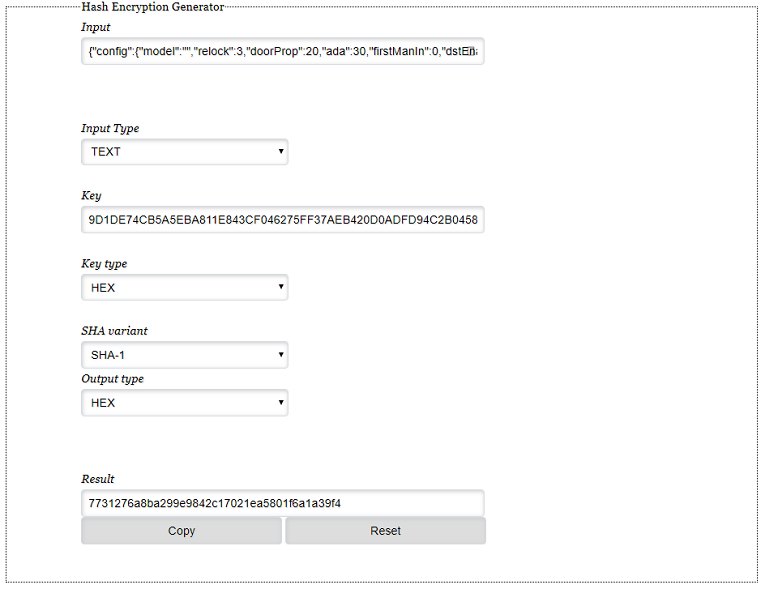
If the intended JSON message to be sent to the ENGAGE device is defined as the following:
An example site key is utilized in calculating the HMAC tag value:
(0x9D1DE74CB5A5EBA811E843CF046275FF37AEB420D0ADFD94C2B045845B1E92C0)
{"db":{"usrRcrd":{"deleteAll":1,"delete":[],"update":[{"usrID":"1","adaEn":0,"actDtTm":"20171119000000",
"expDtTm":"20171120235900","fnctn":"updtFrmSvrNrm","crSch":[1],"primeCr":"A58295CC18335831A60C40415531E746",
"prCrTyp":"card","scndCr":null,"scndCrTyp":null},{"usrID":"2","adaEn":0,"actDtTm":"20171119000000","expDtTm":
"20171120235900","fnctn":"toggle","crSch":[1],"primeCr":"A58295CC18335831A60C40415531E746","prCrTyp":"card",
"scndCr":null,"scndCrTyp":null},{"usrID":"1118","adaEn":0,"actDtTm":"20170228000033","expDtTm":"20220228235933",
"fnctn":"norm","crSch":[1],"primeCr":"711157FB0355FAA51A3259D0C87344F3","prCrTyp":"card","scndCr":null,"scndCrTyp":null},
{"usrID":"2117","adaEn":0,"actDtTm":"20170423000000","expDtTm":"20170831235900","fnctn":"norm","crSch":[1],"primeCr":
"F454D564804883AC5AAB15CDCDD8CABB","prCrTyp":"card","scndCr":null,"scndCrTyp":null},{"usrID":"3","adaEn":0,"actDtTm":
"20170424000000","expDtTm":"20180425235900","fnctn":"toggle","crSch":[1],"primeCr":"5FBA1E470270CB9CE7110502419C5374",
"prCrTyp":"card","scndCr":null,"scndCrTyp":null},{"usrID":"1471","adaEn":0,"actDtTm":"20171119000000","expDtTm":
"20171120235900","fnctn":"toggle","crSch":[1],"primeCr":"A58295CC18335831A60C40415531E746","prCrTyp":"card","scndCr":null,
"scndCrTyp":null},{"usrID":"147","adaEn":0,"actDtTm":"20171119000000","expDtTm":"20171120235900","fnctn":"toggle","crSch":[1],
"primeCr":"A58295CC18335831A60C40415531E746","prCrTyp":"card","scndCr":null,"scndCrTyp":null},{"usrID":"1136","adaEn":0,
"actDtTm":"20170427000034","expDtTm":"20220427235934","fnctn":"norm","crSch":[1],"primeCr":"E7A9609875436E6C6F23B73419ECE0A7",
"prCrTyp":"card","scndCr":null,"scndCrTyp":null},{"usrID":"1112","adaEn":0,"actDtTm":"20170221000043","expDtTm":"20220221235943",
"fnctn":"norm","crSch":[1],"primeCr":"FB86DCA56B0074C735CB8FC52A46AA25","prCrTyp":"card","scndCr":null,"scndCrTyp":null}]},
"schedules":[{"days":["Su","Mo","Tu","We","Th","Fr","Sa"],"strtHr":10,"strtMn":10,"lngth":1439}],"holidays":[],"autoUnlock":[]},
"dbDwnLdTm":"20171202003234","hmacData":{},"config":{"relock":9,"doorProp":21,"ada":22,"firstManIn":0,"dstEnable":1,"dstStart":
"3022","dstEnd":"B012","wifiAlertEn":"T","rtcTime":"20171201133234","proxConfHID":"T","proxConfGE4001":"F","proxConfGECASI":
"T","uid14443":"F","mi14443":"T","mip14443":"T","noc14443":"T","iClsUID40b":"F","groupIds":[0],"name":"ArunsNde1234","lockId":151},
"nxtDbVerTS":"0x8d538c6cd9ba429","genPrmtrs":{"mainSN":"00802300444d5814","msgTS":"0x123456781234567",“hmacEnable”:”T”}}
Prior to the algorithm calculation, the hmacData object is empty. Empty implies no text between the {} marks.
The site key (K = 0x9D1DE74CB5A5EBA811E843CF046275FF37AEB420D0ADFD94C2B045845B1E92C0) is utilized in the HMAC-based JSON Message Authentication algorithm.
The result is the HMAC value of “0xb0d29c4d991af15dcb8917933fd0048f652f68dd”.
The HMAC value and hashing type is placed in the "hmacData" object.
{"db":{"usrRcrd":{"deleteAll":1,"delete":[],"update":[{"usrID":"1","adaEn":0,"actDtTm":"20171119000000","expDtTm":"20171120235900",
"fnctn":"updtFrmSvrNrm","crSch":[1],"primeCr":"A58295CC18335831A60C40415531E746","prCrTyp":"card","scndCr":null,"scndCrTyp":null},
{"usrID":"2","adaEn":0,"actDtTm":"20171119000000","expDtTm":"20171120235900","fnctn":"toggle","crSch":[1],"primeCr":
"A58295CC18335831A60C40415531E746","prCrTyp":"card","scndCr":null,"scndCrTyp":null},{"usrID":"1118","adaEn":0,"actDtTm":
"20170228000033","expDtTm":"20220228235933","fnctn":"norm","crSch":[1],"primeCr":"711157FB0355FAA51A3259D0C87344F3","prCrTyp":
"card","scndCr":null,"scndCrTyp":null},{"usrID":"2117","adaEn":0,"actDtTm":"20170423000000","expDtTm":"20170831235900","fnctn":
"norm","crSch":[1],"primeCr":"F454D564804883AC5AAB15CDCDD8CABB","prCrTyp":"card","scndCr":null,"scndCrTyp":null},{"usrID":"3",
"adaEn":0,"actDtTm":"20170424000000","expDtTm":"20180425235900","fnctn":"toggle","crSch":[1],"primeCr":
"5FBA1E470270CB9CE7110502419C5374","prCrTyp":"card","scndCr":null,"scndCrTyp":null},{"usrID":"1471","adaEn":0,"actDtTm":
"20171119000000","expDtTm":"20171120235900","fnctn":"toggle","crSch":[1],"primeCr":"A58295CC18335831A60C40415531E746","prCrTyp":
"card","scndCr":null,"scndCrTyp":null},{"usrID":"147","adaEn":0,"actDtTm":"20171119000000","expDtTm":"20171120235900","fnctn":
"toggle","crSch":[1],"primeCr":"A58295CC18335831A60C40415531E746","prCrTyp":"card","scndCr":null,"scndCrTyp":null},{"usrID":"1136",
"adaEn":0,"actDtTm":"20170427000034","expDtTm":"20220427235934","fnctn":"norm","crSch":[1],"primeCr":
"E7A9609875436E6C6F23B73419ECE0A7","prCrTyp":"card","scndCr":null,"scndCrTyp":null},{"usrID":"1112","adaEn":0,"actDtTm":
"20170221000043","expDtTm":"20220221235943","fnctn":"norm","crSch":[1],"primeCr":"FB86DCA56B0074C735CB8FC52A46AA25","prCrTyp":
"card","scndCr":null,"scndCrTyp":null}]},"schedules":[{"days":["Su","Mo","Tu","We","Th","Fr","Sa"],"strtHr":10,"strtMn":10,
"lngth":1439}],"holidays":[],"autoUnlock":[]},

"dbDwnLdTm":"20171202003234","hmacData":{"hmacType":"sha1","hmac":"b0d29c4d991af15dcb8917933fd0048f652f68dd"},"config":{"relock":9,
"doorProp":21,"ada":22,"firstManIn":0,"dstEnable":1,"dstStart":"3022","dstEnd":"B012","wifiAlertEn":"T","rtcTime":"20171201133234",
"proxConfHID":"T","proxConfGE4001":"F","proxConfGECASI":"T","uid14443":"F","mi14443":"T","mip14443":"T","noc14443":"T","iClsUID40b":
"F","groupIds":[0],"name":"ArunsNde1234","lockId":151},"nxtDbVerTS":"0x8d538c6cd9ba429","genPrmtrs":{"mainSN":"00802300444d5814",
"msgTS":"0x123456781234567",“hmacEnable”:”T”}}
Figure 13 outlines the acceptable HMAC implementations:
| Message Type | Communication Channel | HMAC Applicable |
|---|---|---|
| JSON messages to ENGAGE™ device | Ethernet, WiFi, or BLE Data Transfer Service | Y |
| JSON messages from ENGAGE™ device | Ethernet, WiFi, or BLE Data Transfer Service | Y |
| Certificate Download to ENGAGE™ Device | Ethernet or WiFi | Y |
| Firmware Download to ENGAGE™ Device | Ethernet, WiFi, or BLE Data Transfer Service | N[1] |
| Any Message on the BLE General or RTAC Service | BLE General Service or RTAC Service | N[2] |
| Any Communication with the MT-20W or Gateway | WiFi or BLE (all) | N[3] |
[1] ENGAGE Device firmware is encrypted and verified through mechanisms outside the scope of this document.
[2] The General Service and RTAC Service security protocols are outside the scope of this document.
[3] Future implementation.
Server Commands are “cached” meaning multiple commands are received, stored in memory, and then acted upon. Memory is allocated for 2 commands in a single JSON message.
The cached commands are processed if the HMAC authentication passes; otherwise, the cached commands are discarded.
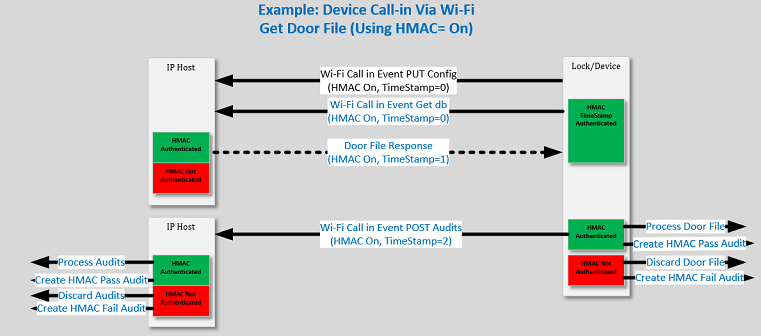
During WiFi operation the edge device calls in for three separate pieces of information. In order, these are:
PUT /swordfish/lock/Config
GET /swordfish/lock/db/{timestamp}
POST /swordfish/lock/audits
If JSON Message Authentication has been successfully enabled when completing the authentication of the recent message, the edge device will utilize all aspects of JSON Message Authentication for subsequent JSON messages reported via WiFi.
This includes the PUT Config, POST audits, and any asynchronous WiFi events.
During these events, the edge device will populate the JSON “genPrmtrs-msgTS” tag with the saved timestamp incremented by one. The IP Host receives the JSON message and authenticates the message. If the message validates, the IP Host will save the extracted timestamp and populate the return message timestamp with a timestamp that is greater in value than the received timestamp.
The edge device will next request the database file with the “Get db” message and receive the db and the new JSON message timestamp.
The edge device will receive the message and extract the contents if the message is authenticated. Authentication includes the verification that the timestamp is greater than the value originally transmitted to the IP host.
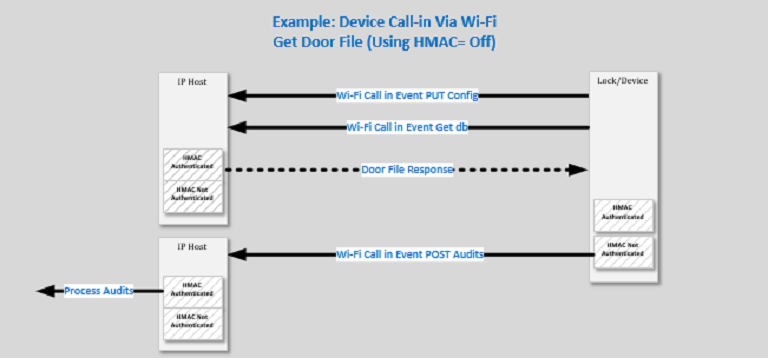
If JSON Message Authentication has not been enabled, the edge device and IP host will not authenticate the JSON Messages. This includes the PUT Config, POST audits, and any asynchronous WiFi events.
The following is an example of an asynchronous event alert that would be sent to the host with the proper HMAC:
{
    "asyncEvent": {
        "event": "07130000",
        "time": "20171204015008"
    }
"genPrmtrs": {
        "mainSN": "00802300444d5814",
        "msgTS": "0x123456781234567",
        "hmacEnable": “T"
    },
    "hmacData": {
        "hmacType": “sha1",
        "hmac": "b9e6af0d0d185e353a2b42f1afd889b6da4411d3"
    }
}
The Lock Root Certificate is transported with JSON messages. The scope of this document is not focused on the validation of the certificate. The focus is on the JSON message in the response body of the certificate request.
If a certificate validation error is detected during a device authentication, the ENGAGE edge device automatically attempts to retrieve certificate update information over a standard HTTP connection. The host is expected to reply to the HTTP GET request from the edge device with a body of JSON text that contains the tags “cert_url” and “hash” as defined in the Schlage ENGAGE – Lock Root Certificate Update App Note document. The “hash” tag defined here is the base 64 encoded HMAC value of the certificate itself, located at the certificate URL specified.
If HMAC has been turned on in the device, the host must also include the HMAC tags defined above which are specific to the requesting device serial number, timestamp, HMAC type, and the HMAC value of the JSON message (not the certificate).
Certificate Download
NOTE: In the case where the HMAC is enabled and a certificate validation error is detected, the edge device first validates the JSON HMAC message digest, timestamp, hash type, and the serial number, before the device attempts to download the updated certificate and validates the HMAC of the certificate itself against the “hash” tag defined in the JSON.
Certificate Download JSON Message Example
{
  "cert_url": "192.168.1.182/updateCertificate/certificate.der",
  "hash": "yenYNROqTCcEz4Veqkzz1o3w2wc=",
  "genPrmtrs": {
   "mainSN": "a0f10000000a0219",
   "msgTS": "0x000000000000001",
   "hmacEnable": "T"
 },
 "hmacData": {
  "hmacType": "sha1",
  "hmac": "b886797a8c18484c72020765fdaac3a79a407be0"
 }
}
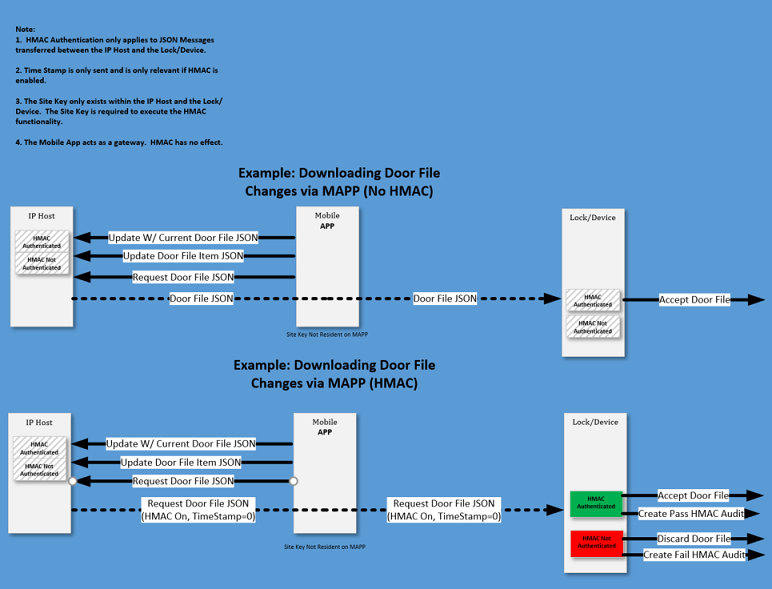
The MAPP can make direct requests to the server or device via WiFi. The MAPP does not contain the site key. All requests originating from the MAPP are without HMAC authentication.
The server and the device contain the site key. Communications originating from the server to the device and from the device to the server pass through the MAPP. The JSON messages passing through incorporate the HMAC data objects for authentication at the destination.
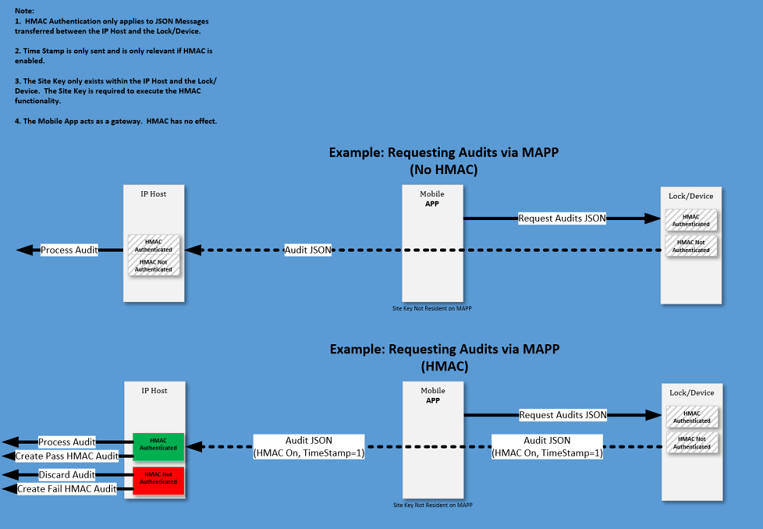
This section describes the resulting audits that the edge device or IP host generates when authenticating JSON Messages.
HMAC Validation Events are encoded into the 4-byte Audit: Byte 3 and Byte 2 represent the Audit Event value. The HMAC Validation Events are HMAC_VALIDATION_ON, HMAC_VALIDATION_PASSED, HMAC_VALIDATION_FAILED, and HMAC_VALIDATION_OFF.
Both the HMAC_VALIDATION_ON and HMAC_VALIDATION_OFF are created only once immediately after enabling or disabling them respectively.
When HMAC_VALIDATION_ON and HMAC_VALIDATION_OFF audits are sent, the HMAC_VALIDATION_PASSED event is also sent.
For a single JSON message, only one failure audit results from the HMAC processing.
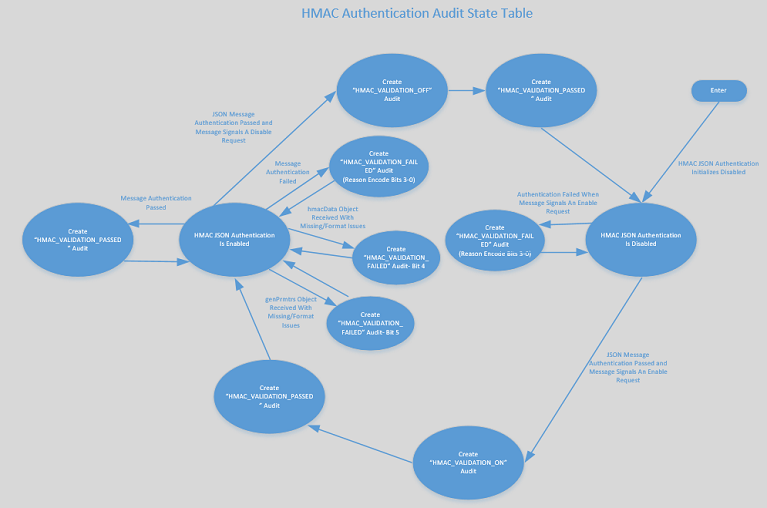
The HMAC Validation Events are based on the enabled status of the HMAC validation and the result of the HMAC validation, if enabled.
HMAC Validation Audit Data is encoded into the 4-Byte Audit.
The HMAC Validation Audit Data is the encoded status of the validation process.
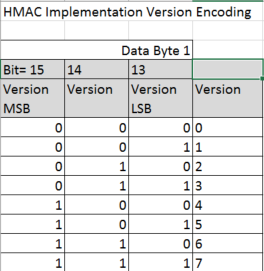
The encoded value indicates the active HMAC implementation method, the active hashing type (SHA1) and the result of the validation steps:
the genPrmtrs Object is formatted correctly
the hmacData Object is formatted correctly
the genPrmtrs and hmac Data Object included when configured disabled
the hmacData Object is formatted correctly
the JSON messages embedded hashing type matches the expected hashing type
the HMAC tag is formatted correctly
the timestamp is within the contextual parameters
the serial number received is the same as the evaluation device’s serial number
the calculated HMAC message digest matches the embedded HMAC value
For a single JSON message, only one failure mode is encoded in the failure audit. The exception is Bit 4 and Bit 5 are set at the same time if both failure modes are active.
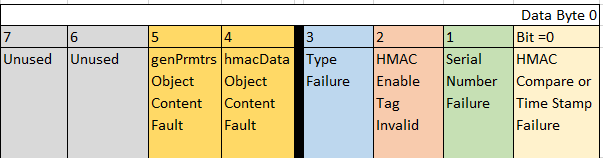
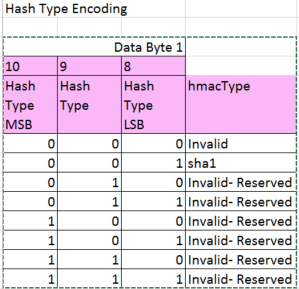
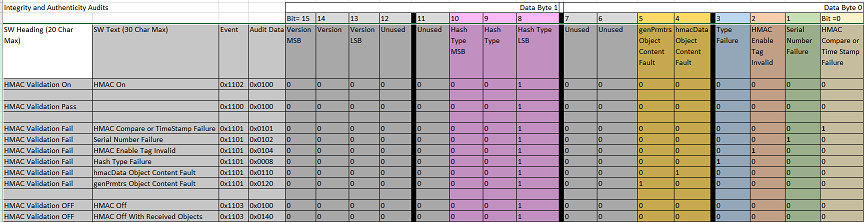
Edge device reports that the validation has been enabled (0x11020100).
The reported Audit Event is 0x1102:
The reported event is “HMAC_VALIDATION_ON”
The reported Audit Data is 0x0100:
The reported active HMAC implementation version is “000”
The reported active hashing method utilized is “001”- sha1
The reported failures “000” is no validation failures
{
" audits ":{"event": "11020100","time": "20171204015008"},
}
NOTE: HMAC JSON tags excluded from the above to avoid confusion.
Edge device or Gateway reports that the message validation passed (0x11000100)
The reported Audit Event is 0x1100:
The reported event is “HMAC_VALIDATION_PASS”
The reported Audit Data is 0x0100:
The reported active HMAC implementation version is “000”
The reported active hashing method utilized is “001”- sha1
The reported failures “000” is no validation failures
{
" audits ":{"event": "11000100","time": "20171204015008"},
}
NOTE: HMAC JSON tags excluded from the above to avoid confusion.
The “PASS” and “ON” audits can be in either order.
Edge device or Gateway reports that the validation has been disabled (0x11030100)
The reported Audit Event is 0x1103:
The reported event is “HMAC_VALIDATION_OFF”
The reported Audit Data is 0x0100:
The reported active HMAC implementation version is “000”
The reported active hashing method utilized is “001”- sha1
The reported failures “000” is no validation failures
{
" audits ":{"event": "11030100","time": "20171204015008"},
}
NOTE: HMAC JSON tags excluded from the above to avoid confusion.
Edge device or Gateway reports that the message validation passed (0x11000100)
The reported Audit Event is 0x1100:
The reported event is “HMAC_VALIDATION_PASS”
The reported Audit Data is 0x0100:
The reported active HMAC implementation version is “000”
The reported active hashing method utilized is “001”- sha1
The reported failures “000” is no validation failures
{
" audits ":{"event": "11000100","time": "20171204015008"},
}
NOTE: HMAC JSON tags excluded from the above to avoid confusion.
The “PASS” and “OFF” audits can be in either order.
Edge device or Gateway reported 0x11000100.
The reported Audit Event is 0x1100:
The reported event is “HMAC_VALIDATION_PASSED”
The reported Audit Data is 0x0100:
The reported active HMAC implementation version is “000”
The reported active hashing method utilized is “001”- sha1
The reported failures “000” is no validation failures
{
" audits ":{"event": "1100 0100","time": "20171204015008"},
}
NOTE: HMAC JSON tags excluded from the above to avoid confusion.
Edge device or Gateway reported 0x11010101.
The reported Audit Event is 0x1101:
The reported event is “HMAC_VALIDATION_FAILED”
The reported Audit Data is 0x0101:
The reported active HMAC implementation version is “000”
The reported active hashing method utilized is “001”- sha1
The reported failures “001” is HMAC comparison failure
{
" audits ":{"event": "11010101","time": "20171204015008"},
}
NOTE: HMAC JSON tags excluded from the above to avoid confusion.
Edge device or Gateway reported 0x11010110.
The reported Audit Event is 0x1101:
The reported event is “HMAC_VALIDATION_FAILED”
The reported Audit Data is 0x0110:
The reported active HMAC implementation version is “000”
The reported active hashing method utilized is “001”- sha1
The reported failures “01100000” is hmacData Object Content Fault
{
" audits ":{"event": "11010110","time": "20171204015008"},
}
NOTE: HMAC JSON tags excluded from the above to avoid confusion.
Edge device or Gateway reported 0x11010120.
The reported Audit Event is 0x1101:
The reported event is “HMAC_VALIDATION_FAILED”
The reported Audit Data is 0x0120:
The reported active HMAC implementation version is “000”
The reported active hashing method utilized is “001”- sha1
The reported failures “00100000” is genPrmtrs Object Content Fault
{
" audits ":{"event": "11010120","time": "20171204015008"},
}
NOTE: HMAC JSON tags excluded from the above to avoid confusion.
Example JSON:
{"db":{"usrRcrd":{"deleteAll":1,"delete":[],"update":[{"usrID":"1","adaEn":0,"actDtTm":"20171119000000","expDtTm":"20171120235900",
"fnctn":"updtFrmSvrNrm","crSch":[1],"primeCr":"A58295CC18335831A60C40415531E746","prCrTyp":"card","scndCr":null,"scndCrTyp":null},
{"usrID":"2","adaEn":0,"actDtTm":"20171119000000","expDtTm":"20171120235900","fnctn":"toggle","crSch":[1],"primeCr":
"A58295CC18335831A60C40415531E746","prCrTyp":"card","scndCr":null,"scndCrTyp":null},{"usrID":"1118","adaEn":0,"actDtTm":
"20170228000033","expDtTm":"20220228235933","fnctn":"norm","crSch":[1],"primeCr":"711157FB0355FAA51A3259D0C87344F3","prCrTyp":"card",
"scndCr":null,"scndCrTyp":null},{"usrID":"2117","adaEn":0,"actDtTm":"20170423000000","expDtTm":"20170831235900","fnctn":"norm",
"crSch":[1],"primeCr":"F454D564804883AC5AAB15CDCDD8CABB","prCrTyp":"card","scndCr":null,"scndCrTyp":null},{"usrID":"3","adaEn":0,
"actDtTm":"20170424000000","expDtTm":"20180425235900","fnctn":"toggle","crSch":[1],"primeCr":"5FBA1E470270CB9CE7110502419C5374",
"prCrTyp":"card","scndCr":null,"scndCrTyp":null},{"usrID":"1471","adaEn":0,"actDtTm":"20171119000000","expDtTm":"20171120235900",
"fnctn":"toggle","crSch":[1],"primeCr":"A58295CC18335831A60C40415531E746","prCrTyp":"card","scndCr":null,"scndCrTyp":null},
{"usrID":"147","adaEn":0,"actDtTm":"20171119000000","expDtTm":"20171120235900","fnctn":"toggle","crSch":[1],"primeCr":
"A58295CC18335831A60C40415531E746","prCrTyp":"card","scndCr":null,"scndCrTyp":null},{"usrID":"1136","adaEn":0,"actDtTm":
"20170427000034","expDtTm":"20220427235934","fnctn":"norm","crSch":[1],"primeCr":"E7A9609875436E6C6F23B73419ECE0A7","prCrTyp":
"card","scndCr":null,"scndCrTyp":null},{"usrID":"1112","adaEn":0,"actDtTm":"20170221000043","expDtTm":"20220221235943","fnctn":
"norm","crSch":[1],"primeCr":"FB86DCA56B0074C735CB8FC52A46AA25","prCrTyp":"card","scndCr":null,"scndCrTyp":null}]},"schedules":
[{"days":["Su","Mo","Tu","We","Th","Fr","Sa"],"strtHr":10,"strtMn":10,"lngth":1439}],"holidays":[],"autoUnlock":[]},

"dbDwnLdTm":"20171202003234","hmacData":{"hmacType":"sha1","hmac":"b9e6af0d0d185e353a2b42f1afd889b6da4411d3"},"config":
{"relock":9,"doorProp":21,"ada":22,"firstManIn":0,"dstEnable":1,"dstStart":"3022","dstEnd":"B012","wifiAlertEn":"T","rtcTime":
"20171201133234","proxConfHID":"T","proxConfGE4001":"F","proxConfGECASI":"T","uid14443":"F","mi14443":"T","mip14443":"T",
"noc14443":"T","iClsUID40b":"F","groupIds":[0],"name":"ArunsNde1234","lockId":151},"nxtDbVerTS":"0x8d538c6cd9ba429","genPrmtrs":
{"mainSN":"00802300444d5814","msgTS":"0x123456781234567",“hmacEnable”:”T”}}
{"rsiConfigs":{"cacheMemBts":0,"cacheMemMd":"full","clrCache":false,"rsiCommFailSfMd":"sec","dnyAccs":false,"rsiFrstDly":3,
"rsiHrtbtTm":40,"ipbLedBlink":false,"ipbLongPress":15,"ipbOfflineCfg":"disbld","ipbOnlineCfg":"disbld","maxCacheEntries":25,
"pinReqMode":"disbld","autoPrg":false,"relockMethod":"tmr","renInquiry":false,"rsiRtryTm":5,"rsiApmType":16,"rsiRdrType":68,
"rsiSubqtDly":2},"db":{"usrRcrd":{"deleteAll":1,"delete":[],"update":[],"add":[]},"schedules":[{"days":["Su","Mo","Tu","We",
"Th","Fr","Sa"],"strtHr":0,"strtMn":0,"lngth":1439}],"holidays":[],"autoUnlock":[]},"config":{"relock":3,"dstEnable":1,"dstStart":
"3022","dstEnd":"B012","bprEn":"T","rtcTime":"20180411084419","jagSectors":4,"cntrlDecTimeout":50,"credSecNum":1,"groupIds":[0],
"name":"hari","lockId":28},"dbDwnLdTm":"20180412024419","nxtDbVerTS":"0x8d59fa877dee523","genPrmtrs":{"mainSN":"A0E15352494B410B",
"msgTS":"0x8d59fa9f1c671cd","hmacEnable":"T"},"hmacData":{"hmacType":"sha1","hmac":"052133e1b9cca789d8ceb8f5c0290da98fc4085c"}}
{"db":{"usrRcrd":{"deleteAll":1,"delete":[],"update":[],"add":[{"usrID":20020,"adaEn":0,"fnctn":"norm","crSch":1,"actDtTm":
"20150211000000","expDtTm":"21350101000000","primeCr":"00920b87fe49c7cd82bbfdc77822bad8","prCrTyp":"card","scndCr":"null",
"scndCrTyp":"null"},{"usrID":20021,"adaEn":0,"fnctn":"toggle","crSch":1,"actDtTm":"20150211000000","expDtTm":"21350101000000",
"primeCr":"60cc790c0500abd70bf4b6ef8fb3df35","prCrTyp":"card","scndCr":"null","scndCrTyp":"null"},{"usrID":20022,"adaEn":0,
"fnctn":"norm","crSch":1,"actDtTm":"20150211000000","expDtTm":"21350101000000","primeCr":"812a8b3262f40008c0d5372634e68000",
"prCrTyp":"card","scndCr":"null","scndCrTyp":"null"}]},"schedules":[{"days":["Su","Mo","Tu","We","Th","Fr","Sa"],"strtHr":12,
"strtMn":0,"lngth":14000},{"days":["Su","Mo","Tu"],"strtHr":12,"strtMn":21,"lngth":140}],"holidays":[],"autoUnlock":[]},"config":
{"mdl":410,"type":"stm","reock":5,"doorProp":20,"ada":10,"firstManIn":0,"battFail":"sec","dstEnable":1,"dstStart":"3022"},
"dbDwnLdTm":"","nxtDbVerTS":"","genPrmtrs":{"mainSN":"A021000000010007","msgTS":"0x8d5aad0158ebf49","hmacEnable":"F"},"hmacData":
{"hmacType1":"sha1","hmac":"21435153ccbd21eb5208b0730f4035dac83aafca"}}
{"db":{"usrRcrd":{"deleteAll":1,"delete":[],"update":[{"usrID":"47","adaEn":0,"actDtTm":"20171119000000","expDtTm":"20171120235900",
"fnctn":"toggle","crSch":[1],"primeCr":"A58295CC18335831A60C40415531E746","prCrTyp":"card","scndCr":null,"scndCrTyp":null},
{"usrID":"18","adaEn":0,"actDtTm":"20170228000033","expDtTm":"20220228235933","fnctn":"norm","crSch":[1],"primeCr":
"711157FB0355FAA51A3259D0C87344F3","prCrTyp":"card","scndCr":null,"scndCrTyp":null},{"usrID":"27","adaEn":0,"actDtTm":
"20170423000000","expDtTm":"20170831235900","fnctn":"norm","crSch":[1],"primeCr":"F454D564804883AC5AAB15CDCDD8CABB","prCrTyp":"card",
"scndCr":null,"scndCrTyp":null},{"usrID":"35","adaEn":0,"actDtTm":"20170424000000","expDtTm":"20180425235900","fnctn":"toggle",
"crSch":[1],"primeCr":"5FBA1E470270CB9CE7110502419C5374","prCrTyp":"card","scndCr":null,"scndCrTyp":null},{"usrID":"36","adaEn":0,
"actDtTm":"20170427000034","expDtTm":"20220427235934","fnctn":"norm","crSch":[1],"primeCr":"E7A9609875436E6C6F23B73419ECE0A7",
"prCrTyp":"card","scndCr":null,"scndCrTyp":null},{"usrID":"12","adaEn":0,"actDtTm":"20170221000043","expDtTm":"20220221235943",
"fnctn":"norm","crSch":[1],"primeCr":"FB86DCA56B0074C735CB8FC52A46AA25","prCrTyp":"card","scndCr":null,"scndCrTyp":null}],"add":[]},
"schedules":[{"days":["Su","Mo","Tu","We","Th","Fr","Sa"],"strtHr":0,"strtMn":0,"lngth":1439},{"days":["Su","Mo","Tu","We","Th",
"Fr","Sa"],"strtHr":1,"strtMn":0,"lngth":570}],"holidays":[],"autoUnlock":[]},"config":{"relock":5,"doorProp":20,"ada":22,
"firstManIn":0,"dstEnable":1,"dstStart":"3022","dstEnd":"B012","battFail":"sec","bprEn":"T","wifiAlertEn":"T","rtcTime":
"20171201133234","proxConfGE4001":"F","proxConfAWID":"T","proxConfGECASI":"T","uid14443":"F","mi14443":"T","mip14443":"T",
"noc14443":"T","rdrSense":"norm","jagSectors":4,"groupIds":[0],"name":"Arun12345678901234"},"rsiConfigs":{"dnyAccs":"F",
"relockMethod":"tmr","firstDelay":"3","subsequestDelay":"2","autoPrg":"F","rsiRtryTm":"5","rsiFrstDly":"3","rsiSubqtDly":"2",
"rsiCommFailSfMd":"disbld","maxCacheEntries":"25","cacheMemBts":"0","cacheMemMd":"full","clrCache":"T"},"wifiCmsh":{"hstCnfg":
{"ipDNS":"192.168.1.182","altDNS":"","scrCnn":"http","dscvryTyp":"ipAddr","tlsCert":2},"apCnfg":{"ssid":"firmwarewpa2","psswd":
"12345firmware","wifiSec":"prsnl","kyIndx":""},"saveCnfgs":"T"},"dbDwnLdTm":"20171202003234","nxtDbVerTS":"","genPrmtrs":{"mainSN":
"a011000000000039","msgTS":"0x000000000000021","hmacEnable":"T"},"hmacData":{"hmacType":"sha1","hmac":
"530c81828a243aaf9b5e22c39a7b2ac8cf719072"}}
{"db":{"usrRcrd":{"deleteAll":0,"delete":[],"update":[{"usrID":"47","adaEn":0,"actDtTm":"20171119000000","expDtTm":"20171120235900",
"fnctn":"toggle","crSch":[1],"primeCr":"A58295CC18335831A60C40415531E746","prCrTyp":"card","scndCr":null,"scndCrTyp":null},{"usrID":
"18","adaEn":0,"actDtTm":"20170228000033","expDtTm":"20220228235933","fnctn":"norm","crSch":[1],"primeCr":
"711157FB0355FAA51A3259D0C87344F3","prCrTyp":"card","scndCr":null,"scndCrTyp":null},{"usrID":"27","adaEn":0,"actDtTm":
"20170423000000","expDtTm":"20170831235900","fnctn":"norm","crSch":[1],"primeCr":"F454D564804883AC5AAB15CDCDD8CABB","prCrTyp":"card",
"scndCr":null,"scndCrTyp":null},{"usrID":"35","adaEn":0,"actDtTm":"20170424000000","expDtTm":"20180425235900","fnctn":"toggle",
"crSch":[1],"primeCr":"5FBA1E470270CB9CE7110502419C5374","prCrTyp":"card","scndCr":null,"scndCrTyp":null},{"usrID":"36","adaEn":0,
"actDtTm":"20170427000034","expDtTm":"20220427235934","fnctn":"norm","crSch":[1],"primeCr":"E7A9609875436E6C6F23B73419ECE0A7",
"prCrTyp":"card","scndCr":null,"scndCrTyp":null},{"usrID":"12","adaEn":0,"actDtTm":"20170221000043","expDtTm":"20220221235943",
"fnctn":"norm","crSch":[1],"primeCr":"FB86DCA56B0074C735CB8FC52A46AA25","prCrTyp":"card","scndCr":null,"scndCrTyp":null}],"add":[]},
"schedules":[{"days":["Su","Mo","Tu","We","Th","Fr","Sa"],"strtHr":0,"strtMn":0,"lngth":1439},{"days":["Su","Mo","Tu","We","Th","Fr",
"Sa"],"strtHr":1,"strtMn":0,"lngth":570}],"holidays":[],"autoUnlock":[]},"config":{"relock":5,"doorProp":20,"ada":22,"firstManIn":0,
"dstEnable":1,"dstStart":"3022","dstEnd":"B012","battFail":"sec","bprEn":"T","wifiAlertEn":"T","rtcTime":"20171201133234",
"proxConfGE4001":"F","proxConfAWID":"T","proxConfGECASI":"T","uid14443":"F","mi14443":"T","mip14443":"T","noc14443":"T","rdrSense":
"norm","jagSectors":4,"groupIds":[0],"name":"Arun12345678901234"},"rsiConfigs":{"dnyAccs":"F","relockMethod":"tmr","firstDelay":"3",
"ipbOfflineCfg":"disbld","renInquiry":"F","ipbOnlineCfg":"disbld","subsequestDelay":"2","autoPrg":"F","ipbLedBlink":"F","rsiRtryTm":
"5","ipbLongPress":"5","rsiFrstDly":"3","pinReqMode":"disbld","rsiSubqtDly":"2","rsiCommFailSfMd":"disbld","maxCacheEntries":"25",
"cacheMemBts":"0","cacheMemMd":"full","clrCache":"T"},"wifiCmsh":{"hstCnfg":{"ipDNS":"192.168.1.182","altDNS":"","scrCnn":"https",
"dscvryTyp":"ipAddr","tlsCert":2},"apCnfg":{"ssid":"lermru","psswd":"asuswpa2aes1","wifiSec":"prsnl"},"saveCnfgs":"T"},"dbDwnLdTm":
"20171202003234","nxtDbVerTS":"0x8d538c6cd9ba429","genPrmtrs":{"mainSN":"00802300444D5814","msgTS":"0x123456781234567","hmacEnable":
"T"},"hmacData":{"hmacType":"sha1","hmac":"8998989889989898"}}
HMAC-based JSON Authentication is not applicable.
HMAC-based JSON Authentication is not applicable.
HMAC-based JSON Authentication is not applicable.
HMAC-based JSON Authentication is not applicable.