Allegion Developer Portal
Allegion Developer Portal

| REVISION CONTROL RECORD | |||
|---|---|---|---|
| VER | DATE | DESCRIPTION OF CHANGE | AUTHOR |
| 0.1 | 06/24/2014 | Initial draft | M. Dexter |
| 0.2 | 11/10/2014 | Update serial number information (3.1.2) Update Site Key Use (3.3) | M. Dexter |
| 0.3 | 02/03/2015 | Updated the AppToken Definition (3.1.1) Updated the USRID definition and use (3.1.3) Updated BLE Challenge Definitions (3.2) Updated Site Key Use (3.3) Created Firmware Encryption Section (3.5) Created production key seeding information (4.1) Created Capture lock process section (4.3) Created Mobile Device to Lock Authentication section (4.4) Created Examination of Security Plan (5.0) Removed CBC Block definition tables Updated Acronym and Definitions table (A.1) | M. Dexter |
| 1.0 | 02/27/2015 | Initial release | M. Dexter |
| 1.1 | 04/23/2015 | Updated AppToken variable table with data formats | M. Dexter |
| 1.2 | 05/08/2015 | Updated AppToken table with Zone information Reordered BLE Challenge response to match what is sent from the mobile app. | M. Dexter |
| 1.3 | 12/03/2015 | Updated to add new device types to serial number section for Marlin(LE) and Raven(Evo) projects | J. Everson |
| 1.4 | 10/26/2016 | Change serial number section to reference separate ENGAGE – Product Serial Number Encoding doc for device type. | T. Anfield |
List of Tables
Table 1: AppToken Byte Definition 6
Table 2: AppToken Variable Definitions 7
Table 3: Serial Number Byte Definition 7
Table 5: DUID and USRID Byte Definition 8
Table 7: BLE Challenge from the Lock 9
Table 8: Mobile App Response to Lock Challenge 9
Table 9: Lock Login Byte Definition 10
Table 10: Enrollment Mode Data from Lock to the Mobile Device 12
Table 11: Production Token Definition 13
Table 12: Mobile Device Capture Request Byte Definition 13
Table 13: Lock Capture Request Response Byte Definition 14
Table 14: Capture Request to ENGAGE Byte Definition 14
Table 15: ENGAGE Verifies Lock Serial Number 14
Table 16: ENGAGE Verifies DUID (Step 1) 15
Table 17: ENGAGE Verifies DUID (Step 2) 15
Table 18: ENGAGE Capture Response Byte Definition 15
Table 19: Capture Response from Mobile Device to Lock Byte Definition 16
Table 20: Data sent to the lock requesting Communications 16
Table of Contents
List of Tables iii
Table of Contents iv
1.0 Introduction 6
2.0 Related Documents 6
3.0 Detailed Descriptions 6
3.1 Encryption Key Definitions 6
3.1.1 AppToken 6
3.1.2 Serial Number 7
3.1.3 Device ID (DUID) and User ID (USRID) 8
3.2 BLE Challenge Process 9
3.3 Site Key Definition and Use 9
3.4 Lock Authentication with ENGAGE 10
3.5 Firmware Package Encryption 11
3.6 Enrollment Mode 12
4.0 Detailed Descriptions 12
4.1 Lock Manufacture 12
4.2 ENGAGE Account Creation 13
4.3 Lock Capture Process 13
4.3.1 Mobile Device Capture Request (Capture Step 1) 13
4.3.2 Lock Response to Capture Request 13
4.3.3 Mobile Device Data Package to ENGAGE 14
4.3.4 ENGAGE Data Package to Mobile Device 15
4.3.5 Mobile Device to Lock (Capture Step 2) 15
4.4 Mobile Device and Lock Authentication Process 16
4.4.1 First Contact (No Temp Key) 16
4.4.2 Quick Return (Valid Temp Key) 17
4.4.3 Delayed Return (Expired Temp Key) 17
5.0 Examination of Security Plan 17
Appendix A: Abbreviations and Acronyms 18
The purpose of this document is to provide detailed documentation on the implementation of the Neptune Security Plan.
| Document Title | Description | Surround Link |
|---|---|---|
| Review and Recommendations for Neptune System Communication Security Plan | Cryptography Research Inc. (CRI) independent review of the Neptune security plan | Link |
| Neptune Security Plan | High level description of the Neptune encryption plan | Link |
| Security Presentation_00 | High level presentation showing the flow of information and encryption keys in the Security Plan | Link |
| Wi-Fi Design Document | Design document for the NDE Wi-Fi module | Link |
| ENGAGE – Product Serial Number Encoding | Maintains current ENGAGE Device Type values for product serial numbering | Link |
One of the primary features of the Neptune Security plan is the AppToken. The AppToken is an encrypted piece of information that contains all of the security protocols needed by the lock to communicate with a mobile device. The AppToken is generated by the ENGAGE cloud service, and is not able to be decrypted by the mobile device. The AppToken structure is defined in Table 1 and Table 2.
Table 1: AppToken Byte Definition
| AppToken | ||||||||
|---|---|---|---|---|---|---|---|---|
| Site Key Encrypted , AES256 – CBC with IV(0) | ||||||||
| Padding | Timestamp | DUID | USRID | Zone | TempK | CNTR | MGR | Total |
| 3 | 17 | 16 | 16 | 4 | 32 | 4 | 4 | 96 Bytes |
Table 2: AppToken Variable Definitions
| Variable | Description | Format |
|---|---|---|
| Padding | Extra data used to randomize the AppToken | 3 bytes of random hexadecimal data |
| Timestamp | The time when the AppToken was generated. The timestamp is a string variable formatted as: YYYYMMDDHHMMSSFFF (where FFF is in milli-seconds) | The ASCII timestamp is converted to hexadecimal in the AppToken |
| DUID | Device Unique Identifier: A unique identifier of the mobile device that uniquely identifies the hardware to the ENGAGE system. The DUID is provided by the hardware provider (i.e. Apple) and is not editable by the ENGAGE mobile app. | 16 byte hexadecimal number |
| USRID | User Identifier: A unique identifier assigned by ENGAGE to identify the user account in the system. The lock uses this information to keep track of the users that have communicated with the lock with a mobile device. | 16 byte hexadecimal number |
| Zone | Reserved for future use. It can be used to sub-divide a site into distinct areas that can be operated independently. Currently not implemented. The Zone is hard coded to 0x30 30 30 30 (ASCII 0000) during commissioning. For any token to work, it must have this value. | 0x30 30 30 30 |
| TempK | The Temporary Encryption Key. This is the session key that the lock will use to encrypt the communications between the mobile device and the lock. The temporary key expires after 24 hours. | 32 byte hexadecimal number |
| CNTR | Counter variable. The counter is incremented every time a new AppToken is given to the mobile device. The CNTR is used to mitigate against replay attacks. | 4 byte hexadecimal number in Big Endian format (LSB, MSB). Thus the decimal number 258 is represented as 0x02 01 00 00 |
| MGR | Reserved for future use. The MGR variable is included to be able to send user rights to the lock. This would limit the user’s ability to make changes at the lock. Currently not implemented. | 4 bytes of zeros (0x00’s) |
The lock serial number is 16 bytes of hexadecimal information. The first 8 bytes are 0x00’s and are reserved for future use. The next two bytes act as an identifier for ENGAGE to distinguish between devices in the Neptune architecture. The values defined for the Device Type are maintained in a separate document, the ENGAGE – Product Serial Number Encoding. The last 6 bytes are the Device ID. The Device ID is set by the production facility and is the serial number printed on the device label.
Table 3: Serial Number Byte Definition
| Serial Number | |||
|---|---|---|---|
| Padding (0x00) | Device Type | Device ID | Total |
| 8 | 2 | 6 | 16 Bytes |
In the security model there are two unique identifiers that are used to verify authenticity of a mobile device and the user account. The Device ID (DUID) is an identifier that is unique to a mobile device and the User ID (USRID) is created by the ENGAGE cloud service to identify the account in use. Each ID is 16 bytes long, and is used to identify the user and hardware in the system.
Table 4: DUID and USRID Byte Definition
| DUID or USRID | |
|---|---|
| ID | Total |
| 16 | 16 Bytes |
The DUID is used in the authentication process to verify that the mobile device connecting to the lock is the same device that obtained the AppToken. As was shown in 3.1.1, the AppToken contains an encrypted copy of the DUID that the lock uses to compare to an unencrypted DUID sent from the mobile device. This check is done as a measure to combat replay attacks against the lock. This feature prevents a mobile device from trying to present a stolen AppToken as its own.
The USRID is also included in the AppToken and is used to combat potential replay attacks against the lock. The lock uses the USRID to populate a list of users that have connected to the lock. The lock stores the last 10 users that connect to the lock. When the 11th user tries to connect to the lock, the oldest record is replaced with the new USRID. The lock creates a table of USRIDs, Counter variables, timestamp of when the user connected and Temp Keys as shown in Table 5.
Table 5: USRID Table
| Memory Slot | USRID | CNTR | Temp Key | Timestamp |
|---|---|---|---|---|
| 1 | User01 | CNTR01 | TempKey01 | Date1 |
| 2 | User02 | CNTR02 | TempKey02 | Date2 |
| 10 | User10 | CNTR10 | TempKey10 | Date10 |
When a Temp Key expires after 24 hours, the lock uses the CNTR variable in the AppToken to validate the AppToken. The CNTR variable is incremented every time that an AppToken is generated. The lock compares the counter variable in the AppToken to the stored value in this table. If the CNTR in the AppToken is greater than the stored value, the lock will communicate with the mobile device. If not, the lock will refuse communications and the mobile device will be forced to obtain a new AppToken from the ENGAGE cloud service before communications can begin.
This feature was implemented to account for the fact that a customer can have multiple mobile devices that can talk to a lock. If the lock only remembered the DUIDs of the devices it communicates with, the concern is that a limited number of users with multiple mobile devices would be able to overflow the list buffer (10 devices) before the old devices would be removed from the list. The lock will always accept (and communicate with) a device with a valid AppToken that is not on its user list the first time. By storing the USRID only, the hardware dependency on the implementation of this security feature has been removed. A site would need to have more than 10 authenticated users before this design feature can be exploited. Each authenticated user would have had to be invited to the site by a site admin for them to have access to the lock. This was deemed an acceptable design trade-off given the target market of the NDE locks.
The lock performs a challenge to any device that attempts to establish a BLE connection with the lock. The challenge is the primary defense of the lock to prevent against a replay attack.
Table 6: BLE Challenge from the Lock
| BLE Challenge From Lock | |
|---|---|
| Random Number Challenge | Total |
| 16 | 16 Bytes |
The random number challenge is encrypted with the TempK by the mobile device.
The mobile device sends its DUID, the AppToken and challenge response to the lock as the authentication step.
Table 7: Mobile App Response to Lock Challenge
| BLE Response To Challenge from Mobile Device | |||
|---|---|---|---|
| Unencrypted | TempK Encrypted AES256 – CBC with IV(0) | SK Encrypted AES256 – CBC with IV(0) | |
| DUID | Challenge Response | AppToken | Total |
| 16 | 16 | 96 | 128 Bytes |
Lock decodes the AppToken with the Site Key, verifies that the DUID in AppToken matches the DUID sent from the mobile device.
Lock verifies the random number sent from the mobile device with the TempK in the AppToken.
The lock authenticates the mobile device per the detailed descriptions found in the Detailed Descriptions section.
The security plan contains an encryption key known as the Site Key (SK). The Site Key is used to group all of the locks at a site together. The locks are shipped without a site key installed, and one will be loaded into the lock as a part of the capturing process (Section 4.3). Once all of the locks have a site key, they will be able to decrypt the same AppToken at all of the locks within the same site.
The ENGAGE cloud service creates a Site Key and associates it with an account. Each account that is created in ENGAGE will receive a unique Site Key. The site key is 32 bytes long, and is used to encrypt the AppToken that is passed to the mobile device. The ENGAGE cloud service uses the Site Key to encrypt the credential information that is stored in the lock database. The rest of the database information is not encrypted, only the credential information. This was done to speed up the performance of the lock and to only encrypt the data that must be protected.
The lock uses the Site Key to authenticate itself to the ENGAGE services by encrypting data with the site key. The lock authentication procedure as described in the Lock Authentication with ENGAGE section.
The lock authenticates with ENGAGE via:
A base64 encoded semi-colon separated ASCII string consisting of:
Serial Number
Encrypted Payload
Security Version
Example = Serial Number : Encrypted Payload : Security Version
The encrypted payload is encrypted by the Site Key and consists of:
16 byte timestamp to randomize the data
16 byte serial number
The lock authentication also includes a security version number, that lets ENGAGE know which security protocol to use when authenticating the lock. This was included for future changes in the lock authentication protocol.
An example of the lock login can be found in Section 5 of the WiFi Design Document found here. Table 8 shows the format of the lock authentication string. Recall that this is a base64 encoded ASCII string, and the serial number has been increased by a factor of two to account for the ASCII conversion from bytes to characters (i.e. a 1 byte hex value [0x00] becomes a 2 byte character value [0x30 30]).
Table 8: Lock Login Byte Definition
| S/N, SK( Timestamp, S/N ), Security Version | ||||||
|---|---|---|---|---|---|---|
| Unencrypted | SK Encrypted AES256 – CBC with IV(0) | Unencrypted | ||||
| S/N | : | Time Stamp | S/N | : | Security Version | Total |
| 32 | 1 | 32 | 32 | 1 | 1 | 99 Bytes |
ENGAGE uses the S/N to locate the Site Key and verify that the S/N encrypted by the Site Key matches the unencrypted S/N.
Firmware packages in the ENGAGE system are encrypted to protect their contents. The encryption scheme is separate from the overall Neptune security plan. It is included here to provide a comprehensive overview to the encryption used in the ENGAGE system. The encryption scheme uses a Substitution Cipher Look Up Table in the lock to allow for a unique encryption key to be used for each package, while not requiring for the key to be known by all of the locks ahead of time.
The firmware image contains the code needed to update the 4 microprocessors in the lock as shown in Figure 1. In the actual image, the Reader Application is further subdivided into 3 blocks (Utility, Bootloader, and Application), but shown as one block here for clarity. Each application data is encrypted by a separate encryption key and initialization vector, while the header contains the information to reconstruct the keys using the Substitution Cipher Look Up Table in the lock.
Figure 1: Typical FW Image Contents (940 KB total)
.png)
Each firmware image is encrypted using AES-128 with Cipher Block Chaining. Cipher Block Chaining requires two inputs: an encryption key and an initialization vector. Both items are derived within the lock by using the information contained in the firmware header.
At manufacture, the lock is programmed with a static block of random data known as the Substitution Cipher Look Up Table that is stored in the main processor’s internal memory. This memory block is used to generate the key to decrypt the FW package. The lock uses the header information to reconstruct the key. The header contains a string that identifies the indices of the Substitution Cipher Look up Table to use to reconstruct the key and initialization vector. This allows for each image to be encrypted uniquely, while not requiring additional burden on the lock. The indices in the header do not need to be encrypted since they are not used to decrypt the image. They are used to reconstruct the key and initialization vector that is used to decrypt the data. By changing the header information, the firmware is able to be encrypted by a large number of keys while keeping the decryption process relatively easy as shown in Figure 2.
Figure 2: FW Image Key Generation from Substitution Cipher Look Up Table
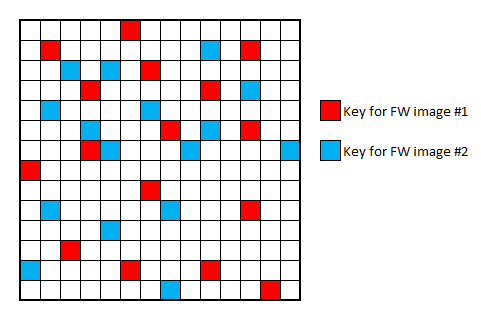
The lock can be commanded to enter into enrollment mode where the lock will read a credential and pass the credential information to the mobile device. The credential information is encrypted with the Site Key to be decrypted by ENGAGE. Encrypting the credential information with the Site Key protects the information from interception by the mobile device since it does have access to the Site Key.
Table 9: Enrollment Mode Data from Lock to the Mobile Device.
| S/N, SK( Primary Credential, Padding ) | |||
|---|---|---|---|
| Unencrypted | SK Encrypted AES256 -CBC with IV(0) | Total | |
| S/N | Primary Credential | Padding | Total |
| 16 | 8 | 8 | 32 Bytes |
During manufacture, the lock will receive a production token from a cloud based service containing the lock’s production encryption key (PEK). The production token contains the PEK, and the lock’s serial number encrypted by the PEK as a verification tool. The PEK is transferred to the lock encrypted by a hardcoded key (Kg) that is stored in the lock FW.
Table 10: Production Token Definition
| S/N, Kg(PEK),PEK(SN) | |||
|---|---|---|---|
| Unencrypted | Kg Encrypted (AES256-CBC with IV(0)) | PEK Encrypted (AES256-CBC with IV(0)) | |
| S/N | Production Key | Serial Number | Total |
| 16 | 32 | 16 | 64 Bytes |
The PEK is used to transfer the Site Key from the cloud to the lock during the capture process. This is the only time that the PEK is used. The PEK is not known or used outside of the cloud and the lock. The factory tester loads the serial number into the lock along with the production token. The lock stores the serial number, decrypts the PEK with the hardcoded Kg. The lock then uses the PEK to decrypt the encrypted serial number and compares the decrypted value to the unencrypted value. The process is successfully completed when the unencrypted serial number matches the decrypted serial number value. To prevent cross-contamination between the development and production environments, separate PEK services are used. Thus, a lock that is programmed with a PEK from the development service will not be able to be captured by the production service, and vice-versa.
A new customer to the ENGAGE platform is required to create an account before they can use the system. The customer uses their email address as a user name, and creates a password. The ENGAGE cloud creates a Site Key and associates it with the user account.
When a lock is manufactured it only contains a Production Encryption Key. The process by which a Site Key is stored in the lock is called “Lock Capture”.
A mobile device will contact a lock in FDR state and request to capture the lock over BLE. The mobile device will attempt to initiate communication with the lock by passing its DUID and AppToken to the lock. The lock challenge is not included in the response because the mobile device is attempting to capture a lock and the lock does not contain the information to verify a challenge response. From the lock’s perspective, this is known as Capture Step 1.
Table 11: Mobile Device Capture Request Byte Definition
| DUID, AppToken | ||
|---|---|---|
| Unencrypted | SK Encrypted – CBC with IV(0) | |
| DUID | AppToken | Total |
| 16 | 96 | 112 Bytes |
The lock responds to the capture request with an encrypted string of data. The data is encrypted with the lock’s Production Encryption Key (PEK), and contains the data just received from the mobile device, along with the lock’s serial number. The lock will append its serial number to the encrypted payload, and send it back to the mobile device. The lock has not saved any information or made any changes to its memory or state at this point.
Table 12: Lock Capture Request Response Byte Definition
| S/N, PEK( S/N, DUID, AppToken ) | ||||
|---|---|---|---|---|
| Unencrypted | PEK Encrypted – CBC with IV(0) | |||
| SK Encrypted -- CBC with IV(0) | ||||
| S/N | S/N | DUID | AppToken | Total |
| 16 | 16 | 16 | 96 | 144 Bytes |
The mobile device sends a package to the ENGAGE cloud services to complete the capture process. The mobile device appends its DUID and a Zone number to the payload received from the lock in the previous step. At launch, the zone feature was not implemented. All zones are set to a single value (ASCII: 0000 or 0x30 30 30 30) in the system.
Table 13: Capture Request to ENGAGE Byte Definition
| DUID, Zone, S/N, PEK( S/N, DUID, AppToken ) | ||||||
|---|---|---|---|---|---|---|
| Unencrypted | PEK Encrypted AES 256, CBC with IV(0) | |||||
| SK Encrypted AES 256, CBC with IV(0) | ||||||
| DUID | Zone | S/N | S/N | DUID | AppToken | Total |
| 16 | 4 | 16 | 16 | 16 | 96 | 164 Bytes |
The ENGAGE cloud takes this data and determines that the lock and mobile device pair is valid in the following steps:
Step 1. Using the lock’s serial number, ENGAGE will look up the lock’s PEK and decrypt the payload from the lock. ENGAGE will compare the unencrypted and encrypted serial numbers to verify that the data was unencrypted correctly. This step verifies that the encrypted payload came from the correct lock.
Table 14: ENGAGE Verifies Lock Serial Number (Step 1)
| DUID, Zone, S/N, PEK( S/N, DUID, AppToken ) | |||||||||||||
|---|---|---|---|---|---|---|---|---|---|---|---|---|---|
| Unencrypted | PEK Encrypted – AES 256, CBC with IV(0) | ||||||||||||
| SK Encrypted – AES 256, CBC with IV(0) | |||||||||||||
| DUID | Zone | S/N | S/N | DUID | Padding | Timestamp | DUID | USRID | Zone | TempK | CNTR | MGR | Total |
| 16 | 4 | 16 | 16 | 16 | 3 | 17 | 16 | 16 | 4 | 32 | 4 | 4 | 164 Bytes |
Step 2. The mobile device’s DUID is compared. This verifies that the mobile device that presented the data to ENGAGE is the same device that contacted the lock.
Table 15: ENGAGE Verifies DUID (Step 2)
| DUID, Zone, S/N, PEK( S/N, DUID, AppToken ) | |||||||||||||
|---|---|---|---|---|---|---|---|---|---|---|---|---|---|
| Unencrypted | PEK Encrypted – AES 256, CBC with IV(0) | ||||||||||||
| SK Encrypted – AES 256, CBC with IV(0) | |||||||||||||
| DUID | Zone | S/N | S/N | DUID | Padding | Timestamp | DUID | USRID | Zone | TempK | CNTR | MGR | Total |
| 16 | 4 | 16 | 16 | 16 | 3 | 17 | 16 | 16 | 4 | 32 | 4 | 4 | 164 Bytes |
Step 3. In addition, ENGAGE uses the DUID to locate the correct Site Key to decrypt the AppToken, and verify that the DUID inside of the AppToken matches the DUID that has presented the data to capture the lock. This verifies that the device that requested the AppToken is the same device that presented it to the lock (since the AppToken was encrypted by the locks PEK).
Table 16: ENGAGE Verifies DUID (Step 3)
| DUID, Zone, S/N, PEK( S/N, DUID, AppToken ) | |||||||||||||
|---|---|---|---|---|---|---|---|---|---|---|---|---|---|
| Unencrypted | PEK Encrypted – AES 256, CBC with IV(0) | ||||||||||||
| SK Encrypted – AES 256, CBC with IV(0) | |||||||||||||
| DUID | Zone | S/N | S/N | DUID | Padding | Timestamp | DUID | USRID | Zone | TempK | CNTR | MGR | Total |
| 16 | 4 | 16 | 16 | 16 | 3 | 17 | 16 | 16 | 4 | 32 | 4 | 4 | 164 Bytes |
Step 4. If any of the above checks fail, then an error is generated and the lock is not able to be captured. Otherwise, the ENGAGE cloud service accepts the capture request and the capture process continues.
The ENGAGE cloud service will respond to the mobile device with the information the lock needs to complete the capture process. ENGAGE will send an encrypted payload to the mobile device that contains the DUID and Site Key associated with the capturing account. The response also has provisions to assign a zone to the lock, but this was not implemented at launch and is reserved for future use. The payload is encrypted by the lock’s PEK and as such, can only be decrypted by the one lock.
Table 17: ENGAGE Capture Response Byte Definition
| PEK( DUID, SK, Zone ) | ||||
|---|---|---|---|---|
| PEK Encrypted AES 256, CBC with IV(0) | ||||
| Padding | DUID | SK | Zone | Total |
| 12 | 16 | 32 | 4 | 64 Bytes |
The mobile device will respond with the following to finalize the capture process. The mobile device passes the payload it received from ENGAGE, and appends its DUID to the payload. The payload is decrypted by the lock using its PEK. The lock compares the unencrypted and encrypted DUID’s to verify that the device that obtained the payload is the same one that delivered it. Once confirmed, the lock saves the Site Key and is now considered captured. The lock enters the Captured State, and begins BLE advertisements. The lock is now able to discriminate between mobile devices and only communicate with authorized devices. This process is described in the next section.
Table 18: Capture Response from Mobile Device to Lock Byte Definition
| DUID, PEK( DUID, SK, Zone ) | |||||
|---|---|---|---|---|---|
| Unencrypted | PEK Encrypted – CBC with IV(0) | ||||
| DUID | Padding | DUID | Site Key | Zone | Total |
| 16 | 12 | 16 | 32 | 4 | 80 Bytes |
When a mobile device wants to communicate with an NDE lock, the lock must first authenticate the mobile device. The primary tool the lock uses is the AppToken. The AppToken is created by the ENGAGE cloud and sent to the mobile device. The AppToken is encrypted by a Site Key, which is not known by the mobile device. The mobile device never has access to a Site Key. The lock obtains the Site Key from ENGAGE as part of the capturing process. The AppToken contains the session information the lock needs to be able to communicate with a mobile device. If the lock is able to decrypt the AppToken, and it is a valid token, then the lock will communicate with the mobile device. If any of the checks fail, then the lock will refuse communications. The mobile device would need to obtain a new AppToken from ENGAGE in order to communicate with the lock.
Table 19: Data sent to the lock requesting Communications
| DUID, AppToken | |||||||||
|---|---|---|---|---|---|---|---|---|---|
| Unencrypted | SK Encrypted – CBC with IV(0) | ||||||||
| DUID | Padding | Timestamp | DUID | USRID | Zone | TempK | CNTR | MGR | Total |
| 16 | 3 | 17 | 16 | 16 | 4 | 32 | 4 | 4 | 112 Bytes |
The lock uses its saved Site Key to decrypt the AppToken. It compares the DUID stored inside of the AppToken to the DUID sent by the mobile device. If the DUIDs match, then the lock has decrypted the AppToken successfully. Next, the lock extracts the Temporary Key and Counter variable.
The Counter (CNTR) is a variable that is incremented every time a new TempK is generated. This counter provides the ability for the lock to determine if the AppToken is valid or not. The lock saves the Temp Key and Counter pair in memory. If the counter received is not larger than the counter in memory, then communications are rejected by the lock. The mobile device is forced to obtain a new AppToken with updated information.
A mobile device that presents a valid AppToken to a lock for the first time is allowed to connect to the lock. The User ID (USRID) in the AppToken is saved along with the Counter, Temp Key, and a timestamp of when the device successfully authenticated with the lock. The Counter and Timestamp are used when a mobile device returns, as described below.
Once the mobile device leaves, the Temp Key stored in the lock begins to expire. If the mobile device returns before the Temp Key expires, the lock accepts the AppToken, extracts the Temp Key and compares it to the last known Temp Key for that USRID. If there is a match, and the Temp Key is not expired, then the lock accepts the AppToken and begins using the existing Temp Key to communicate with the mobile device. The expiration time of the Temp Key in the lock does not change (it does not get refreshed). Using this approach, the mobile device does not need to request an AppToken every time it attempts to connect to a lock. The mobile device only requires one AppToken, and it will be valid for 24 hours for all of the locks within a site.
When a mobile device returns after a Temp Key expires, the lock will perform additional checks to ensure the AppToken and its information is valid. First the lock extracts the Temp Key and USRID and verifies that the Temp Key stored in the lock has expired. The lock then compares the Counter variable. If the Counter from the AppToken is less than the Counter stored in the lock, the lock will refuse communications with the mobile device. The Counter in the AppToken must be greater than what the lock has stored. By having a Counter variable, the lock is able to prevent replay attacks. Should a mobile device present an old AppToken, the lock will be able to identify the AppToken as an old token, and refuse the connection. If the Counter is greater than the stored value, the lock updates the Counter variable, Temp Key and Timestamp in its memory, and begins communication with the mobile device.
As part of the review of the Neptune system, the security plan was reviewed both internally and externally. Internal reviews were held with the Paranoid team where all aspects of the security design were reviewed and discussed. In addition, the security plan was reviewed by Cryptography Research Inc. (CRI), a third party company that specializes in network security. All of the documentation was supplied to CRI and through a number of meetings, the details of the security plan were discussed and reviewed. CRI generated a report and concluded that fundamentally, the plan was secure. There was room for improvement around how the lock authenticates with the server, and how the production key is transmitted to the lock during manufacture among other issues. Due to time constraints, only the production issue was fully resolved. The security version to the lock authentication string was added, to be able to implement the recommendations to the lock authentication improvements at a later time. A copy of the CRI report is stored in Surround at the link at the beginning of this document.
| Abbreviation/ Acronym | Definition |
|---|---|
| AES | Advanced Encryption Standard |
| CBC | Cipher Block Chaining |
| CNTR | Counter variable stored in the AppToken |
| CRI | Cryptography Research Inc. |
| DUID | Device Identifier of mobile hardware |
| FDR | Factory Default Reset |
| FW | Firmware |
| IV | Initialization Vector |
| MGR | Defines the access rights of this user to the lock. |
| PEK | Production Encryption Key |
| SK | Site Key |
| S/N | Serial Number |
| TempK | Temporary Encryption Key |
| USRID | User Identifier of logged in user |