Allegion Developer Portal
Allegion Developer Portal

The APIs should now support a new authentication scheme called Driver. All MT20Ws that are commissioned in the USB mode use this Driver authorization scheme header (i.e. Authorization: Driver {token}) for communicating with the APIs. The MT20Ws that are in WiFi mode continue to use the existing Device authorization scheme. If the MT20W is in USB mode and tries to call the API with Device authorization scheme (i.e. Authorization: Device {token}) instead of Driver authorization scheme, the API should send back a ** 401-Unauthorized** message. The Driver token is a combination of the serial number of the device and a timestamp (or random number). See the details below on how the driver token is generated from the firmware.
The following algorithm is used in the MT20W firmware to generate the driver token.
Append 16-byte random number or timestamp (i.e the value of response header 'X-Device-Last-Connected') to the 16-byte serial number. The total length = 32-bytes (16-bytes number + 16-bytes SN). Reference the Section: Handling Driver Token from the API for more details about 'X-Device-Last-Connected'.
A sample random number could be 20180919105017.
Encrypt this 32-byte data with the site key. This encrypted value is appended with the serial number.
Encode the entire string to base64.
The resulting string is the auth token that is sent to the host.
Example: Consider Site Key to be BAE3B37054AFDF441390B29032417F5BF1739AE1B784BF6C6A8A9617CC5B19
Let 16-byte random number be 2019011103485600
| BitPosition | 0 | 1 | 2 | 3 | 4 | 5 | 6 | 7 | 8 | 9 | 10 | 11 | 12 | 13 | 14 | 15 |
|---|---|---|---|---|---|---|---|---|---|---|---|---|---|---|---|---|
| Data (0x) | 32 | 30 | 31 | 39 | 30 | 31 | 31 | 31 | 30 | 33 | 34 | 38 | 35 | 36 | 00 | 00 |
Let Serial number be A0C1777700000017
| BitPosition | 0 | 1 | 2 | 3 | 4 | 5 | 6 | 7 | 8 | 9 | 10 | 11 | 12 | 13 | 14 | 15 |
|---|---|---|---|---|---|---|---|---|---|---|---|---|---|---|---|---|
| Data (0x) | 00 | 00 | 00 | 00 | 00 | 00 | 00 | 00 | A0 | C1 | 77 | 77 | 00 | 00 | 00 | 17 |
Step 1: Append random number to serial number to form 32-byte data, the result would be:
| BitPosition | 0 | 1 | 2 | 3 | 4 | 5 | 6 | 7 | 8 | 9 | 10 | 11 | 12 | 13 | 14 | 15 |
|---|---|---|---|---|---|---|---|---|---|---|---|---|---|---|---|---|
| Data (0x) | 32 | 30 | 31 | 39 | 30 | 31 | 31 | 31 | 30 | 33 | 34 | 38 | 35 | 36 | 00 | 00 |
| BitPosition | 16 | 17 | 18 | 19 | 20 | 21 | 22 | 23 | 24 | 25 | 26 | 27 | 28 | 29 | 30 | 31 |
| Data (0x) | 00 | 00 | 00 | 00 | 00 | 00 | 00 | 00 | A0 | C1 | 77 | 77 | 00 | 00 | 00 | 17 |
Step 2: Encrypt 32-byte data with Site Key (AES 256 encryption), the result would be:
EF8A7F17E39973D9154E7AFDDD5EC93A8BD13710A2CA943E24CFF8AA391DB8B4
Step 3: Append Serial Number to Encrypted data, the result would be:
0000000000000000A0C1777700000017:EF8A7F17E39973D9154E7AFDDD5EC93A8BD13710A2CA943E24CFF8AA391DB8B4:1
Step 4: Encode the entire string to base64, the result would be:
MDAwMDAwMDAwMDAwMDAwMEEwQzE3Nzc3MDAwMDAwMTc6RUY4QTdGMTdFMzk5NzNEOTE1NEU3QUZEREQ1RUM5M0E 4QkQxMzcxMEEyQ0E5NDNFMjRDRkY4QUEzOTFEQjhCNDox
This is the Auth Token to be sent in the API request with Driver as prefix.
Below is an existing API that is used to transfer No Tour data to the MT20W. This API is called each time a card is presented to the MT20W reader.
API: POST /api/credentials/scan
Request Headers:
Authorization: Driver
MDAwMDAwMDAwMDAwMDAwMEEwQzE3Nzc3MDAwMDAwMTQ6QjQzNjcxQjhBMkE2MkVCMEMzRkZCOUNCMTZEM0E3N0FFMTZEMDJEN0Y3NzQyODQ1MkNGRDY5NjQyODgzQTE1RDox
Content-Type: application/json; charset=UTF-8
Request Body:
{
"BadgeId":"65535",
"Primary":" MmBz+Li+C3Pk5GNR8oSsjWY6qa958PdTSAQS4RcbwCk=",
"CardFormat": "smart",
"Format":"Bytes"
}
Response: There is no change in the response format. It remains the same as the existing response. The only difference now is every API request that is made using Driver auth token is expected to send a response header ‘X-Device-Last-Connected’. (Ref: Handling Driver Token From the API)
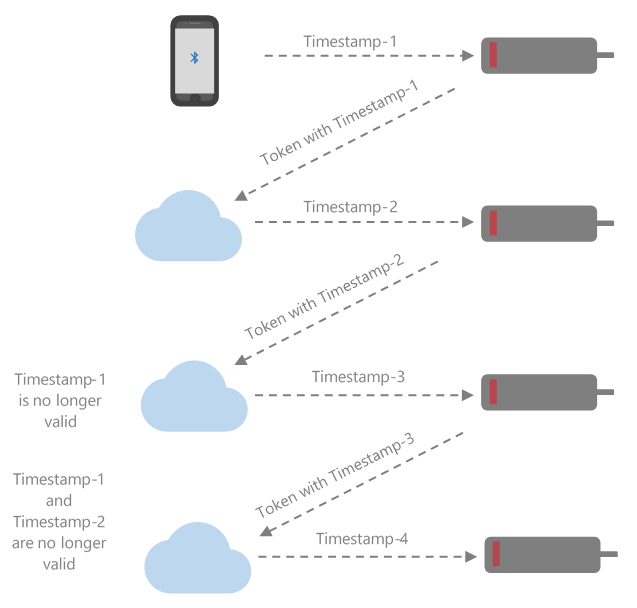
API requests from MT20W with Driver token are in USB mode. Furthermore, API requests with Driver token are always responded with an encrypted + encoded timestamp (or random number) value in the response header. The response header is X-Device-Last-Connected.
This timestamp must be unique for the consecutive requests. The MT20W uses the timestamp from the response header in the authorization token of the next request (This is done to ensure dynamic token generation. Since the messages are now exchanged over USB with the Desktop application, dynamic tokens are necessary to avoid record and replay attacks).
It is recommended that the API keep the information of the timestamp sent in the response header and perform an equality check during the next request (This is to ensure the authorization tokens are always unique and previous authorization tokens are always invalid, to avoid any request replays). However, for the very first request from the MT20W, this check cannot be done as the host does not have the information of the timestamp used in the token, which would be acceptable.
NOTES:
Here the timestamp must be a 14-digit number. You could use any 14-digit random number as long as consecutive requests do not have the same value for this number.
The timestamp is encrypted with the siteKey and encoded in base64 format and sent as ‘X-Device-Last-Connected’ response header value.
The existing validation check remains as it is (i.e. Serial number validation, commissioned or not validation etc.).
Last Modified: October 15, 2019