Allegion Developer Portal
Allegion Developer Portal

This section details how to integrate and use the aptiQ MT20W enrollment reader within a Software Alliance Member managed system including details critical to implementing MT20W credential services and hosting by a SAM server.
The MT20W with WiFi connectivity enables SAMs to create a system supporting No Tour and products such as Schlage Control, NDE, and LE.
For an end user, the process to use the MT20W is as follows:
Create an ENGAGE account via the Partner API and a site key (REK) known by the Alliance Partner.
Commission the MT20W on that site with the ENGAGE mobile app. Configure the WiFi settings and host URL.
Now the MT20W connects to the WiFi and sends all credential information directly to the specified host. MT20W uses the host URL as a base to invoke the credential API’s.
The host sends the data to be written to the smart type credential directly to MT20W.
Communication paths between the server and lock are secured by the Comodo server certificate in the SAM server.
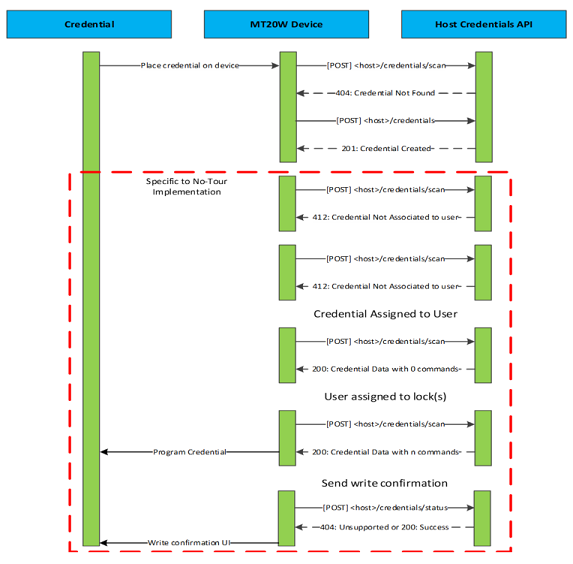
Figure 6 is a bounce diagram that illustrates the API interaction between the MT20W and the host.
NOTE: All interactions inside of the dashed red line represent interactions specific to hosting a No Tour enabled site. For specifics on how to implement No Tour, refer to the No Tour Information section.
The MT20W ENGAGE Services include the following APIs: